A1006 ADC to DVI adaptor internal power supply

Hi all,


I just picked up an Apple ADC to DVI adaptor, and it's not working. I popped it apart, and aside from some corrosion on the bottom of the circuit board (no where near any capacitors) I don't see anything obviously fried.


My question is - does anyone have a schematic service manual or diagram for this unit? - specifically the plug that comes from the power supply and plugs into the video board inside the A1006 (top right in the picture). (There are 2 different boards inside the white enclosure)


User uploaded file


I figured, if I get that, I can test the voltages and if needed, find a way to replace the power supply with something else (unless anyone knows where to get one of these pretty cheap)


Thanks!

Posted on May 8, 2013 6:12 PM

Reply
10 replies

Aug 27, 2013 7:07 AM in response to TheRealAnubis

Hi, I am trying to hack on one of these as well. Since the colors of the 6-pin plug are red, black, yellow, it seems that they are likely to follow a standard atx power supply style color scheme. Black would be ground, red +5v to power on-board ICs, and in this case the yellow is probably 26v since that is what the monitor requires (or it could be dual 12v rails, idk for sure). I put my multimeter on mine and didn't get any voltage so either my meter is bad, or the power supply sleeps when not in use -- I'll need to investigate further to tell for sure.


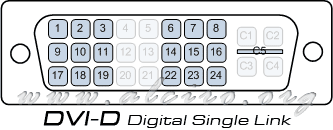
Now, the problem that I have is that someone lopped off the dvi and usb cable on mine. I'm trying to get the pinout of the 21-pin connector on the mainboard so that I can splice a new DVI cable onto it but the pins don't seem to be active when the power is not on (ie I can't just probe from the ADC to the connector). Would you be able to do me a solid and probe from the DVI socket to the mainboard connection so that I can wire up a DVI cable? You can reference the DVI pinout here and just make a mapping of DVI pin --> Connector pin. You can number the connector pins any way you want, but iirc there are a couple of pin numbers on the board that might give you a clue. In return, if I get this thing working I can probe those power supply pins to tell you for sure what the voltages are!

Aug 28, 2013 2:04 PM in response to crakarjax

Ok, here goes - I re-checked all of my test points, so the info is now double checked..


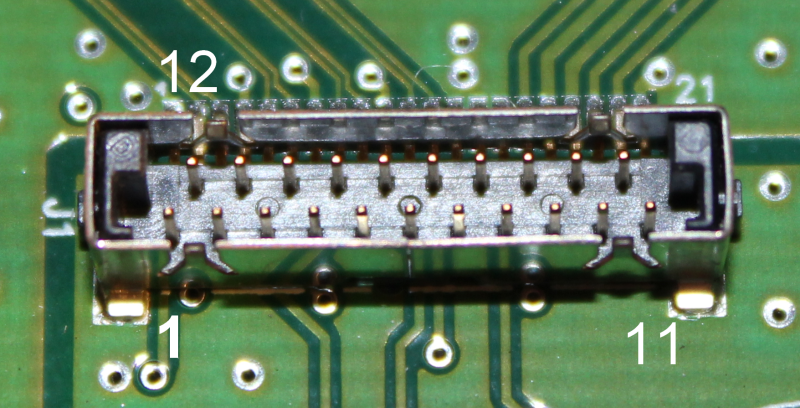
Here is the socket on the converter - I added the numbers (except for 21):


http://www.eanubis.net/AppleADC/Socket_ADC_Converter_resized.png


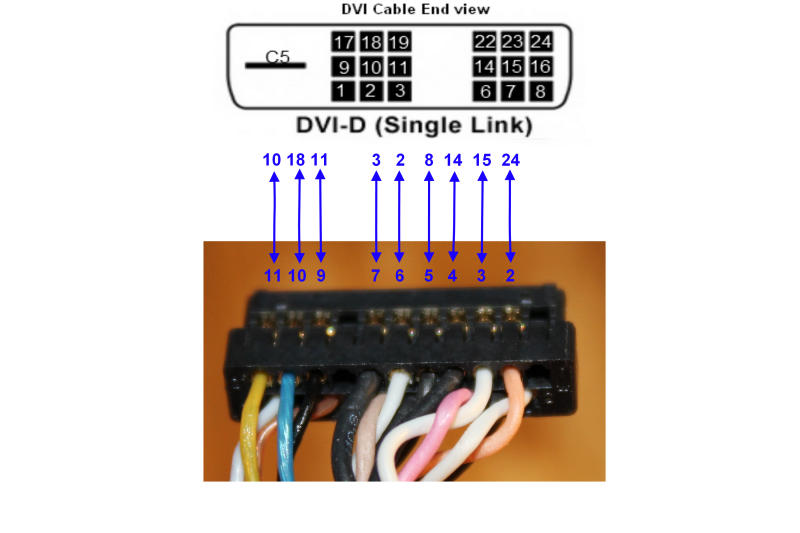
Since the pic you linked to was the video card end, I found a blank and reworked the numbers so the pinout is looking directly into the end of the DVI cable that you plug into the video card - This shows pins 1-11:


http://www.eanubis.net/AppleADC/Finished_Pins_1-11_resized.png


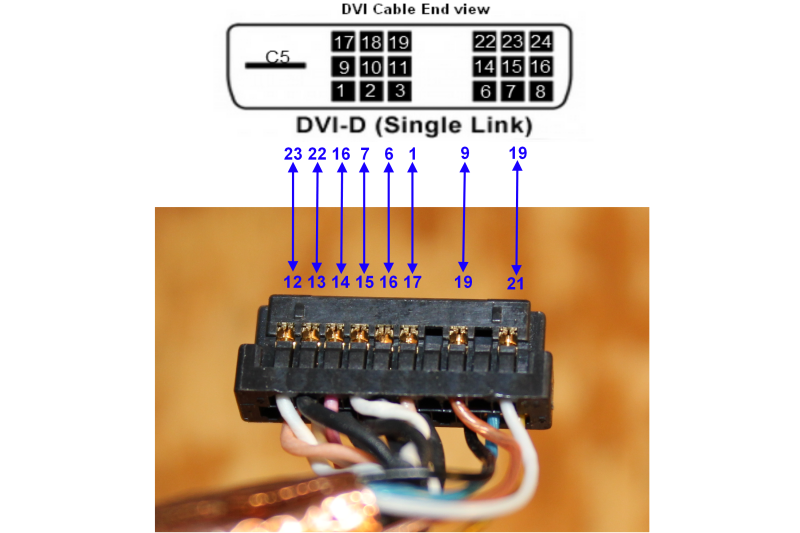
And here are pins 12-21:


http://www.eanubis.net/AppleADC/Finished_Pins_12-21_resized.png


I'm hoping this helps you get a cable built so you can test your converter.


Keep me posted!

This thread has been closed by the system or the community team. You may vote for any posts you find helpful, or search the Community for additional answers.

A1006 ADC to DVI adaptor internal power supply

Welcome to Apple Support Community
A forum where Apple customers help each other with their products. Get started with your Apple Account.