-
All replies
-
Helpful answers
-
May 13, 2013 2:50 PM in response to FourWorldsCDLby seventy one,Don't panic. Chances are it can be rescued. Read through the links to a previous question. It may help; can't tell for sure as you have not completed your profile, so we don't know what OS you have. But check them out; the principle is similar.
lost my iphoto library: Apple Support Communities
-
May 13, 2013 3:14 PM in response to FourWorldsCDLby LarryHN,How about sharing information - what version of iPhoto and of the OS? What upgrade did you just do?
Any other information that might hlep figure out how to help yoou?
LN
-
May 13, 2013 3:22 PM in response to FourWorldsCDLby FourWorldsCDL,We have iPhoto '09 and we are operating with Mac OS X version 10.6.8 and I am not clear on the upgrade that I did as it was a prompt and I have never had problems before.
-
May 13, 2013 3:25 PM in response to FourWorldsCDLby LarryHN,What version of iPhoto '09? THere have been no upgrades as far as I know for iphoto '09 for a couple of years
At this time the best resolution is probably going to be to restore your iPhoto library form your backup from before this happened
LN
-
May 13, 2013 5:57 PM in response to FourWorldsCDLby Old Toad,By being gone do you mean the library is not in your Pictures folder or when you open the library you don't see any photos or thumbnails? If it's the latter apply the two fixes below in order as needed:
Fix #1
Launch iPhoto with the Command+Option keys held down and rebuild the library.
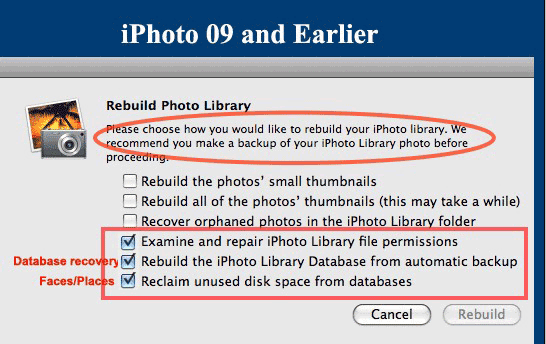
Select the options identified in the screenshot.
Fix #2
Using iPhoto Library Manager to Rebuild Your iPhoto Library
- Download iPhoto Library Manager and launch.
- Click on the Add Library button, navigate to your Home/Pictures folder and select your iPhoto Library folder.
- Now that the library is listed in the left hand pane of iPLM, click on your library and go to the File ➙ Rebuild Library menu option
- In the next window name the new library and select the location you want it to be placed.
- Click on the Create button.
Note: This creates a new library based on the LIbraryData.xml file in the library and will recover Events, Albums, keywords, titles and comments but not books, calendars or slideshows. The original library will be left untouched for further attempts at fixing the problem or in case the rebuilt library is not satisfactory.
OT

-
May 14, 2013 9:24 AM in response to FourWorldsCDLby FourWorldsCDL,The version of iPhoto is 8.1.2 (424). And when I look at my backup there seem to be no pictures there either.
Old Todd: The libraby is not in the pictures folder and also there are no thumbnails when I open iPhoto.
-
May 14, 2013 9:33 AM in response to FourWorldsCDLby Old Toad,Dwonload and use Find Any File to search for a file named "Library6.iPhoto". That is a file that is in every iPhoto library and tell you where the library is located. When you find it drag it from the search results window to the Desktop and then into your Pictures folder.
Once you have it there apply the two fixes above.
-
May 14, 2013 9:37 AM in response to FourWorldsCDLby seventy one,You originally said your version was iPhoto 09. Then it is iPhoto 08 (424). And your computer / product model details have still not been added to your profile.
Despite Old Toad's excellent summary it would still be helpful if you could do this. We all rely on accurate background details when a question has to be answered.
-
May 14, 2013 9:47 AM in response to FourWorldsCDLby FourWorldsCDL,Thank you Old Toad I was able to rebuild my library with your advice.


