How do I keep a running tally?

Let's say in Column "A", I'm going to input a number between 1 and 10. I then want a separate column to let me know how many times I've typed each number. So, if I go back a day later and change one of the numbers in Column "A", the tally will be updated. Anyone know how to do this?


Thanks,


Mark

iMac, OS X Mountain Lion

Posted on Aug 28, 2013 10:36 AM

Reply
2 replies

Aug 28, 2013 11:41 AM in response to marknovom

you can get the "Frequency" each number appears (that is the count of the number of times a number is listed) by number by using the function countif():


User uploaded file

D2=COUNTIF($A, C2)


this is shorthand for in cell D2 and the formula "=COUNTIF($A, C2)" without the double quotes


select D2 and fill down by grabbing (click and hold) the little circle at the bottom right then drag down as needed


In column C and the number 1 thu 10 as shown

Aug 28, 2013 11:11 PM in response to marknovom

Hi Mark,


Wayne's solution gives you the tally for each value in the full list in column A, which I suspect is what you want.


A running tally, though, is a count of the number of times a specific value has been used to this point in the process/list. For row 3 of Waynes list this would be 1 for 4, 1 fo 6, and 0 from the rest of the values.


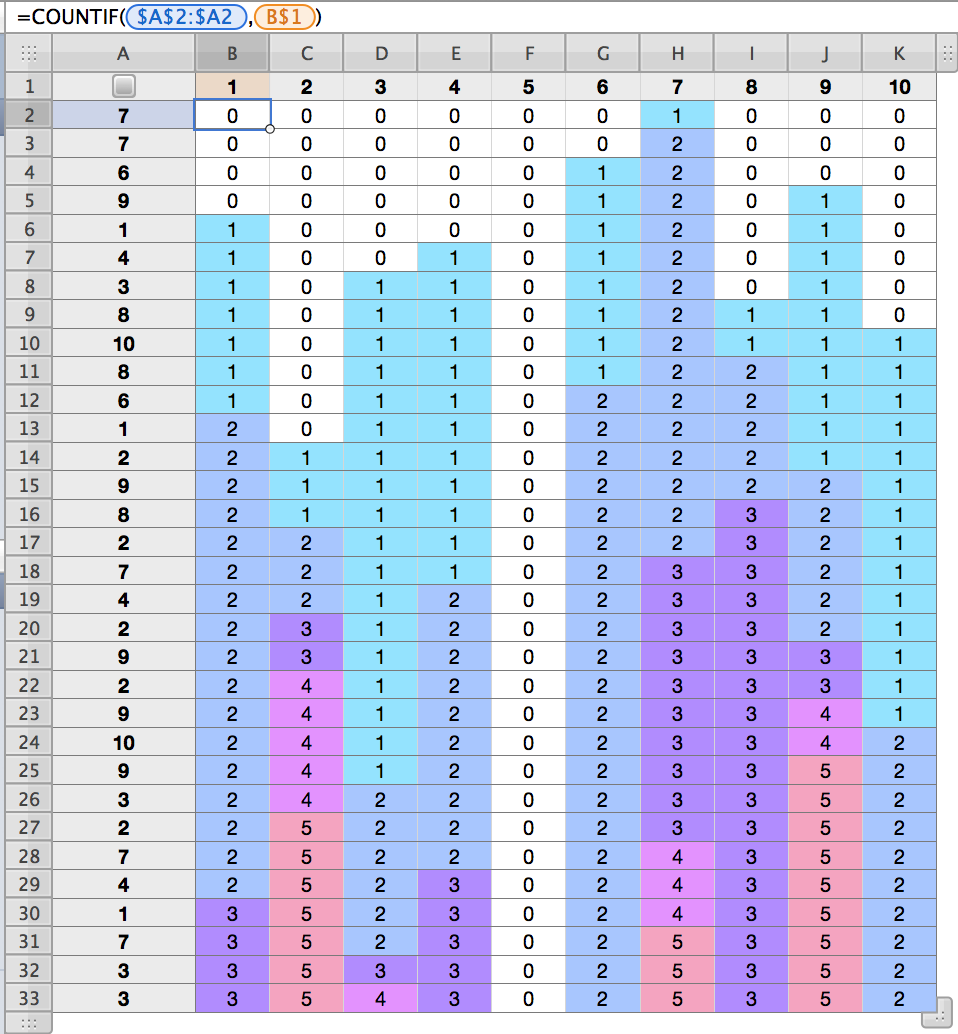
If you are actually looking for a running count of each value, this will give it to you:
User uploaded file

Numbers are in column A; columns B through K give a running count of the occurences of the value at the top of the column from Row 2 to the row in which the number appears. The formula above the table, shown for B2, is filled down and right to K33.


The colour fill of cells in the frequency table is controlled by the set of conditional formatting rules shown below, applied to all cells in the range B2:K33.

User uploaded file

The nine rules are identical except for the value in the box and the colour selected for the fill.


Regards,

Barry

This thread has been closed by the system or the community team. You may vote for any posts you find helpful, or search the Community for additional answers.

How do I keep a running tally?

Welcome to Apple Support Community
A forum where Apple customers help each other with their products. Get started with your Apple Account.