Hello there rajamanickam7,
Thank you for using Apple Support Communities!
I feel that a reset is in order at this point. That should essentially reboot your device and get it going again.
To reset your iPod:
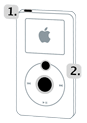
- 1. Toggle the Hold switch on and off. (Slide it to Hold, then turn it off again.)
- 2. Press and hold the Menu and Center (Select) buttons simultaneously until the Apple logo appears, about 6 to 10 seconds. You may need to repeat this step.
Tip:
- If you are having difficulty resetting your iPod, set it on a flat surface. Make sure the finger pressing the Select button is not touching any part of the click wheel. Also make sure that you are pressing the Menu button toward the outside of the click wheel, and not near the center.
- If the above steps did not work, try connecting iPod to a power adapter and plug the power adapter into an electrical outlet, or connect iPod to your computer. Make sure the computer is turned on and isn't set to go to sleep.
From: iPod classic Troubleshooting Assistant
http://www.apple.com/support/ipod/five_rs/classic/#
Regards,
Sterling


