How do I delete saved text messages that are taking up storage on my iphone?

When I go to settings>General>usuage> I see that I have 3.2GB of messages stored. Can someone tell me how to delete those messages? I don't even know where all of these messages could be stored. I don't think I am storing them in icloud.

I always delete my messages because I don't like having so many message things open, so those messages are not directly on my phone.
As you can see it's taking up way too much of my storage.
I have no need to save any text messages. If anything were that important to me I could take a screen shot of it and email it to myself or something.

Please someone help me because I have searched everywhere and asked everyone I can think of and no one has any idea how to help me..

Thanks in advance.

iPhone 5, iOS 7

Posted on Sep 24, 2013 11:07 PM

Reply
105 replies

Mar 10, 2015 4:11 PM in response to Nickc25

Your solution (method #1) Nickc25/Kurty999 was the winner. The KEY point was item #9: "Then just restore that backup using iTunes!"

I got my Messages (Saved) down to zero MB. I subsequently sent several text messages to myself with some photo attachments - approximately 20 MB's. After I went and deleted all of them in the Message App (ios 8), I went to General - Usage - Manage Storage and found that Messages (Saved) was 12 MB. Only a portion - 60% were removed. Why is my iPhone (5c) retaining a percentage of these messages in storage? I just wondered if anyone else has come across this issue, and if so, do you have a solution? Thanks!

Mar 10, 2015 4:12 PM in response to Nickc25

Your solution (method #1) Nickc25/Kurty999 was the winner. The KEY point was item #9: "Then just restore that backup using iTunes!"

I got my Messages (Saved) down to zero MB. I subsequently sent several text messages to myself with some photo attachments - approximately 20 MB's. After I went and deleted all of them in the Message App (ios 8), I went to General - Usage - Manage Storage and found that Messages (Saved) was 12 MB. Only a portion - 60% were removed. Why is my iPhone (5c) retaining a percentage of these messages in storage? I just wondered if anyone else has come across this issue, and if so, do you have a solution? Thanks!

Apr 7, 2015 11:49 PM in response to Kurty999

Maybe I'm just a pack rat but I have a big problem with deleting all my text messages. I have searched old text messages for information or to recall events, dates, etc and it has proven invaluable at times.


So is everyone here just bombing their whole text history? Or are they backing it up in a way that is accessible somewhere else (cloud, HD, computer, etc)?


I do have PhoneView which let's me store all texts in a PDF and print/export, but I haven't integrated that into my workflow yet so I got some work to do.

Apr 17, 2015 4:56 AM in response to Kurty999

Kurty999, thanks for sharing Lucerova's solution. This worked for me. I had 2.8 GB of messages. I thought it would take forever to delete each thread individually, but it really only took about 25 minutes. I used that method of turning off spotlight search, deleting messages, closing all apps, then rebooting phone. Now messages only take up 286 MB and instead of having only 705 MB of free space available, I now have 3.2 GB of free space available. There was no need to go through the lengthy process of installing a new app, backing up, deleting, resetting phone, then restoring backup.

May 28, 2015 8:03 PM in response to angoli

Before iOS 8.3 I NEVER searched internet for "how to do ... on iPhone ?". Now it's my third time when I cannot find a function to delete all messages on iPhone, that should be and was obvious in previous versions of iOS.

Steve Jobs is turning in his grave, Mac has been already pushed away from main stream when PC came in with open architecture, now history will repeat itself, Apple will loose clients because of iOS8.3, and Android will take the market. But this time Steve Jobs will not come back to rescue the company. Pitty.

Sep 30, 2016 12:19 PM in response to angoli

Hey y'all - this solution really helped me! Deleted so much space off my phone instantly -- but you must be OK with deleting some of these messages! See below.. via idownloadblog.com


Messages, one of the most frequently used application in iOS, stores on your device text messages, iMessages and any media attached to them. Like most people, I message my friends and family quite a lot on any given day.

Needless to say, animated GIFs, pictures, videos and other media attached to messages can easily clog up your iPhone’s storage, which can be especially problematic on devices with just sixteen gigabytes of storage.

What most users don’t realise is that deleting a conversation doesn’t remove it immediately from the Messages database on your device.

Thankfully, iOS provides a setting for how long to keep messages on your device. This tutorial will teach you how to tell Messages to permanently delete your conversations after 30 days or one year.

How to set text messages to be kept for 30 days or 1 year

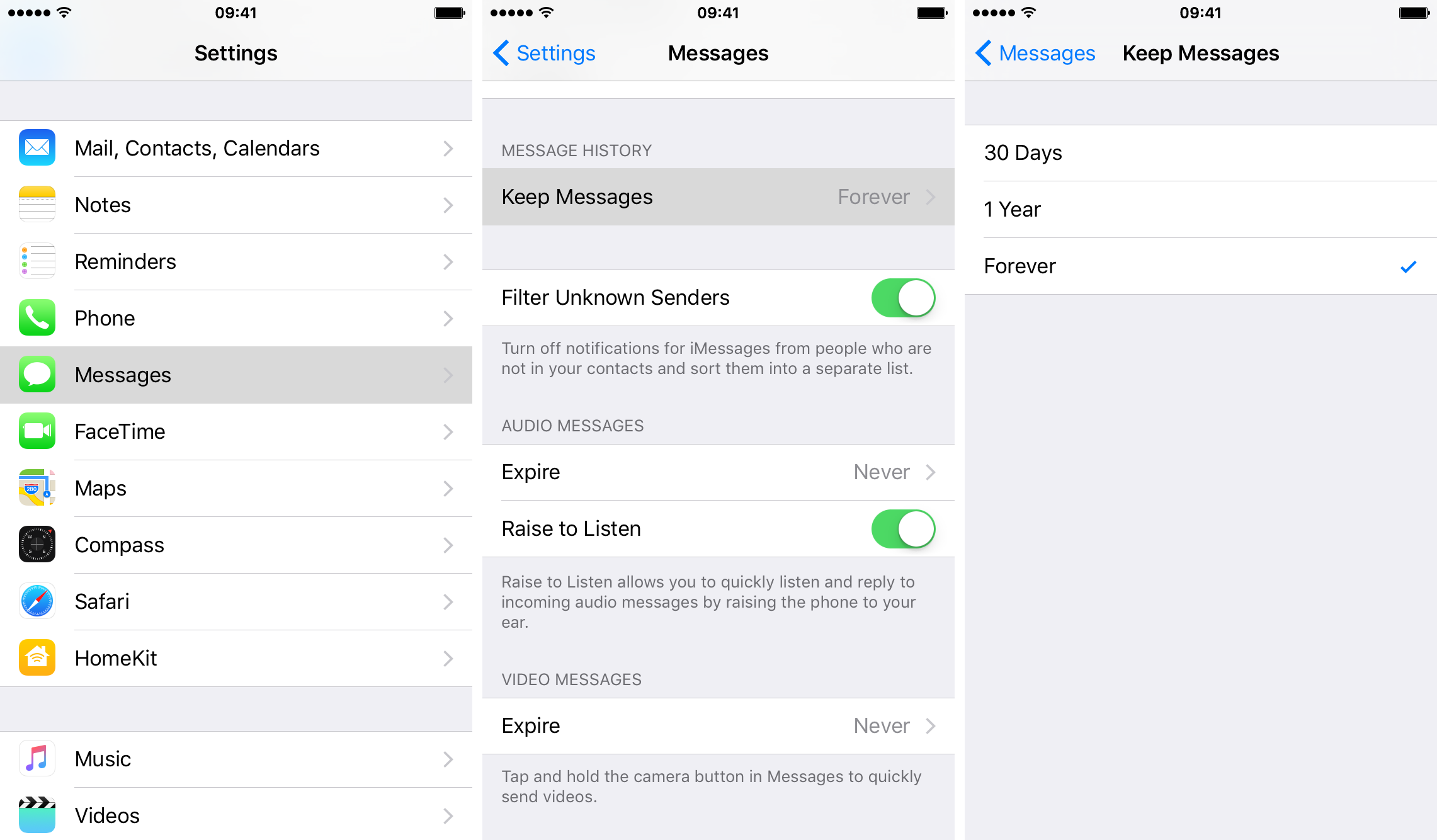
Step 1: Launch Settings on your iOS device.

Step 2: Tap on Messages.

Step 3: Now tap on the Keep Messages option under the Message History heading.

Step 4: Lastly, set for how long you would like to keep messages on your iPhone: 30 Days, 1 Year or Forever.
User uploaded file

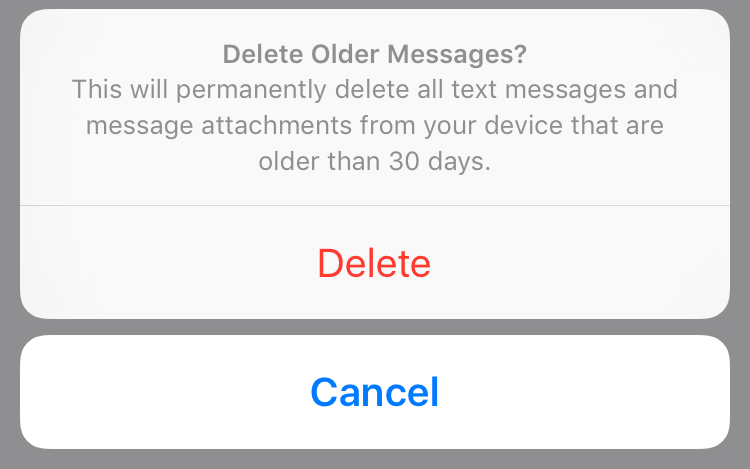
Step 5: Depending on your choice, you might be prompted to confirm it by tapping theDelete button.
User uploaded file

If you set message expiration to 30 days, for example, you’ll be warned that all text messages and their attachments on your device that are older than 30 days will be permanently deleted.

Messages default to keeping your conversations on the device permanently.

RELATED: How to set how long Tap to Talk audio messages are kept on your iPhone

I’d recommend changing message expiration to 30 days if you exchange lots of media-rich messages with your friends and family and your iPhone is low on storage.

This thread has been closed by the system or the community team. You may vote for any posts you find helpful, or search the Community for additional answers.

How do I delete saved text messages that are taking up storage on my iphone?

Welcome to Apple Support Community
A forum where Apple customers help each other with their products. Get started with your Apple Account.
