2Leigh
Please though, can someone answer if I were to buy a new drive (regardless of brand/enclosure/firmware) and formatted it's partitions (Ext Journaled) under Mavericks with Apple Disk Utility, would this then work OK?
Additionally why...ditch FW completely?
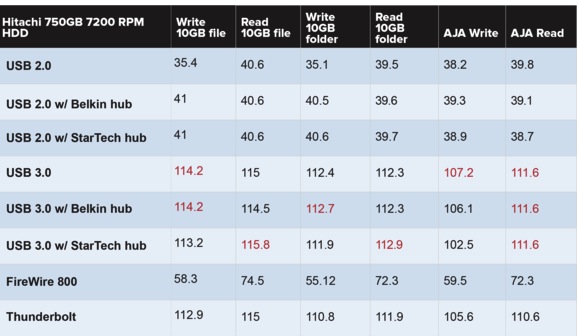
Firewire in general is less than half as fasts as USB3, and the cables are far cheaper to mfg.
Before Mavericks, during, and after, its all about redundancy, all HD are fragile, SSD or conventional. HD are cheap as dirt, your vital work data, stuff you made, saved, are working on is far far more valuable than buying an extra $70 hard drive or two.
Just backup and archive your vital data you "dont dare lose" on a nice Toshiba or Hitachi, Seagate 1, or 2TB drive and disconnect it.
ℹNothing can be corrupted that isnt connected (outside of mechanical /ferromagnetic failure obviously).
Archive data to drive A, disconnect it.....archive data connected all the time to drive B.....at intervals connect one at a time and archive vital data then disconnect it.
By backup I refer to data backups and archives, not a Time Machine backup.
Speed chart USB2, USB3, FW, Thunderbolt with conventional 7200RPM HD. All speeds are ultimately limited by platter and spindle speed and start-up revs.