Mavericks printer driver Sharp MX-2640n

I upgraded to Mavericks yesterday and discovered that the printer driver I had been using with the Sharp MX-2640n in our office was not compatable with 10.9. I've searched Sharp's website and tried Apple's update but no luck finding something that works. I'm open for any suggestions to get me going.

Posted on Oct 30, 2013 7:31 AM

Reply
20 replies

Oct 31, 2013 8:09 AM in response to tinman57

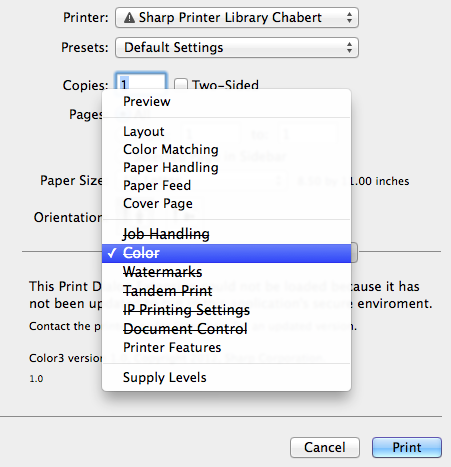
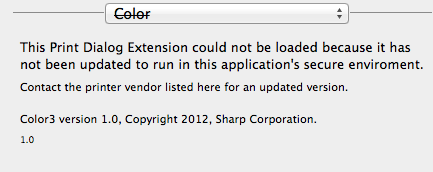
We have a 2610N and the driver disabled many functions but it still prints even from Adobe Acrobat Pro and Pages both old and new versions. Now I remember there were two drivers provided by Sharp. One was a CUPS driver I believe and the other was a PostcScript PPD profile, I don't remember which I installed. One thing is for sure many printer options cannot be run from mavericks without an updated driver. I just noticed that, older non-sandboxed apps can run all options of the driver. Seems like you're right only the newer apps. In my case however even the newer apps can still print, they just cant change most options, like watermarks, color settings etc. Fortunately the printer options, like stapling and output tray selection still work from everywhere.


**Update. I definitely installed the PostScript PPD driver. Check to see if that is the case with your printer. For the time being this is allowing mine to still be functional.


User uploaded file

User uploaded file

User uploaded fileUser uploaded file


Message was edited by: DrBenru to add screen caps of my print dialog.


Message was edited by: DrBenru to add info on PS driver

Oct 31, 2013 11:32 AM in response to DrBenru

I'm using the postscript driver, my real problem is that we use user accounts to control who prints color & B+W etc. The user controls are under the job handling tab that's lined out. So when I get desperate I can disable the user controls on the printer, do my thing and then reenable them but that's a major PITA. Thanks for the reply!

Nov 1, 2013 3:39 PM in response to tinman57

Our offices have several Sharp MFP's. One unit (all that we have checked so far) is not compatible with 10.9. Same screen as yours. I spent a half hour with Sharp "Technology" and they were unaware of the issue, or claimed to be. As usual Apple is getting the blame. Their mobile app for iOS does not handle user control either. Trying to get support from Sharp is a little like trying to get support from Microsoft--there aere likely several, perhaps many people who could answer the question but they are not the ones answering the phone.


MFP Tested - Sharp MX5111N. Not tested but expected to not work MX-3100N MX3501N MX3601N MX4100N MX4501 MX5001 MX-M3563M MX-M503N. I will update after I can get to these machines.

Nov 12, 2013 2:27 PM in response to Esarbee 2

I am expericing the same issue. I did call and email Sharp and they were very unhelpful. All they said was that the lastest driver should work fine. I explained that it didn't and they acted like it was something I wasn't doing right even though I explained it was working fine up until the new Mavericks update and their driver is now out of date. Hopefully enough people will reach out to them abou this that they will create the new driver.

Nov 14, 2013 10:50 AM in response to tinman57

I have the same issue with our office's MX-5111N.

So I tried to download and install the "latest" driver--only to find that the latest driver released by Sharp is only for up to 10.8 Mountain Lion.


In some instances/ apps, the Print dialog options are not crossed out; others not.

In Preview it is crossed out: and it just will not print.

In Sparrow (Email app) it is not crossed out: and it will print.

Dec 19, 2013 1:15 PM in response to tinman57

Here is a script to fix the plugins to get back some functionality to MAC OS X 10.9 printing.


Place the plugin.py file on the desktop, open a terminal session, to do that click on the Applications Folder, then the Utilities Folder, then Terminal.


Type CD Desktop <ENTER>, sudo python plugin.py <ENTER> and enter the admin password when prompted. Once it is finished, close the terminal window and restart the MAC.


Tandem Printing and Document Filing will not work, actually Main Folder and Quick Folder will work but we can’t read the list of User folders as network access is restricted.


https://www.dropbox.com/s/d0cnin8rgdhd783/plugin.zip

Jan 7, 2014 12:26 PM in response to aleung871

The Aries, Aries2, Virgo, Virgo2, Aries2-Lotus, GeminiPlus and Capricorn drivers are actually all the same despite each one dowonloading a differently named ZIP file. Only a text file naming the particular models in the series was added which is kind of ridiculous as it just leads to downloading redunt files when you need several models and could just download any one of them and be done.


I spent a full day downloading all the MAC files and cataloging duplication and incorrect files that don't match what they were supposed to be to try and get them fixed while I had a little downtime.

This thread has been closed by the system or the community team. You may vote for any posts you find helpful, or search the Community for additional answers.

Mavericks printer driver Sharp MX-2640n

Welcome to Apple Support Community
A forum where Apple customers help each other with their products. Get started with your Apple Account.