
Why do my photos turn white once I selected them from my camera roll
Why do my photos turn white once I selected them from my camera roll
iPhone 4S
Why do my photos turn white once I selected them from my camera roll
iPhone 4S
I don't know why but I figured out if you edit the photo you can restore it. So try changing the rotation or filter, saving the photo and then editing it again to put the original settings on it. This has worked for me, good Luck!
I had "white photos" today also. I edited the photos, saw that somehow I had selected the filter 'fade'.
Corrected that to 'none' and it fixed the problem. Saved the photo and it is now ok.
When taking photos I keep selecting a button other than 'photo' because I am not paying attention. Filter is usually the one.
Good luck.
Here’s how I solved my Camera Roll and Camera crash situation–this is a slightly advanced method so I urge you to proceed with caution. This method requires you to view your iPhone’s internal files. Do not attempt this as deleting incorrect files could ‘wreck’ your iPhone. You’ve been warned.
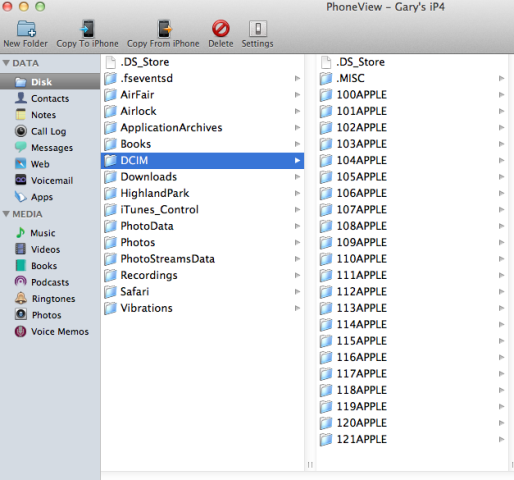
1. I used PhoneView to connect to my iPhone (a free Mac/PC alternative is iPhone Explorer). I then transferred off all of my photos and videos to my Mac to back them up. Highlight the “DCIM” folder (which contains all your photos) and select ‘Copy from iPhone’ (just save them to a new folder on your desktop to make it easy):
2. Next, I navigated to the PhotoData folder, backed up (just copy them to your desktop to make it easy) and then deleted the following three files (or just delete ANY of the ones you see in this list):
(this image below is just to highlight the PhotoData folder)
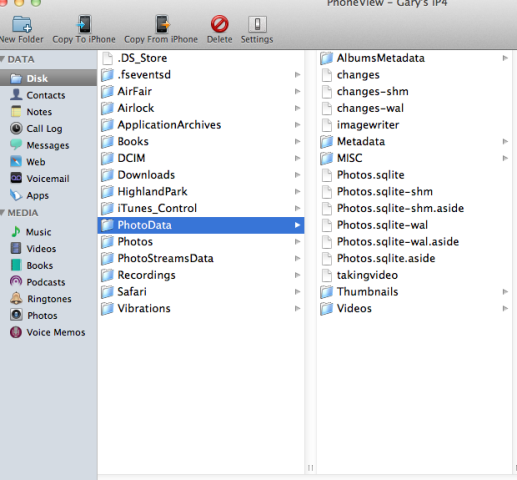
You will be warned against deleting these files, but if you have them backed up proceed.
Note: In the Windows version of iPhone Explorer, you’ll have to ‘right click’ and delete.
3. Restart your iPhone. Afterwards, my Camera Roll actually launched–but no photos were shown. Be patient, as the photo library will rebuild itself and all your images should appear minutes later.
The above method worked for my situation, and enabled me to recover my photos without restoring my iPhone. If you are running into Camera Roll crashes, I would highly recommend trying the above before attempting to ‘nuke’ your iPhone.
Why do my photos turn white once I selected them from my camera roll