-
All replies
-
Helpful answers
-
Nov 2, 2013 8:00 AM in response to AjaxOdessaby sterling r,Howdy AjaxOdessa,
It sounds like you are unable to log into your iCloud account for iMessage, but your password is not working.
First, verify you can log into your account at http://www.icloud.com with the same Apple ID. If not, then you may need to reset your password:
Apple ID: Changing your password
http://support.apple.com/kb/HT5624If you can, then I would try the troubleshooting in this article named:
FaceTime, Game Center, Messages: Troubleshooting sign in issues
http://support.apple.com/kb/ts3970
- Ensure that you have an active Internet connection.
- Verify that you are using a valid Apple ID at appleid.apple.com. You can also create an Apple ID or reset your password from this website. Other things you should confirm while logged into appleid.apple.com:
- Confirm that the email addresse(s) for your Apple ID has been verified.
- Check for miss-types of the email address
- Check the spelling of the email address
- Check that all letters are lower case
- Make sure that special characters are correct, e.g. no commas (,) where there is supposed to be full stops (.), etc.
- Note You may experience issues if your email address is associated with more than one Apple ID. If you have multiple Apple IDs, log in to appleid.apple.com with each Apple ID and confirm that each email address you wish to use for FaceTime or Messages is associated with only a single Apple ID.
- Make sure the date, time, and time zone are set correctly in Data & Time preferences, in System Preferences.Tip: Enable "Set date and time automatically" in Date & Time preferences to automatically keep this information accurate.
- If third-party firewall or port filtering software is installed, it needs to be configured to allow connections toapple.com, verisign.com and verisign.net. A list of ports required for using FaceTime and Messages is in Using FaceTime and iMessage behind a firewall. Please consult this article for further help configuring firewalls and Internet security software.
- If your /private/etc/hosts file has been modified, make sure that it is not interfering with communications toapple.com, verisign.com or verisign.net servers. Note: Some third-party software installers may modify the /private/etc/hosts file without alerting you. Instructions about how to check and resolve issues with a /private/etc/hosts file are in the "Blocked by configuration: (Mac OS X/Windows)" section of iTunes: Advanced iTunes Store troubleshooting.
Thank you for using Apple Support Communities.
Cheers,
Sterling
-
Nov 2, 2013 8:39 AM in response to sterling rby AjaxOdessa,It is definitely not the case as I'm using this AppleID on another devices (iMessage, iCloud etc.) and on THIS device for iCloud (and it works!). Moreover this AppleID used to work just a few days ago and since then it stopped. What is worst in this case, I had such problem on 10.8.5 about a half year ago, called to AppleCare suport and they had no idea what to do with that customer code and couldn't help me. But after some time iMessage started to work.
-
Nov 5, 2013 2:01 PM in response to AjaxOdessaby Ralph Johns (UK),Hi,
Always worth checking here http://www.apple.com/support/systemstatus/
You an scroll back in the time Line to see if there was an Issue.
I can't see one for iMessages.

10:01 pm Tuesday; November 5, 2013 iMac 2.5Ghz 5i 2011 (Mavericks 10.9)
G4/1GhzDual MDD (Leopard 10.5.8)
MacBookPro 2Gb (Snow Leopard 10.6.8)
Mac OS X (10.6.8),
Couple of iPhones and an iPad
-
Nov 19, 2013 6:27 AM in response to AjaxOdessaby ArtAlexion,I am having the same problem as AjaxOdessa. AppleCare wants to treat it as a warranty issue and tells me the Mac is out of warranty. This is an account issue, and I can't seem to get help.
-
by Ralph Johns (UK),Nov 19, 2013 2:30 PM in response to ArtAlexion
Ralph Johns (UK)
Nov 19, 2013 2:30 PM
in response to ArtAlexion
Level 9 (72,947 points)
ApplicationsHi,
Start here http://www.apple.com/uk/support/itunes/contact/
Follow the iTunes Store link on the right at first and generally the Account Management options after that until you get the email Link.

10:30 pm Tuesday; November 19, 2013 iMac 2.5Ghz 5i 2011 (Mavericks 10.9)
G4/1GhzDual MDD (Leopard 10.5.8)
MacBookPro 2Gb (Snow Leopard 10.6.8)
Mac OS X (10.6.8),
Couple of iPhones and an iPad
-
Apr 5, 2014 6:09 AM in response to sterling rby wolfyrules123,Here's the weird thing. I've never signed out of iMessage on my iPad Mini, but now it wants me to sign in again. Whenever I try to, it sits there until this pops up: "Could not sign in. Please check your network connection and try again." But, I can do everything on the internet but that.
-
by Ralph Johns (UK),★HelpfulApr 5, 2014 1:04 PM in response to wolfyrules123
Ralph Johns (UK)
Apr 5, 2014 1:04 PM
in response to wolfyrules123
Level 9 (72,947 points)
ApplicationsHi,
Try this:-
In a Finder Window use the Go Menu whilst holding down the ALT key.
Select the Library that appears
Navigate to Preferences
Find the com.apple.ids.service.com.apple.madrid.plist and drag it to the Trash.
Restart Messages - you may have to re-enter your Apple ID.
9:04 pm Saturday; April 5, 2014
iMac 2.5Ghz i5 2011 (Mavericks 10.9)
G4/1GhzDual MDD (Leopard 10.5.8)
MacBookPro 2Gb (Snow Leopard 10.6.8)
Mac OS X (10.6.8),
Couple of iPhones and an iPad -
Apr 6, 2014 3:27 AM in response to Ralph Johns (UK)by ArtAlexion,The whole things seems intermittent, long lasting, and isolated to one computer. That is, sometimes I can of in, sometimes I can't. Sometimes, logins are preserved between sessions, sometimes, not. When I can't, I can't for a week or so. This affects my Mac Mini at home. Never happens on my work computer nor my MacBook.
-
by Ralph Johns (UK),Apr 6, 2014 12:38 PM in response to ArtAlexion
Ralph Johns (UK)
Apr 6, 2014 12:38 PM
in response to ArtAlexion
Level 9 (72,947 points)
ApplicationsHi,
On this one computer are you using a Public DNS server in the System Preferences > Network settings (If Wifi access the Advanced Buttons > DNS Tab).
Sometimes the Mac does not show the ones from the ISP (normally greyed out) and some ISP DNS servers are not all they could be.
8:37 pm Sunday; April 6, 2014
iMac 2.5Ghz i5 2011 (Mavericks 10.9)
G4/1GhzDual MDD (Leopard 10.5.8)
MacBookPro 2Gb (Snow Leopard 10.6.8)
Mac OS X (10.6.8),
Couple of iPhones and an iPad -
-
by Ralph Johns (UK),Apr 7, 2014 11:31 AM in response to ArtAlexion
Ralph Johns (UK)
Apr 7, 2014 11:31 AM
in response to ArtAlexion
Level 9 (72,947 points)
Applications -
Apr 7, 2014 11:56 PM in response to AjaxOdessaby jem consulting,OMG, I spent 3 hours on the hone with Apple Support 5-8 pm EST. they made this matter os much worse. iMessage on my MacBookPro kept forcing me to login but would not accept my AppleID pw. SUPPORT had me delete my keychain which took out all of my passwords then Safari stopped working. The 'senior advisor' hung up on me after I told him his 'solution' to delete my keychains made matters worse and caused safari to not work and throw an error.
I then called back and was connected to someone else who said they would own this problem until Safari was working again and hopefully iMessage. Note iMessage works on my iPod touch new gen and my iPhone 5 just fine and nothing that I know of has changed. NOTHING!!!!!!
So we got Safari working but not Facetime or iMessage... we have tried EVERYTHING.... 6 people at Apple and no one can fix it..
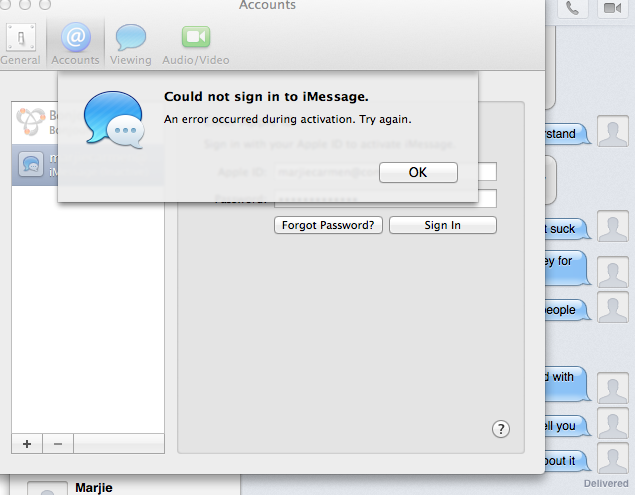
Unbelievable.. This is the message... and it just started happening today around 4:45pm est or so... NOTHING I know of changed unless they dropped something into production... any one have any ideas? yes my AppleID PW works, yes I checked it. Everything else works. I created a test account, iMessage works fine there... WHAT IS GOING ON??
-
Apr 8, 2014 12:01 AM in response to ArtAlexionby jem consulting,That happens to me as well, it's driving me crazy and no one at Apple can fix it..
-
Apr 8, 2014 12:03 AM in response to Ralph Johns (UK)by jem consulting,Pulling out the com.apple.ids.service.com.apple.madrid.plist and drag it to the Trash does not resolve the problem.



