Hi Bryan,
This is a common question.
That behavior, now called "autocomplete text in cells", has disappeared from Numbers 3.0 but Apple says it will reintroduce it sometime within the next six months.
Meanwhile, If you frequently enter repeating values in a column and don't want to type the same text over and over again you could consider formatting the cells in the column as Pop-Up Menu. In many situations this has clear advantages over "autocomplete." It's easy to set up:
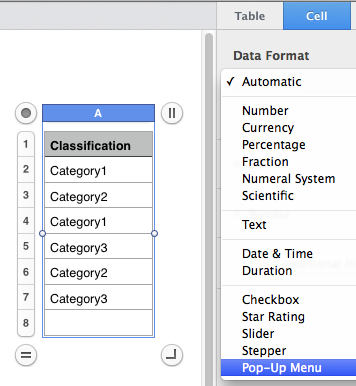
If you've selected the whole column before formatting as Pop-Up Menu, your existing values in that column will pre-populate a menu automatically:
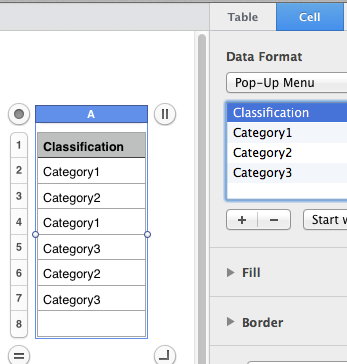
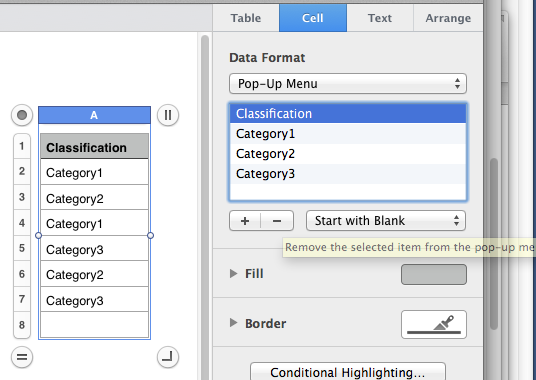
Then you remove the values you don't want in the list, such as the column header (and possibly some previous spelling errors too!):
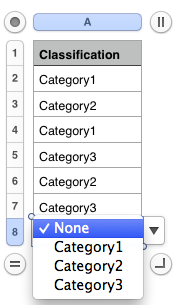
And after this easy one-time setup all you have to do thereafter is to choose from the pop-up list when you add rows:
In Numbers 3.0 there's no keyboard shortcut to activate the menu such as hitting the spacebar in the old Numbers (hope they'll add one in upcoming versions) but the Pop-Up Menu approach has some advantages over autocompletion: no spelling errors or lack of capitalization when there should be capitalization, etc.
And should you ever want to take your Numbers with you, in a touch interface pop-ups are much more efficient than typing the first few letters of items.
See this thread for this and other workarounds for Numbers 3.0.
SG

