-
All replies
-
Helpful answers
-
Dec 25, 2013 2:30 AM in response to whatzup25by Roger Wilmut1,Go to https://getsupport.apple.com ; click 'See all products and services', then 'More Products and Services, then 'Apple ID', then 'Other Apple ID Topics' then 'Forgotten Apple ID security questions'.
-
Mar 27, 2015 2:16 PM in response to Roger Wilmut1by 3.141596,..which tells you to reset with the alternative email. Not helpful.
-
-
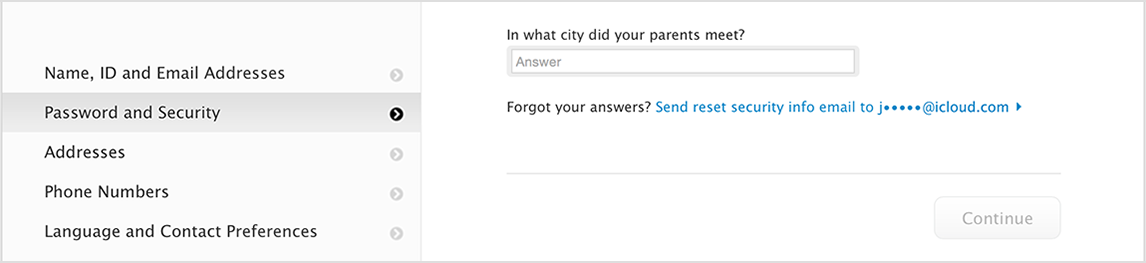
Mar 27, 2015 2:59 PM in response to 3.141596by King_Penguin,I get to this screen when following Roger's instructions :
Clicking on the Continue button gives me 'schedule call' and 'call Apple Support later' options. Are you not getting that ?
(An alternate email is not used for resetting security questions, the reset link will only show on your account if you have a rescue email address on it.)
-
Mar 27, 2015 3:09 PM in response to whatzup25by Ethan7988,Go here.
Click "Manage your Apple ID"
Log in.
Click "Password and Security"
Click "Send Answers to <Your Email address>"
-Ethan
-
-
May 5, 2016 9:09 AM in response to Nightfire007by ChitlinsCC,You have tacked onto a very old thread... always just start your own new question if you do not find an answer in an old thread
===
If your Apple ID is locked - Apple Support
If your Apple ID is locked
If you or someone else enters your password, security questions, or other account information incorrectly too many times, your Apple ID automatically locks to protect your security and you can't sign in to any Apple services. You can unlock your Apple ID after you verify your identity.
If your Apple ID is locked for security reasons, you might see one of these alerts:
- “This Apple ID has been disabled for security reasons”
- "You can't sign in because your account was disabled for security reasons"
- "This Apple ID has been locked for security reasons"
When you see one of these alerts, you can go to iforgot.apple.com to unlock your account with your existing password or to reset your password.
After multiple unsuccessful attempts to unlock your account, your Apple ID will remain locked and you can try again the next day.
If you use two-step verification, you need to use your recovery key and a trusted device. And if you use two-factor authentication, you need a trusted device or trusted phone number to unlock your Apple ID.
If you see a message that is different from the alerts above and you can't reset your password, contact us for help.
Learn more
After you change your password, you might need to update it in your iCloud settings and in any Apple services that you sign in to with your Apple ID. Learn more about Apple ID and where you can use it.
Last Modified: Mar 16, 2016
======
If you forgot the answers to your Apple ID security questions - Apple Support
...
If you can't reset your security questions
If you can't send a reset email, don't have a rescue email address, or can't access email at your rescue email address, call us for help. When you call, you might need to create a temporary support PIN to verify your identity. After you reset your security questions, you might want to update your rescue email address.
If you answer your security questions incorrectly too many times in a row, you temporarily can't access your account. You can try to reset your questions after the waiting period ends.
Last Modified: Mar 16, 2016

-
May 5, 2016 10:23 AM in response to Nightfire007by King_Penguin,No reset link means that you don't have a verified rescue email address on your account
-
May 5, 2016 12:19 PM in response to King_Penguinby Nightfire007,So all in all, I won't be able to add a rescue email and then change the security questions?
-
May 5, 2016 12:58 PM in response to Nightfire007by ChitlinsCC,I'll repeat and emphasize...
If you can't reset your security questions
If you can't send a reset email, don't have a rescue email address, or can't access email at your rescue email address,
call us for help.<= go here!!
When you call, you might need to create a temporary support PIN to verify your identity. After you reset your security questions, you might want to update your rescue email address.
If you answer your security questions incorrectly too many times in a row, you temporarily can't access your account. You can try to reset your questions after the waiting period ends.
-
May 6, 2016 4:19 AM in response to Nightfire007by King_Penguin,Correct, you have to contact Support in the country where you are (and which is therefore the country on your iTunes account)