Barney-15E:
Re 1/21 message:
I’m still not sure that it is helpful to say the settings “do what they say they do,”
Many Apple statements used to be clear, but things have gotten much more complex since the Apple II.
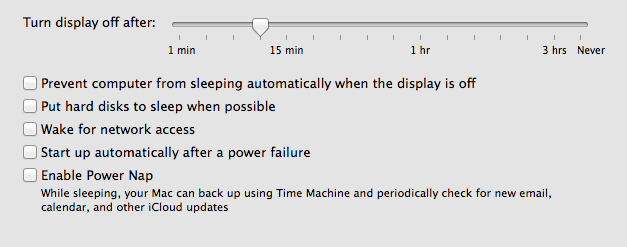
The first energy saver option, "put hard disks to sleep when possible," fails to describe, or give a link to a description of, when it is "possible.' it is not obvious. For example, if TM is running or, as in my case, Crashplan is running in the background, does the OS wait to put the hard disks (in my case a hybrid drive) to sleep?
The option also fails to describe "sleep." Looking down to "power nap," and what the computer does when set to that, one can deduce, infer, or reasonably guess - since "power nap" should be different for "sleep when possible" - that once the hard disk has been put to sleep under a "when possible" scenario, it cannot back up with TM or check for email, etc. But since in another obscure place, Apple tells us that an iMac is never completely asleep - it is not even fully powered off with the power button completely, only unplugging gets it completely off - it appears that under both options the "sleep" stops a hard disk from spinning but the OS and hard disk firmware are not shut down. That is what I had previously understood as "sleep." So, clearly, there are two different types/levels of "sleep" intended in the options. Wouldn't it be useful for an explanatory sentence to be added to the "when possible" option as one is given for the "nap"?
Furthermore, nothing in the energy saver options (imaged) indicates whether the two sleep options are compatible (what are the consequences of having both selected?) or that only one should be selected.
As to whether any of the numerous discussions about "improperly ejected" external HDs refer to "power nap" is something I will explore by raising the question on one of them. In the meantime, it seems to me that even if the persistent problem only involves those who set to sleep whenever possible, it is still a problem worth resolving. (Apple is said to be working on it.) Until then, I believe more information to allow intelligent use of the "energy saver" options would be welcome.
Re 1/22 message:
Although I think that as of now Apple doesn't own any HD manufacturers, it should have some interest in what HD manufacturers present as being Mavericks-compatible and in making sure that the OS, including parts easily set by users, such as the energy saver settings, works with the HDs at least when they are set up for TM. This is particularly true when the Apple Store sells the HD; and more so when the HD uses Thunderbolt, a connection predominantly, if not exclusively, Apple's. At any rate, I think the readily accessible Apple support pages (not those for developers), should make clear whether Apple is representing that the "power saver" sleep settings are compatible with any external HD, and if Apple can't supply details, it should at least offer a link to sites which can.
Finally, you note that your external drives "sleep fine" and "without incident." What settings do you use? Is this true under 10.9.2? Have you had an "improper ejection" at all using Mavericks?
For the moment, I have not elected either option. (PS - I have found that even with this setting, my old Iomega running USB2, if on, may have improperly ejected when I check in in the morning. I can imagine that its firmware, etc., did not anticipate changes in the last few years in OS, sleep settings, etc.) My cure for this is to shut that drive (an archive) off when I don't need to refer to it.


