I am still using iPhoto 7.1.5 but all photo files disappeared when using Mountain lion

How do I recover my photo files which took many years to set up? The many thousand photos may still be there on the hard disk but what could have caused the filing sytem to disppear??

MacBook Pro, OS X Server

Posted on Jan 27, 2014 3:35 PM

Reply
5 replies

Jan 28, 2014 8:28 AM in response to LarryHN

As mentioned in the heading I use iPhoto 7.1.5 ('08) and the library is located on an external hard disk with som 1.5 terabytes free space. The photos may still be there but the filing system has disappeared. Every time I look for a particular library (I have several) iPhoto opens some recently added photos with no connection to the library that I selected. Any choice of library gives the same photos.

Jan 28, 2014 9:05 AM in response to SECQ

Apply the two fixes below in order as needed:


Fix #1


1 - launch iPhoto with the Command+Option keys held down and rebuild the library.
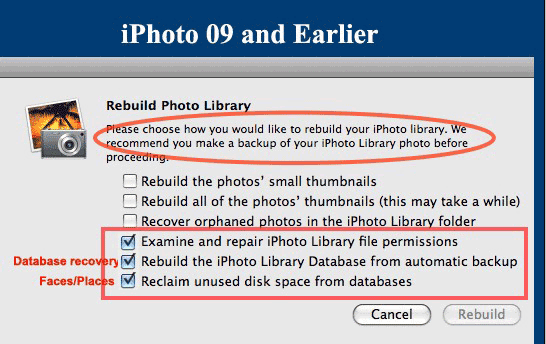

User uploaded file

iPhoto 8 (09) and earlier- run the options indicated

User uploaded file

iPhoto 9 (11) and later- run Option #4 to rebuild the database


Fix #2


Using iPhoto Library Manager to Rebuild Your iPhoto Library


1 - download iPhoto Library Manager (iPhoto 8 or earlier or IPhoto 11 and later) and launch.


2 - click on the Add Library button and select the library you want to add in the selection window..


3 - Now that the library is listed in the left hand pane of iPLM, click on your library and go to the


File ➙ Rebuild Library (iPhoto 8 or earlier)

or

Library ➙ Rebuild Library (iPhoto 9 or later)


menu option to rebuild the library.


4 - In the next window name the new library and select the location you want it to be placed.


5 - Click on the Create button.


Note: This creates a new library based on the LIbraryData.xml file in the library and will recover Events, Albums, keywords, titles and comments. However, books, calendars, cards and slideshows will be lost. The original library will be left untouched for further attempts at fixing the problem or in case the rebuilt library is not satisfactory.


NOTE: iPhoto 7 is no longer supported by the Apple Print stores. So if you plan on ordering any items for printing in the future you'll need to upgrade to iPhoto 9.5 by purchasing it from the App Store.


OT

Feb 3, 2014 10:26 AM in response to SECQ

I would upgrade. iPhoto 7 is no longer supported by Apples print facilities so you won't be able to order any photos, books, cards or calendars with iPhoto 7.


If you're running Mavericks you can purchase the latest iPhoto, 9.5.1, from the App Store. If you're running an earlier system purdchase a coppy of the iLife 11 DVD from a 3rd party retailer like Amazon.com or eBay.com and update to 9.2.3 or 9.4.3 depending on the system version you're running.

This thread has been closed by the system or the community team. You may vote for any posts you find helpful, or search the Community for additional answers.

I am still using iPhoto 7.1.5 but all photo files disappeared when using Mountain lion

Welcome to Apple Support Community
A forum where Apple customers help each other with their products. Get started with your Apple Account.

