Acrobat 9 Pro Compatibility?

Does anyone know whether Mavericks is compatible with Adobe Acrobat 9 Pro? I've been trying to locate a chart or definite answer without success. Holding off on the upgrade to 10.9 because of this issue.

MacBook Pro (15-inch 2.53 GHz), iOS 5.1.1

Posted on Jan 29, 2014 11:20 AM

Reply
15 replies

Jan 29, 2014 1:47 PM in response to expc75

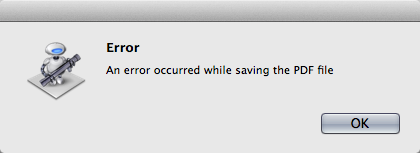
Forgot I still had Acrobat Pro 9 in my pile of software. Tried it on a bare installation of Mavericks, 10.9.1. It installed easily enough, but it no workee. Couldn't even create a PDF of a very simple web page using the print command, then "Save as Adobe PDF" from the menu. It get this error message:

User uploaded file


Why it shows the Automator icon, I don't know, but it sure doesn't work.


Edit: What I forgot to do was have it check for updates. That might fix something. I'll have to check on that tomorrow as I have to leave the office in a moment.

Jan 30, 2014 6:25 AM in response to Kurt Lang

Kurt Lang wrote:


Forgot I still had Acrobat Pro 9 in my pile of software. Tried it on a bare installation of Mavericks, 10.9.1. It installed easily enough, but it no workee. Couldn't even create a PDF of a very simple web page using the print command, then "Save as Adobe PDF" from the menu. It get this error message:


User uploaded file


Why it shows the Automator icon, I don't know, but it sure doesn't work.


Acrobat 9 Pro will run in Mavericks, however the reason the Automator icon shows with 9 Pro's "Save as Adobe PDF" is because of past history with Adobe Acrobat and the Mac OS (somewhere around Lion). At one point the Adobe PDF Printer used to work, but for "security reasons" Apple did something to OS X that disabled it. Adobe made a work around using some app compiled as an Automator workflow. I have noticed that Mavericks does not run many AppleScript and Automator apps that previously worked. It might have something to do with the 32-bit/64-bit running thing. I had to re-open an old app back into AppleScript Editor and resave it to allow it to run.


"Save as Adobe PDF" in Acrobat Pro X and XI work fine.


Unless you will upgrade, you may have to get your PDFs the Apple way then work on them in Acrobat Pro 9 (whether you get the document structure you need is the question though).

Jan 30, 2014 7:58 AM in response to expc75

I guess I'm not really out anything by giving Acrobat 9 a try.

I assume you mean give Mavericks, OS 10.9 a try. 🙂 Yeah, it's free, so the most you could lose was the time to upgrade the OS, find out something doesn't work, then restore the Snow Leopard backup you made before installing Mavericks.


Do be aware that any PowerPC apps you have will not run. That ability was removed back in Lion.

Jan 30, 2014 12:39 PM in response to Kurt Lang

Yup, I did mean Mavericks. I just meant that if I absolutely have to upgrade to Acrobat XI after installing Mavericks it might be worth it to have features in the OS that I don't have now. I do have an external drive plugged in all the time running Time Machine. Have never had to re-do everything though. Just a file here and there.

This thread has been closed by the system or the community team. You may vote for any posts you find helpful, or search the Community for additional answers.

Acrobat 9 Pro Compatibility?

Welcome to Apple Support Community
A forum where Apple customers help each other with their products. Get started with your Apple Account.