How can I override the DNS Servers and Domain Name used by my Airport Time Capsule?

The defaults picked up from my ISP's DHCP are to use the ISP's DNS servers and ISP's domain. I do not want this.


With my prior router I set the DNS servers to Google's Public DNS (8.8.8.8 and 8.8.4.4) and my domain to either "bannister.us" (which I own) or "bannister.home". I do not want simple names resolving to some ISP default. (Yes, I know exactly what this does.)


In the Apple AIrport Utility (version 6.3.2) the fields for DNS and Domain do not allow editing. (Why??)


Is there some way to override this?

MacBook Pro (Retina, 15-inch, Late 2013), iOS 7.0.4, Apple Time Capsule - 7.7.2

Posted on Feb 17, 2014 3:49 PM

Reply
6 replies

Feb 17, 2014 4:11 PM in response to LaPastenague

The connection to the WAN/ISP is DHCP (since I do want the current ISP-assigned WAN IP).


The router is configured as the usual local-DHCP with NAT to the WAN. Pretty vanilla.


Bridged is not an option, since the WAN IP is dynamically assigned by the ISP. (Well, I could put another router between the Airport and the cable modem ... but that does not sound nice.)


There are not a lot of options to the Airport configuration.

Feb 17, 2014 6:09 PM in response to Preston L. Bannister

Unfortunately not one that will work with the latest version TC.


The way around it is to use a different router.. It can be a very simple router.. I usually recommend units like the TP-Link WDR3600 as they take good third party firmware like gargoyle, openwrt, dd-wrt.. ie they have real controls and beyond that a proper Linux firmware with command line interface.


You can then change the TC over to static IP. It will not be the router.. but it will effectively become the local dhcp server.


I have adsl so I cannot reproduce your system.. I have a bridged modem.. a router.. AC66U.. and a TC.. but the TC is not in bridge.. it is in static IP mode.


Let me demonstrate.

User uploaded file


User uploaded file


User uploaded file


User uploaded file


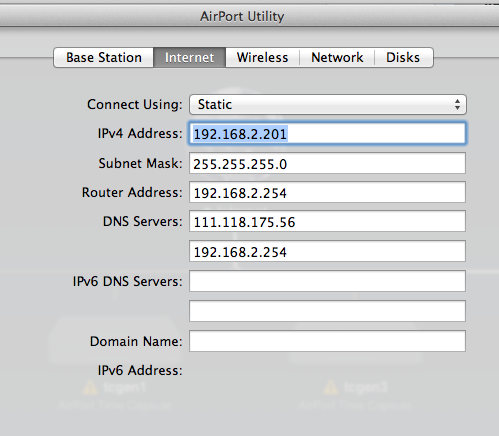
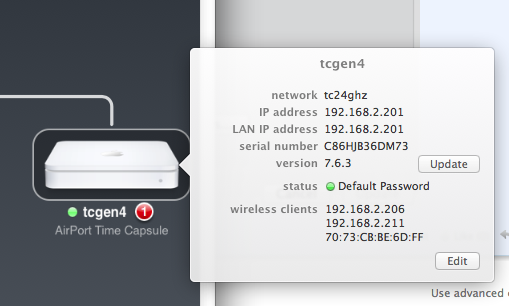
By setting a range on the main router from 1-199 (leave a space.. ) so set the TC to 192.168.2.201 and then you can set DNS and domain as you like. Set the dhcp range (leave a space) you could use 203-253.. then I use the main router as 254.


It is brilliant.. all computers behind the TC receive the IP from the TC with whatever IP and dns (and domain although I haven't changed it).. Effectively the TC works as its own dhcp device.. but is merely a secondary dhcp server to the main unit.


(This gives me netflix which is why I do it.. from well outside the US).


It may be of use.


Why leave a space.. well it helps it to work.. I have not tested it but another person reported issues and found leaving a space .. ie last ip in the router.. 199, static ip 201.. first dhcp 203 (i used 205 to help me keep count!!). worked.. I have not tried to reproduce the problem.. so I reproduce the solution.. it might be like sheep jumping over the fence.. even if the fence was removed the sheep keep jumping over at the same place. Just say bahhh and do likewise.


Feb 17, 2014 6:43 PM in response to LaPastenague

Yes, I am sure that would work, as mentioned at the first. Though since I bought the TC mainly for 802.11ac (as supported by my MBP), buying another wireless router is a bit of a waste.
Also I could take one of my older routers, turn off wireless, turn off the DHCP server, and use a static configuration with the TC. Aside from adding to the rats nest of cables and boxes...


Might end up doing this eventually, if someone offers a router that explicitly supports open-source firmware. (Would be nice to have a router I could be reasonably sure lacked any sort of backdoor.)


Thanks, in any case. 🙂

This thread has been closed by the system or the community team. You may vote for any posts you find helpful, or search the Community for additional answers.

How can I override the DNS Servers and Domain Name used by my Airport Time Capsule?

Welcome to Apple Support Community
A forum where Apple customers help each other with their products. Get started with your Apple Account.