Where are my iphoto downloads recently?

Can't find my iphotos in my library from recently... its like it just stopped showing them there. I can find them by number in recent downloads in finder, but that's frustrating... I need to see a pic of the photo before I upload it somewhere. Wonder why they stopped showing in iphoto when you upload them from iphoto. Its odd though... if you pull up my iphoto library they show... if you try to upload them to another site from iphoto the recent ones are not in there to choose from. Any advice would be great.

MacBook Pro

Posted on Mar 1, 2014 11:22 AM

Reply
6 replies

Mar 1, 2014 11:32 AM in response to ajolson

Apply the two fixes below in order as needed:


Fix #1


1 - launch iPhoto with the Command+Option keys held down and rebuild the library.
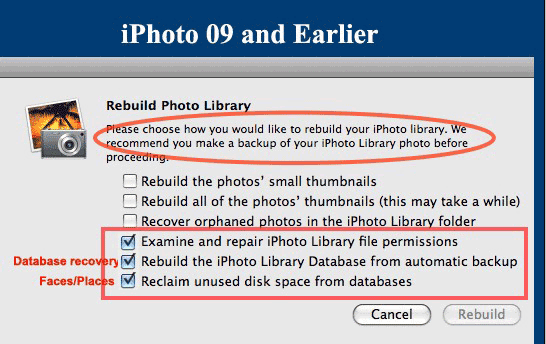

User uploaded file

iPhoto 8 (09) and earlier- run the options indicated

User uploaded file

iPhoto 9 (11) and later- run Option #4 to rebuild the database


Fix #2


Using iPhoto Library Manager to Rebuild Your iPhoto Library


1 - download iPhoto Library Manager (iPhoto 8 or earlier or IPhoto 11 and later) and launch.


2 - click on the Add Library button and select the library you want to add in the selection window..


3 - Now that the library is listed in the left hand pane of iPLM, click on your library and go to the


File ➙ Rebuild Library (iPhoto 8 or earlier)

or

Library ➙ Rebuild Library (iPhoto 9 or later)


menu option to rebuild the library.


4 - In the next window name the new library and select the location you want it to be placed.


5 - Click on the Create button.


Note: This creates a new library based on the LIbraryData.xml file in the library and will recover Events, Albums, keywords, titles and comments. However, books, calendars, cards and slideshows will be lost. The original library will be left untouched for further attempts at fixing the problem or in case the rebuilt library is not satisfactory.


OT

Mar 6, 2014 1:07 PM in response to Old Toad

okay I thought it worked but it didnt. Justed tested it out on shutterfly when looking to upload recent images from iphoto. It's still the old list. I don't know if it helps but it looks like these photos say ipmetadatabackup. Is that a secret file somewhere on my computer that is storing my recent iphotos? haha. Sorry I don't know my mac very well. I might have to take it in for an apple appointment to figure it out soon.Same problem with imovie, showing only old movie clips instead of new ones to choose from and make a movie out of.

This thread has been closed by the system or the community team. You may vote for any posts you find helpful, or search the Community for additional answers.

Where are my iphoto downloads recently?

Welcome to Apple Support Community
A forum where Apple customers help each other with their products. Get started with your Apple Account.

