To clarify this for you:
On the iPod Classic:
- You cannot add a song that is currently playing to the On-The-Go Playlist.
- As you have found, you can add a song to the On-The-Go Playlist by press-and-holding the centre button until the highlighted area blinks - in most menus, including Playlist menus.
The one menu you cannot use, to add songs to the On-The-Go is the Cover Flow menu. I have no idea why Apple missed that one out.
- To find the On-The-Go, look at the very bottom of the Playlists menu. It is not in alphabetical order.
- You can play this list.
- You can delete the complete list using the Clear Playlist option.
- You can delete individual songs from the On-the-Go by click-and-holding, just as you did to add them.
- You can save the On-The-Go Playlist (there's an option in the On-The-Go menu). It will be named New Playlist 1 and the On-The-Go becomes empty. New Playlist 1 will be listed immediately above On-The-Go.
- You can subsequently create another On-The-Go Playlist. If you save this one, it becomes New Playlist 2. And so on.
- If you create a further Playlist, but do not save it (so leave it as On-The-Go), when you Sync the iPod with iTunes it is renamed. See the next point.
- All three of the above On-the-Go Playlists will be renamed in iTunes as On-The-Go X, where X is the next number up. They will also now be on your iPod as On-The-Go X and they will be incorrect alphabetical order. This is important to note, see next point
- If your On-The-Go Playlists reach 10 or more, since they are listed in alphabetical order, not numerical, they will be arranged as 1, 10, 11, 2, 3, 4 etc. (so not as 1, 2, 3, 4, ... 10, 11)
- Once an On-The-Go Playlist is saved, renamed and added back to your iPod, it is like any other regular Playlist on your iPod. You can only modify it in your iTunes Library.
- iTunes has a habit of creating phantom, and empty, playlists under the On-The-Go heading. That's simply an irritation. They don't appear on the iPod itself.
Dmkirk28 wrote:
I want to be able to be listening to a song and like it and therefore add it to the on the go playlist. Is there a way for this?
No. However, there are other options that may help you. By the way, don't forget that the On-The-Go will be fixed and renamed by iTunes at the next Sync.
You can get iTunes to list songs in Reverse Last Played order:
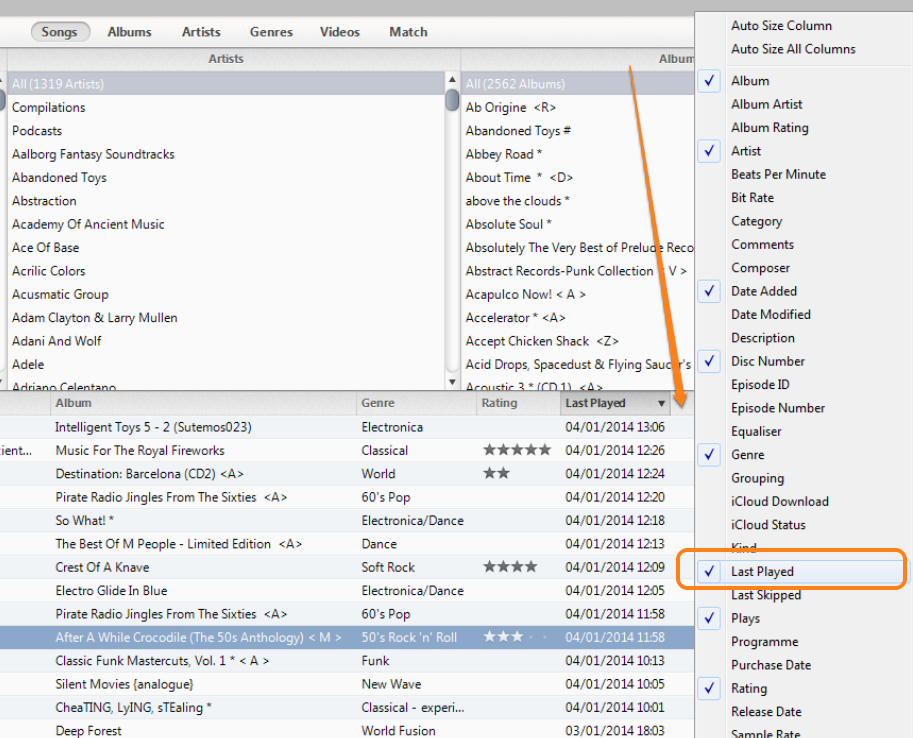
... which would allow you to see and pick out the song and then add it to your Playlist in your iTunes Library. The next Sync will put that revised Playlist onto your iPod.
You could reserve Star Rating 1 (for example) for these songs. Then, in your Library, find the 1 star rated songs and add them to your chosen list. Then remove the star.
Whew! I'm worn out now...


