You can adjust the sidebar size in System Preferences > General > Large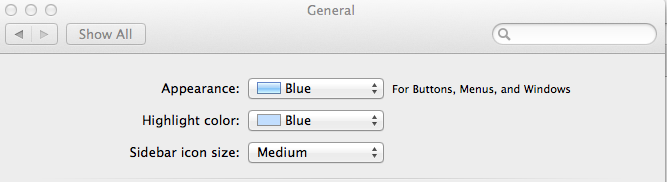
The toolbar doesn't allow for customizations, but try System Preferences > Accessiblity > Zoom

Another option is to turn on icon & text for toolbar. Icons are generally easier to recognize. You can add cusotom icons to folders if it's a generic blue folder.

The new larger monitors make everything smaller. Try System Preferences > Display settings and choose a different resolution. I've never been happy changing from the default however. Really wish they still made a 24" monitor for the iMac.

Other links you might find helpful:
Center for Partially Sighted provides a lot of useful information to help you use your Mac.
Screen Loupe is a desktop utility that displays a magnified view of whatever is underneath your mouse cursor.
http://www.artissoftware.com/screentools/loupe.html
Macnifier shows a magnified section of your Apple Macintosh screen to help viewing up close. Freeware
http://subrosasoft.com/OSXSoftware/index.php?main_page=product_info&products_id= 15
Coloristic is a mouse over magnification program.
http://www.bubblepop.com/coloristic/



