Assign a static id to a printer

I frequently get the message "another device is using your network" or words to that effect, when I reboot my mac & the printer, also connected to my wireless network, is on.


I think I need to assign the printer a static id. I have a very general sense of how to do that BUT I don't know what numbers / range to use.

Could someone walk me through it?


I'm in OS X (10.7.5) (And yes, I am going to move up to a more recent OS, but not for a bit.)


I use the airport utility, but not an airport; have a Belkin wifi router if that matters in any way.

Posted on Jun 19, 2014 10:01 AM

Reply
3 replies

Jun 19, 2014 2:50 PM in response to kdinmass

Assign the printer an IP address within the DCHP range distributed by your Belkin product. It may or may not allow you to reserve a range of IP addresses. If it does not, use one that is numerically high enough so that it is not likely to conflict with others it distributes.


In other words if it is distributing IP addresses in the range 10.0.1.x, assign the printer an IP address of 10.0.1.100.

Jun 19, 2014 5:31 PM in response to John Galt

ok this gives me a hazy idea. I realize my wording understated my lack of knowledge of how to do this--I know what window to open to begin.;


Here is what I don't know:


assign the printer an ip address: where?


what is a dhcp range & how do I know what is distributed with my belkin router


how would I know what is numberically high enough so that it is not likely to conflict...


so, basically; all I really know is that I do this in the network pane of sys preferences

I think I click on my wifi connection and then...um do something in the dhcp dialog


(I did really mean I need to be walked through, sorry

Jun 19, 2014 6:36 PM in response to kdinmass

No worries.


Different printers have different ways of configuring their network options. For your printer, consult its documentation to determine how to configure a "static IP address". That is the usual terminology, thought some might use "fixed IP" or words to that effect. "Static IP" and "DHCP" are mutually exclusive, so what you're looking for is a setting that is not DHCP. That setting will enable you to enter an address manually, from its front panel control or setup utility.


Before you do any of that, make sure you know how to restore the printer's default settings. If you enter an IP address that is off the wall, you won't be able to communicate with the printer. In that case it's usually easiest to start over from the beginning.


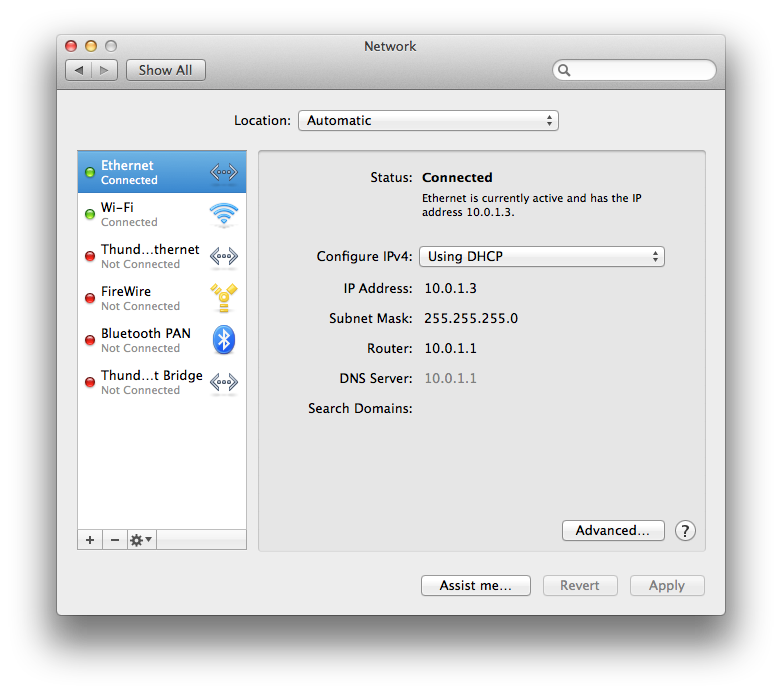
For the Belkin router: Since it's not an Apple product I can't tell you what default range of IP addresses it uses. However, if you go to your Mac's System Preferences > Network, you will see something like this

User uploaded file


The numbers adjacent to IP Address are what you need to know. The above screenshot indicates the router assigned this Mac an IP address of 10.0.1.3. Whatever they are in your case, make the printer's IP address the same except for the last value.


DHCP addresses are assigned by your router to devices on your network sequentially, beginning with the IP address of the router itself. In the example I cited above, notice that the router's IP address is 10.0.1.1. IP address 10.0.1.2 was assigned to something else, then the Mac was assigned 10.0.1.3. Following that addressing scheme, an IP address of 10.0.1.100 would permit 98 other devices to be assigned IP addresses by your Belkin router before any of them would conflict with the printer. That should be sufficient for most small home networks.


If your Belkin doesn't use 10.0.1.x addressing scheme then substitute the values it's using for the first three.


After you do that, you will need to add the printer again in System Preferences > Print & Scan, because the printer will no longer reside at its previous address. Delete the old one.


This thread has been closed by the system or the community team. You may vote for any posts you find helpful, or search the Community for additional answers.

Assign a static id to a printer

Welcome to Apple Support Community
A forum where Apple customers help each other with their products. Get started with your Apple Account.