iMovie Event Date Wrong
iMac, OS X Mavericks (10.9)
Hi Bruce,
Welcome to Apple Support Communities.
It sounds like one or more of the videos in the iMovie Event Library have incorrect date and time information. The article linked below will help you put those videos in the correct chronological order.
iMovie '11: Adjust the date and time of a video clip
http://support.apple.com/kb/ph2297
Cheers!
-Jason
Jason,
I have the dates fixed. It was a combination of needing to update my projects and events, and viewing hidden clips that had different dates which placed them project into a later year.
Hi Bruce,
how exactly did you view the hidden clips? I have the same problem. The events are in the wrong year and inside the iMovie Library Package I can see files from clips that are not in the event in the iMovie user interface. When I delete these clips from the event folder "Original Media", the event still shows up in the wrong year and when I mouse-over over the event it actually gives me the date range that includes the dates of the clips I just deleted.
I tried to update the projects and events, but iMovie says there is nothing to update.
Thanks,
Claas
Claas,
I had a few different problems I needed to solve. First I was not viewing "All Clips" in the iMovie browser window. You need to makes sure you have the setting correct in your iMovie broswer.
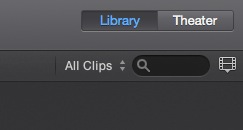
Then I could see the rejected clips, and in my case there were some in the event from 2009 that were not being used in my project, and that cause the event to get dated 2009. In other words, an event is going to get dated based on the newest clip in the event. I deleted those clips, and then the project moved into the 2006 year folder (grouping).
Second I had some missing clips. Those were harder to fix. I had to go to the finder and open the iMovie library package and dig into the files there and find the missing files. I dragged them to my desktop, and then dragged them back into the clips section of the iMove browser. If you try this, make sure you have a good backup of everything in case something goes haywire. I hope this helps. It can be confusing. I final got everything fixed and working right. Now I'm having fun making movies!
Hi Bruce,
I was also not viewing "All Clips". That did the trick. The clips showed up, I deleted them and the events moved into the correct year.
Thanks for the quick help! Now I can get started on a movie project spanning 8 years!
Claas
Hi Bruce: I don't seem to be able to find the option to view all clips. It does not appear on my view under Library like you have in your clip. Can you describe how to activate that function. I am currently using iMovie 10.
Oddly enough - at least in iMovie 10 - the search field does not seem to show up when I have an event selected. Oh well.
It only appears when you have an individual event or project selected in the Libraries List sidebar. Then the search field is on the right side of the window midway down, at least that's where it is for me.
Found it! Solved my date issues. Thanks so much!
iMovie Event Date Wrong

