Letter C won't work in built-in keyboard

The last time I used my macbook was four days ago, all keys are perfectly fine and working. But when I opened it today, somehow the letter C WON'T work at ALL. I've tried all the disabling methods: Mouse keys off, resetting the SCM, reboot to safe mode, disabled slow keys and tried using the universal keyboard using trackpad an it works there by the way. But when i tried using the keyboard itself, it won't respond. I'm a clean person and i don't spill anything or ate anything in front of my laptop so i don't know what's wrong with it.


Can I enter an "C" from Keyboard Viewer? YES

Can I enter an "C" from the built-in keyboard? NO

Please help.

Any suggestions on how to fix it - if its a software issue would be greatly appreciated. Thanks.

MacBook, Mac OS X (10.7.5)

Posted on Aug 10, 2014 12:39 AM

Reply
2 replies

Aug 12, 2014 7:27 AM in response to suyensu

Hi there suyensu,


It sounds like you have isolated the issue, at this point it could be still be either a software or a hardware issue. The article below has some additional troubleshooting steps.


One or more keys on the keyboard do not respond


  1. If the issue persists, use Keyboard Viewer to help isolate the issue:
    1. Click the Language & Text pane (Mac OS X v10.6) or International pane (Mac OS X v10.5.8 or earlier) in System Preferences.
    2. Click the Input Sources tab (or Input Menu tab in Mac OS X 10.5.8 or earlier).
    3. Click the Keyboard & Character Viewer "On" checkbox to select it (click the Keyboard Viewer "On" checkbox in Mac OS X 10.5.8 or earlier).
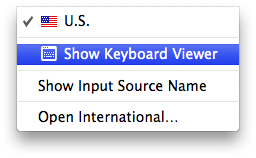
    4. From the Input (flag) menu, choose Show Keyboard Viewer.
      User uploaded file
    5. If the keyboard is connected and detected by OS X, the keys you type will highlight in the Keyboard Viewer window. Open TextEdit (or any text application), and try to type something using the keys that were previously not responding to see if they highlight in Keyboard Viewer.
  2. Start from the Mac OS X Install Disc, choose Terminal from the Utilities menu and test the keys which were previously not working. If the keys work while started from the Install disc, then the keyboard itself is working correctly. Use How to troubleshoot a software issue to isolate the software issue that may be causing the keys to not respond.


-Griff W.

This thread has been closed by the system or the community team. You may vote for any posts you find helpful, or search the Community for additional answers.

Letter C won't work in built-in keyboard

Welcome to Apple Support Community
A forum where Apple customers help each other with their products. Get started with your Apple Account.