TP-LINK Powerline Router Issue

Hello,


I currently purchased the TL-WPA4220KIT Powerline kit. I'm having an issue cloning my wireless network from my airport wireless extreme as it does not support WPS. I cannot access the admin page for the router either - tplinkplcogin.net. No browser on my Macbook will allow me to do so.


Any suggestions welcome.


Thanks,

MacBook Air, iOS 7.1.2

Posted on Aug 15, 2014 6:48 PM

Reply
4 replies

Aug 15, 2014 7:41 PM in response to ditti80

This can be tricky to setup as you are not really able to see which is the bad spot in the network.


The actual setup of the wireless end of the pair however should be relatively easy.


Can you get a wireless connection to it from your Mac?? If not then I would recommend you go and buy the Thunderbolt to Ethernet dongle apple sells.. at least then you are not trying to setup wireless by wireless is akin to sawing off the branch you are sitting on.


Check the IP you get by opening the network preferences .. for wireless you need to check under advanced. The default IP of the TP-Link is 192.168.1.1 .. if as I suspect you get 10.0.1.x then you can never access the WPA4220, because you are on the wrong subnet.. simply set a manual IP of 192.168.1.10 with the normal subnet mask.. 255.255.255.0. You don't need anything else.. then try opening the setup in your browser again.


If you have a PC with ethernet this will be a lot easier.


I do not use this kind of setup.. I run ethernet wherever it is needed.. but the AE does actually have WPS.. it is locked away in the airport utility.

And is specified for printers although that should be irrelevant.


Have a try.
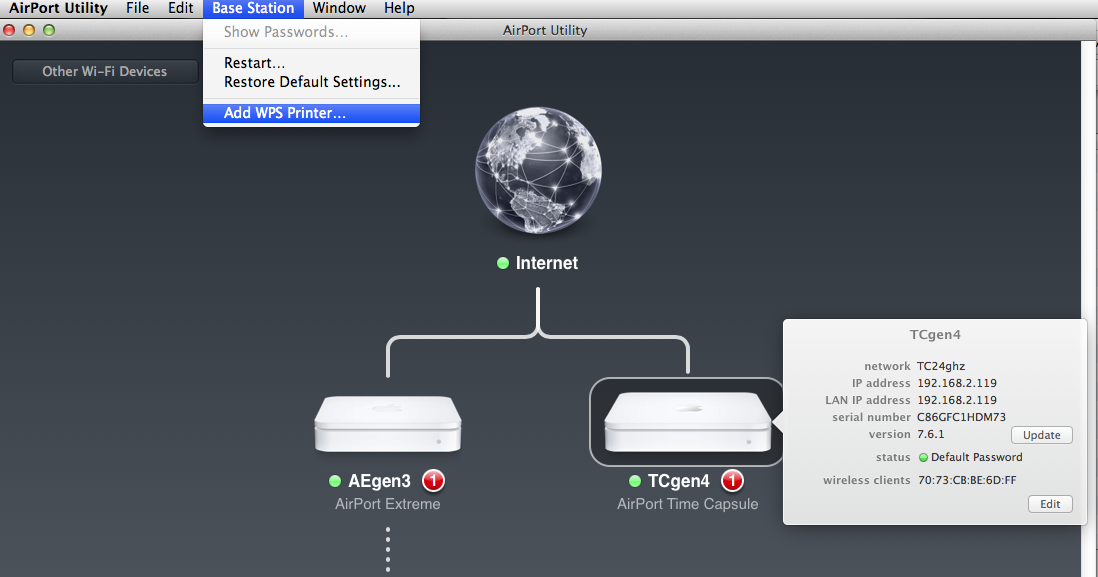

User uploaded file


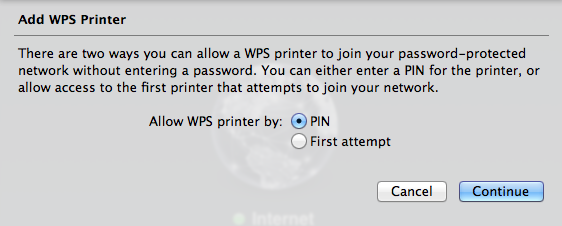
In your case select by first attempt then continue.


Press the WPS button on the TP-Link and see if it is able to join.
User uploaded file


I am just not 100% sure this is what you want for setup.. but it simple enough to try.

Aug 16, 2014 4:48 PM in response to LaPastenague

Thanks for the help. I was able to clone my network using the Add WPS Printer function.

However, when I try to access the cloned network using the TP Link adapter on my iPhone or iPad, it shows that I'm connected and then quickly moves back under choose a network. It's like it connects but then disconnects within a second.


Any thoughts?


Thanks again.

Aug 16, 2014 8:00 PM in response to ditti80

IF you are using typical apple wireless names.. they probably will fail.


Reset your AE to factory and start again.. use wireless names and all names actually that are short, no spaces and pure alphanumeric.


ie if your wireless name looks like this.


Fred Blog's Airport Extreme Wireless


It does not comply with rest of the world .. hardly even works with apple now.


Try using AEwifi


Base station name should also comply.. eg AEbase


And I strongly recommend using WPA2 Personal but the password should be 10-20 characters (more if you are paranoid only) but pure alphanumeric mix of case and numbers.


Tell me how it goes.

Dec 4, 2014 1:38 AM in response to LaPastenague

Hi everyone,


Had the same issue as Ditti80. After using the Add WPS printer in the airport utility managed to get the time capsule (same for aiorport extreme) to recognize the TP-Link. But, as ditti said the devices wouldn't connect to it. Just to share my solution:


- connect to the Powerline web-page (192.168.1.1 by default - had to change mine no to conflict with my main router), then Wireless Security and change the password being shown to the password of your Wireless router. Done. Wireless roaming happiness 😉


Hope this helps someone. Took a few hours.


Cheers

This thread has been closed by the system or the community team. You may vote for any posts you find helpful, or search the Community for additional answers.

TP-LINK Powerline Router Issue

Welcome to Apple Support Community
A forum where Apple customers help each other with their products. Get started with your Apple Account.
