Problems After update to iOS 8 on ipad 2

Hello community,


please pay attention when you update your iPad 2 from iOS 7 to 8. The whole useability of my iPad broke down and their are many problems using my iPad now. Everthing is really slow and I always need a restart to connect to my service provider with 3G. The following problems occurred on my iPad:

  • Safari is working realy slow and sometimes brake down
  • mail is also realy slow and most of the functions sometimes don't work or hang
  • 3G connection fails anytime you switch on the iPad and needs a restart


TO Apple:

please improve this version of iOS and submit your update asap, otherwise my iPad is not usable anymore and lose me as a customer.


thx.

iPad 2, iOS 8

Posted on Sep 24, 2014 7:33 AM

Reply
487 replies

Oct 22, 2014 12:01 PM in response to 2480andy

Then you are getting angry for ABSOLUTELY NOTHING and for a "false idea" borne out of IGNORANCE!! And, I don't know whether to laugh or to feel sorry for people who get angry for absolutely nothing and a wrong idea!


This forum is for "users helping other users" in that one user presents a problem and another user offers a possible solution that the first user can implement. Apple Support is NOT HERE and never was here, and yet, you are "angry" at Apple Support for "not answering" ... LOL ...


If you want Apple Support ... the answer is simple, go to "APPLE SUPPORT" ... :-) ...


Apple Support

http://www.apple.com/support/


Apple Retail Store - Genius Bar

http://www.apple.com/retail/geniusbar/

Oct 22, 2014 4:27 PM in response to Sonya221

It's here at this spot in the Apple Support document ... and this is what causes the iPad to download a "new" system file ... and not use your old one.

Restore your iOS device

  1. Connect your iOS device to your computer using the cable that came with it.
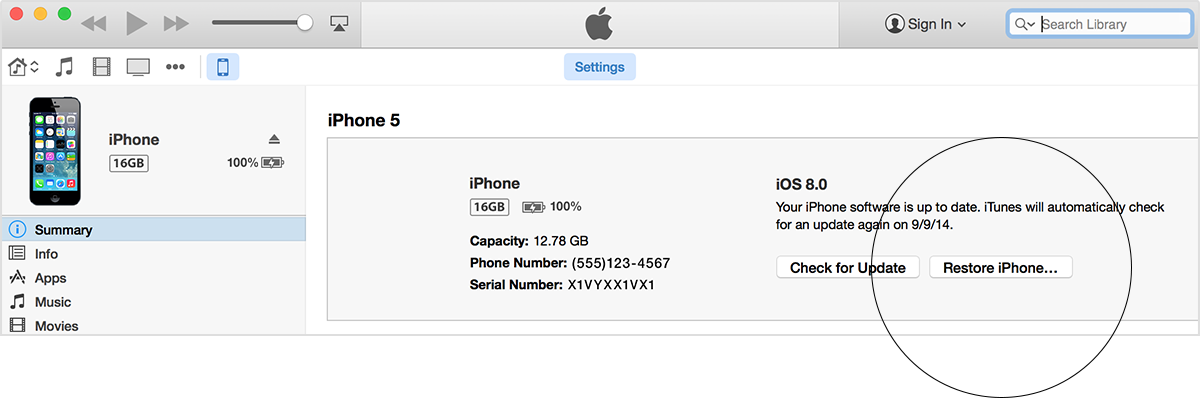
  2. Select your iPhone, iPad, or iPod touch when it appears in iTunes. In the Summary panel, click Restore.User uploaded file
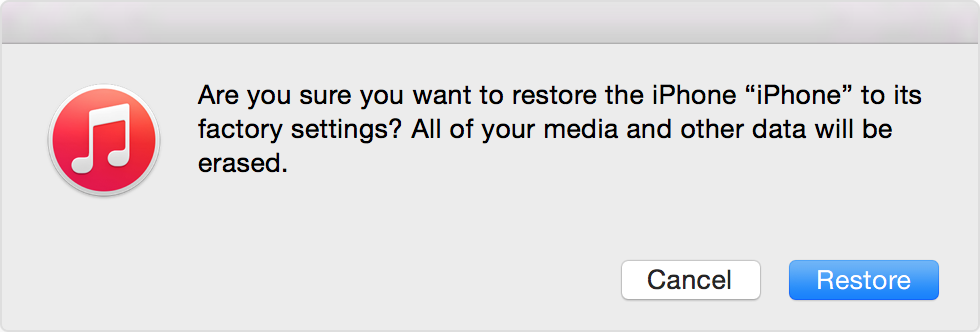
  3. Click Restore again to confirm that you want to restore your device to factory settings and delete all data and content. iTunes will download the iOS software file and restore your iOS device.User uploaded file
  4. After your iOS device is restored to factory settings, it will restart. Once it does, you’ll see the "Slide to set up” welcome screen. Follow the steps in the iOS Setup Assistant. You can set up your device as new or using a previous backup. If your iOS device has cellular service, it will activate after you restore.


Use iTunes to Restore your iOS Device to Factory Settings


http://support.apple.com/kb/ht1414

Oct 23, 2014 5:59 AM in response to flygreg88

iOS 8 ruined our iPad2 - The screen resolution now has squiggly, flickering light blue lines in everything with a white background rendering the device unusable. I have a headache just from looking at it trying to solve the problem.


Apple's stellar no-downgrade policy essentially renders this device an oversized paperweight. 😠


Don't waste your time trying to convince me how great it is that 95%+ are having no trouble with iOS 8. Leaving customers no fallback when there are serious issues is not acceptable.

This thread has been closed by the system or the community team. You may vote for any posts you find helpful, or search the Community for additional answers.

Problems After update to iOS 8 on ipad 2

Welcome to Apple Support Community
A forum where Apple customers help each other with their products. Get started with your Apple Account.