OSX Yosemite Wifi issues

Hi there,


I upgraded my Macbook Pro Retina 15" (mid 2014 revision) to OS X Yosemite last night and am now having issues when using my home WiFi connection. Whilst it connects to either the 5Ghz or 2.4Ghz network, it is basically unusable. Web pages take minutes to load (if they even load at all), dropbox doesn't sync because it can't get a connection and even trying to get to the router config page is extremely slow and hit/miss.


Tethering to my iPhone seems to work ok, as does using my home network via wired ethernet.


Are any others having problems with Yosemite? Wifi was working fine on Mavericks.


Tom

MacBook Pro with Retina display, OS X Yosemite (10.10)

Posted on Oct 17, 2014 12:37 AM

Reply
3,443 replies

Dec 16, 2014 4:23 PM in response to tomstephens89

Try this, It worked for me


1: Remove Network Configuration & Preference Files

Manually trashing the network plist files should be your first line of troubleshooting. This is one of those tricks that consistently resolves even the most stubborn wireless problems on Macs of nearly any OS X version. This is particularly effective for Macs who updated to Yosemite that may have a corrupt or dysfunctional preference file mucking things up:

  • Turn Off Wi-Fi from the Wireless menu item
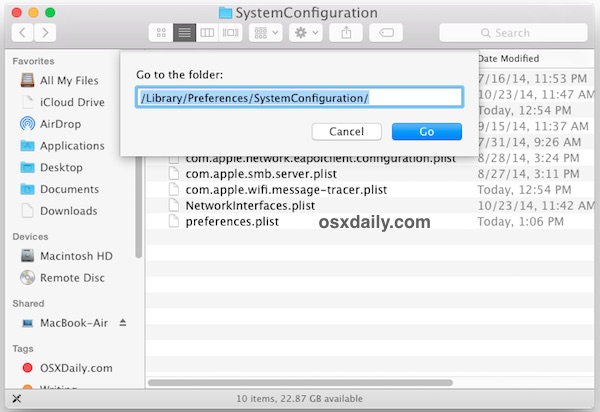
  • From the OS X Finder, hit Command+Shift+G and enter the following path:
  • /Library/Preferences/SystemConfiguration/

    User uploaded file
  • Within this folder locate and select the following files:
  • com.apple.airport.preferences.plist
    
com.apple.network.identification.plist
    com.apple.wifi.message-tracer.plist

    NetworkInterfaces.plist

    preferences.plist
    1. Move all of these files into a folder on your Desktop called ‘wifi backups’ or something similar – we’re backing these up just in case you break something but if you regularly backup your Mac you can just delete the files instead since you could restore from Time Machine if need be
    2. Reboot the Mac
    3. Turn ON WI-Fi from the wireless network menu again

    This forces OS X to recreate all network configuration files.

    Dec 16, 2014 4:51 PM in response to Blower17

    I used this method about 2 months ago. Fixed the yosemite wifi dropout problem and hasn't returned. working perfectly.


  • Within this folder locate and select the following files:
  • com.apple.airport.preferences.plist
    
com.apple.network.identification.plist
    com.apple.wifi.message-tracer.plist

    NetworkInterfaces.plist

    preferences.plist
    1. Move all of these files into a folder on your Desktop called ‘wifi backups’ or something similar – we’re backing these up just in case you break something but if you regularly backup your Mac you can just delete the files instead since you could restore from Time Machine if need be
    2. Reboot the Mac
    3. Turn ON WI-Fi from the wireless network menu again

    This forces OS X to recreate all network configuration files.

    Dec 24, 2014 5:35 AM in response to tomstephens89

    Solution to Yosemite WiFi Issue supplied by Apple Support 12/22 - I've been dealing with the WiFI dropping issue since installing Yosemite. Ive tried most of the suggested solutions ( http://osxdaily.com/2014/10/25/fix-wi-fi-problems-os-x-yosemite/ ) short of rolling back or a complete reinstall.

    I contacted Apple support via chat today and the tech provided the following solution which seems to have resolved the problem for me:


    1. Open System Preference
    2. Select Network
    3. Select Advanced
    4. Select Wi-Fi
    5. In the Preferred Network window delete all wi-fi networks listed. The window should be empty when you are done
    6. Click Ok
    7. This should take you back to the Network pane
    8. In the window on the left select ''Wi-Fi'
    9. Click on the minus sign on the bottom of the window to remove Wi Fi service.
    10. Click Apply
    11. Add 'Wi-Fi' back by clicking on the plus sign at the bottom of the window and then selecting wifi from the drop down
    12. Connect back to your Wifi network (select enter password etc)


    I did this nearly 24 hours ago and the connection to my local wifi network has been stable for almost 24 hours. Perviously this have been dropping at least 3 or 4 times an hour.

    Dec 27, 2014 2:39 PM in response to tomstephens89

    Yosemite may have been rushed but since its release to this date you rarely hear anything public from Apple or otherwise regarding the extent of this issue. I am still having this issue and not just on my Macbook 13 retina but also my 27" iMAC. Both of these machines are business related and this issue has led to a loss of some clientele. When you arrive for demonstrations for a CEO of fortune companies and you cannot connect to their wifi networks, simply blaming apple for a problem they themselves have not heard of publicly looks like I am passing the buck when instead my whole pitch is to instill confidence in my companies technology. I have re-installed my MBP 3x, first was on top of Mavericks, second time was a fresh install of mavericks upgraded to Yosemite, and last week was a fresh USB install of yosemite. I still have no wifi on 5GHz AC and terrible speeds on 2.4Ghz.


    • What I have found is that the upper channels of 2.4 (10-13) do not work at all. I cannot even connect to my ssid. Lower channels work but as I said, terrible speeds. I have 200 megabit download and I can only reach 40-70Mb.
    • I have found connected to 5GHz at 40 or 80Mhz has fast internet for 3-10 seconds before dropping out completely. All 5GHz networks in range continue to disappear from the list over and over. If I run a ping continuously it sings along just fine but pings vary from 10-300ms and this does not happen on 2.4Ghz. Browsing via any browser does not work past a google search.
    • I am using an ASUS RT-AC87U on the latest firmware 3.0.0.4.376_2769. I have factory reset and configured from scratch again with same results. The reason I include this info is because my UPC wifi modem capable of 5GHz AC speeds up to 120 megabit actually runs "somewhat" decenton my MBP however I am paying for 200 and would like to use it. So although the majority of my connections to wifi networks fail over AC speeds, the UPC modem tells me that this also seems to be an issue of how the apple hardware is talking to certain wifi chipsets communications.
    • I have tried every bandaid listed in this forum since day ONE. NADA

    Apple really has to get on the ball with this. Enough time has gone by now to either 1. publicly come forward! rather than allowing their die hard fans continue to troubleshoot there local networks to no end... I'm sure many have spent a pretty penny on technical house calls and/or visits to their local shop. 2. Well let's leave it at 1... Apple's blind eye to my emails, and hours of round robin helpdesk calls has certainly put a rather disgust in my opinion at the moment.

    Apple???

    Dec 28, 2014 12:11 PM in response to wombat2k

    Well, unfortunately I've spent countless hours on this and I'm not getting anywhere. None of the plausible workarounds work.


    On top of this specific Yosemite wifi issue, I've been having related issues with my iPhones and iPad (also network/wifi related). As you can imagine I'm not a happy camper to say the least. It doesn't help that I've spent trying to figure out these issues and whenever I contact Apple for any issues, I never get really far. The people on the line are always polite and understanding, but can't really help. Not to sound elitist, but as a Software Engineer, it's frustrating to be talking to people whose solution are invariably to reboot/re-install your phone/exchange/buy a new device. Heck, I'd be happy with a simple "Yeah we're aware of this issue, we have no idea what it is but we're looking into it"


    From my investigation here is what I've noticed:

    • As far as I can tell, this wifi issue must be very common. I have issues on 2 MBA (2010 11" and 2014 13", 2 iPhones and 2 iPads)
    • This leads me to believe that while it's unlikely the Yosemite and iOS issues are exactly the same, they are probably related
    • It seems that you're more likely to see the wifi issue in Yosemite in lower signal areas. It doesn't have to be a bad signal, but something like medium signal will be more likely to trigger this. I can't reproduce on full signal when sitting next to the AP, but can easily reproduce it in my room upstairs which has "fair signal. I am able to get speeds of around 135mbps when things work, which I think is decent considering there is a wall in between.
    • I have a hunch this issue is much more likely to happen on the 5Ghz band, although I can't reliably test the 2.4Ghz band around my house.
    • When doing speed tests, the speeds vary wildly. Some of it can expected due to network activity, but I have some evidence that the devices have trouble maintaining a stable connection. This is particularly visible in iOS devices where the signal bar will keep changing between 1 and 3 bars. This didn't use to happen previously.
    • Does not seem to be router related. I had a nice Asus router which I upgraded to a Airport Extreme assuming that Apple would at least test it with their devices. Same issue.
    • The issue gets progressively worse until rebooted. At first it's only when the MBA comes back from sleep, I'll notice it trying to connect to the AP and fail with an exclamation mark on the signal strength menu bar widget. It then progressed from that to appear to reconnect fine but being disconnected to outright disconnections in the middle of doing using it.
    • iOS devices are much better behaved since iOS 8.1. There are still some visible issues (signal strength indicator fluctuating wildly) and short stalls, but at least they are usable since they recover on their own. I have a condition on all my phones where network data (both cellular and wifi) stop working, but I haven't been able to find evidence it's related to this.
    • Console logs appear to indicate a loss of AP

    Dec 28, 2014 11:30 PM in response to nicknish

    Thanks a lot!


    This:

    nicknish wrote:


    1. Creating a New Wi-Fi Service (this solution worked for me!)
      • Copy and paste these instructions, because you'll be disconnected from the Internet and you'll need to reboot.
      • Go into your Network Preferences > Select Wi-Fi Service (in the list in the left column) > Click on the options (cog icon) > Select "Make Service Inactive" > Select Apply.
      • Select the same Wi-Fi Service > Delete It ( – ). Reboot.
      • Return to Network Preferences > Create a New Service ( + ).
      • Inside the prompt select Wi-Fi under Interface, name the Service Name something other than Wi-Fi. (I named mine Wi-Fi2. Apparently if you retain the previous Wi-Fi name the WiFi dropping will return on reboot.) > Click Create.
      • Click Apply.
    2. Delete and Reconnect to your Preferred Network
    3. Go into your Network Preferences > Advanced > Select Your WiFi Network and Delete It ( – ). Reconnect to it.


    FIXED the Wifi ISSUE!!! :-)

    Its a few days I'm not suffering from the wifi connectivity problems!

    Dec 29, 2014 4:10 PM in response to Refael N

    I can confirm the following works good. I had so many problems with wifi stopping working, safari doing nothing, dns/bonjour not responding, meanwhile IMCP was still working...


    This fixed it for me. The main important part is to click "Apply" when you have removed wifi before you re-add it.


    This absolutely fixed it 100% for me. I think it came back one, when iCloud synced some wifi network settings somehow and I had to do it again.


    nicknish wrote:


    1. Creating a New Wi-Fi Service (this solution worked for me!)
      • Copy and paste these instructions, because you'll be disconnected from the Internet and you'll need to reboot.
      • Go into your Network Preferences > Select Wi-Fi Service (in the list in the left column) > Click on the options (cog icon) > Select "Make Service Inactive" > Select Apply.
      • Select the same Wi-Fi Service > Delete It ( – ). Reboot.
      • Return to Network Preferences > Create a New Service ( + ).
      • Inside the prompt select Wi-Fi under Interface, name the Service Name something other than Wi-Fi. (I named mine Wi-Fi2. Apparently if you retain the previous Wi-Fi name the WiFi dropping will return on reboot.) > Click Create.
      • Click Apply.
    2. Delete and Reconnect to your Preferred Network

      Go into your Network Preferences > Advanced > Select Your WiFi Network and Delete It ( – ). Reconnect to it.

    Jan 1, 2015 7:15 AM in response to tomstephens89

    Even after disabling awdl0 I've seen other issues on current hardware (MacBook Air 2014, Mac mini 2014):

    • The WiFi scan is very unreliable, the variance of stations found is very high, especially when comparing to a Mac mini 2012.
    • Sometimes even my 2.4 and 5 GHz networks could not be found, although they're the only ones in proximity.
    • Once the connection was lost and Yosemite claimed an authentication error for unknown reasons. Manual reconnect worked without entering the password again.


    It seems there's a lot of work to be done. Especially for the newer generation WiFi chips.

    Jan 1, 2015 2:18 PM in response to AndreasSt

    Even after disabling awdl0 I've seen other issues on current hardware (MacBook Air 2014, Mac mini 2014):

    • The WiFi scan is very unreliable, the variance of stations found is very high, especially when comparing to a Mac mini 2012.
    • Sometimes even my 2.4 and 5 GHz networks could not be found, although they're the only ones in proximity.
    • Once the connection was lost and Yosemite claimed an authentication error for unknown reasons. Manual reconnect worked without entering the password again.

    Sorry, AndreasSt, I'd somewhat overlooked your post. What you describe are typical issues of a weak WiFi link. Been there, done that.

    However, I'm very pleased we are separating/ isolating issues from the main issue here. And that results from killing awld0 and Airdrop are finally seeping in. Just about time.

    It seems Yosemite/ Discoveryd is not very adept at low level radio tasks- OK, probably because it has to operate in a much more hostile/ crowded environment. But hey, mdnsResponder under Mavericks had to do so too and was stable. Where are the days of Tiger 10.4.11 and Interference Robustness?

    http://www.macinstruct.com/node/213

    Moreover, there were some posts from square_eyes here, who states he lives on a farm. Which would exclude RF crowding, no?

    Anyhow, happy New Year!

    Jan 1, 2015 2:52 PM in response to hexdiy

    Sorry for the double post; got logged out again or something.

    Here goes:

    Even after disabling awdl0 I've seen other issues on current hardware (MacBook Air 2014, Mac mini 2014):

    • The WiFi scan is very unreliable, the variance of stations found is very high, especially when comparing to a Mac mini 2012.
    • Sometimes even my 2.4 and 5 GHz networks could not be found, although they're the only ones in proximity.
    • Once the connection was lost and Yosemite claimed an authentication error for unknown reasons. Manual reconnect worked without entering the password again.

    Sorry, AndreasSt, I'd somewhat overlooked your post. What you describe are typical issues of a weak WiFi link. Been there, done that.

    However, I'm very pleased we are separating/ isolating issues from the main issue here. And that detailed results from killing awld0 and Airdrop are finally seeping in. Just about time.

    It seems Yosemite/ Discoveryd is not very adept at low level radio tasks- OK, probably because it has to operate in a much more hostile/ crowded environment. But hey, mDNSResponder under Mavericks had to do so too and was stable. Where are the days of Tiger 10.4.11 and Interference Robustness?

    http://www.macinstruct.com/node/213

    A more recent paper on IR-UWB (interference Robustness- Ultra Wide Band) here: http://infoscience.epfl.ch/record/147968

    Sorry, just a few thoughts.

    Moreover, there were some posts from square_eyes here, who states he lives on a farm. Which would exclude RF crowding, no?

    Anyhow, happy New Year!

    Jan 2, 2015 2:55 PM in response to kevinski_uk

    I have come back after some testing. I was the guy on the farm having 5GHz issues, of crashing and rebooting 880L.


    Clean installs using fresh downloads and Diskmaker X below yielded the following results...


    • Yosemite - Same problems
    • Maveriks - Router's WiFi drops for all users when connecting to 5GHz (immediately), although MBP appears to be connected for 30 seconds. Router does not reboot this time, but takes 60 seconds or so to recover its wireless connection.


    At this point, as 5GHz works for other devices I'm going to assume that I have a hardware compatibility issue between my 880L and 2014 MBP.


    I will update my original post to avoid confusion.

    Jan 6, 2015 4:54 PM in response to hexdiy

    @hexidly


    My point was that the coexistence of com.apple.mDNSRresponder.plist and com.apple.discoveryd.plist on a Yosemite system (maybe leftovers from a migration and not a clean install) may cause irreparable clashes. Causing DNS no longer to be resolved


    Having both plist files is probably fine. They are basically preferences files. You can safely ignore them. It's going to be confusing, but you can have DNS resolution working even if Bonjour services are down. As for Discoveryd gobbling up 100% CPU, I've seen that a few times, and I suspect that it's probably due to the fact that the scope of the original mdnsresponder seems to have been greatly increased in Yosemite. I don't think that issue is related to the WiFi issues though.


    I think the main issue is that a lot of people seem to have different issues. Some look like they are related, but others look unrelated. For instance a gentleman (or lady) was complaining about their Router crashing. I suspect that's unrelated. Somebody else was complaining about their Time Capsule not being visible which also appears to be unrelated.


    Basically I think the Wifi problem can be described as this:


    • Disconnection on coming back from sleep
    • Random Visible Disconnection (visible in the Wifi icon)
    • Random Transparent Disconnections (Wifi icon shows connected)
    • Random momentary Slowdowns

    Jan 14, 2015 9:28 AM in response to hexdiy

    Just in case you get bored Hex: 😝

    Topics for the OS X Yosemite Troubleshooting Exam (9L0-066)

    Learn what topics are on the OS X Yosemite Troubleshooting Exam (9L0-066).

    9L0-066 Basics
    The exam is open resource. This means you may use resources such as Apple Service Articles, AppleCare Service Training in ATLAS, and the Apple public support site to answer the questions and pass the exam.

    GSX access is recommended but not required in order to pass this exam. Test takers will need to use Apple public support articles listed in the Learning Resources sections of the training courses in ATLAS to answer some of the exam items.

    This exam has 65 scored items and you have two hours to complete it. A passing score is 80%.

    Exam Topics
    Family Sharing (2 items)

    Using supplied scenarios, describe how to evaluate and isolate issues with iTunes devices.

    Peripherals (5 items)

    Describe how to evaluate and isolate connectivity issues with peripherals on Apple products.

    Accounts and Permissions (5 items)

    Describe how to evaluate and isolate permissions issues in OS X Yosemite.

    Time Machine (5 items)

    • Describe the functions and benefits of Time Machine.
    • Based on supplied service scenarios, identify the troubleshooting procedures recommended by Apple.

    Security and Privacy (5 items)

    Describe how to evaluate and isolate security and data privacy issues with OS X-based systems.

    Startup Process (5 items)

    Describe how to evaluate and isolate OS X startup issues to determine the correct resolution to those types of issues.

    File System (5 items)

    Describe how to evaluate and isolate file system issues.

    Spotlight (1 item)

    Describe how to evaluate and isolate Spotlight issues.

    Installation (5 items)

    Describe how to evaluate and isolate installation issues.

    Recovery (4 items)

    Describe how to use Apple procedures and utilities to successfully recover an installation of OS X on a system.

    Apps (5 items)

    Describe how to evaluate and isolate app issues with OS X-based systems.

    Troubleshooting Tools and Techniques (6 items)

    Describe how to apply systematic troubleshooting methodology to correctly evaluate and isolate a given issue with an OS X-based system to determine the correct resolution to the issue.

    Networking (5 items)

    • Describe how to evaluate and isolate network and wireless connectivity issues with OS X-based systems to determine the correct resolution to those types of issues.
    • Describe how to configure and set-up a wireless network using an Apple wireless product so that client devices can successfully access services on that network.

    iCloud (5 items)

    Describe how to evaluate and isolate connectivity issues with iCloud-supported devices to determine the correct resolution to those types of issues.

    Continuity (2 items)

    Describe how to evaluate and isolate connectivity issues with iCloud-supported devices to determine the correct resolution to those types of issues.

    Last Modified: Nov 20, 2014

    Jan 15, 2015 3:39 PM in response to hexdiy

    For any of you still experiencing those severe periodical Yosemite WiFi dropouts: It has come to my attention today that the daemon "secd", probably a "Discoveryd" component most possibly taking care of the iCloud keychain, is systematically causing CPU threads to crash, possibly thus causing unresolved DNS, and thence, Internet silence. No more data packets getting through.

    "secd" is fairly undocumented.

    Just for verifying/testing this theory: read this link and follow the advice quoted:

    http://apple.stackexchange.com/questions/159809/what-is-secd-process-on-osx-mave ricks-yosemite

    It looks like secd is responsible for syncing the keychain with iCloud?

    So what should you do? Try one or more of these:

    1. If you don't need iCloud keychain syncing, turn it off in iCloud preferences.
    2. Use
      launchctl
      to disable secd if it doesn't seem to adversely affect anything.
    3. If you need iCloud keychain syncing, see if you have a ton of keychain items, and remove the ones you don't need.
    4. Perhaps rebuild your keychain (make a new keychain, move items you need into it, and move it over the older one), in case there are unnecessary artifacts left over in the old keychain.

    If you are uncouth enough and have a backup, I might have an inkling as to a Terminal command that has remedied some issues in Mavericks and Yosemite as well (one of the first workarounds on this Yosemite issue), but with a variation specific to "secd", so far more targeted.

    $ sudo launchctl unload -w /System/Library/LaunchDaemons/com.apple.secd.plist
    $ sudo launchctl load -w /System/Library/LaunchDaemons/com.apple.secd.plist

    You will have to provide your admin password, and mark well that under Terminal, the green cursor stays still while you provide that password- that is how it goes, rest assured. You may have to shut down and relaunch the secd preference list on every restart. A preference list is prone to rebuild itself (disabling it and reenabling it will probably clear its caches or the likes). Or just use the 1st command and see what happens.

    If I'm not tunneling down on the issue, please let me know.

    Well, good luck!

    Feb 1, 2015 11:05 AM in response to j-m-d

    Good grief...


    Just read the last line of the BCM4360 feature set...

    (Well that's what I have in my MBA as per http://en.wikipedia.org/wiki/AirPort#Integrated_AirPort_Extreme_802.11ac_cards)...


    http://www.broadcom.com/products/Wireless-LAN/802.11-Wireless-LAN-Solutions/BCM4 360


    • 1.3 Gbps PHY rate performance offering over 3x performance vs. three stream 802.11n devices
    • Dual-band operation compatible with legacy 802.11n networks
    • 80 MHz wide bandwidth that is 2x wider than current 802.11n solutions
    • 256-QAM, a higher modulation scheme that increases data transfer efficiency
    • 802.11ac-compliant transmit and receive Beamforming for extended coverage for 802.11ac and legacy devices
    • Low Density Parity Check (LDPC) Codes for increased rate at range
    • PCI Express® 2.0 host interface
    • Enhanced Bluetooth® coexistence interface support for seamless BT + 5G WiFi operation


    OK...no more questions...but at least Apple should make it clear that for Airport Extreme 802.11ac equipped MacBooks 2.4GHz Wi-Fi and BT are a NO GO (or at least expect "less seamless operation")...

    This thread has been closed by the system or the community team. You may vote for any posts you find helpful, or search the Community for additional answers.

    OSX Yosemite Wifi issues

    Welcome to Apple Support Community
    A forum where Apple customers help each other with their products. Get started with your Apple Account.