I upgraded from Mavericks to Yosemite this morning, and had a very pleasant experience for several hours, when Apple Mail suddenly crashed (Not responding). I tried everything including reinstalling Yosemite, but Apple Mail does NOT OPEN.

I upgraded from Mavericks to Yosemite this morning, and had a very pleasant experience browsing and emailing for several hours till Apple Mail suddenly crashed (Not responding). I tried everything including reinstalling Yosemite, but Apple Mail does NOT OPEN. Not even a Window. Just the rotating beach ball. Force Quit works, and several error logs must have been sent to Apple.


Can I reinstall just the Mail app? If so, how?

MacBook Pro (Retina, Mid 2012), OS X Yosemite (10.10), Upgraded from Mavericks

Posted on Oct 17, 2014 3:46 AM

Reply
20 replies

Oct 17, 2014 9:35 PM in response to ReddyVinod

I solved the problem. Can pat my own back but cannot give you a reason why it worked.


I went to System Preferences > Internet Accounts and tweaked something there. I made one of my many accounts Inactive by not ticking any of its boxes.


When I next opened Mail, it just did - like magic. While saving the new settings of Internet Accounts, whatever got screwed up must have corrected itself.


I hope something silly like this helps you guys. The new Mail was much better than the old Mail in my experience of a few hours till it Crashed and would not even Open a window.


🙂

Oct 19, 2014 9:21 AM in response to ReddyVinod

Since downloading the OS X Yosemite upgrade yesterday Apple Mail isn't working. I think there's a major bug.


It hangs and won't respond. Can't access the Mail menu bar commands to make any changes. It crashes. It isn't displaying email content. And, quite oddly, the message viewer window is doing a "punch through" and revealing what's displayed on the desktop behind it.


I'm on a MacBook Pro (Retina, 15-inch, Mid 2014; 16 GB 1600 MHz DDR3)

Oct 19, 2014 11:46 AM in response to ReddyVinod

Apple Mail started crashing a soon as I had installed Yosemite.


I disabled all accounts except iCloud in System Preferences -> Internet Accounts


Mail launched and didn't crash.


I added GMail accounts one by one, including calendars, contacts etc. Again no crashing.

I quit and relaunched mail. Again no crashing.


I then enabled one of my IMAP accounts with Heart Internet and Apple Mail crashed immediately.

I will pursue this with them.

Oct 19, 2014 12:24 PM in response to sai dusho bob

UPDATE:


I used the advice here http://osxdaily.com/2013/08/01/rebuild-mailbox-reindex-messages-mail-mac-os-x/

Repair & Reindex All Messages in Mail app

You may encounter an alert from Mail app telling you that the mailbox must be repaired, but you can also do this manually. This is particularly helpful if the search functions of the Mail app have become unreliable.

  • Quit out of Mail app and go to the Finder
  • Hit Command+Shift+G and go to the following path:
  • ~/Library/Mail/V2/MailData/

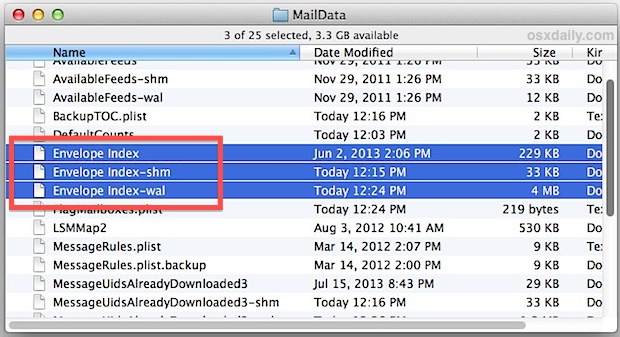
    • Delete every file that begins with “Envelope Index” (optional but recommended: back up these files to the desktop just in case something goes awry)
    • Close the MailData window, then relaunch Mail app to force reindexing

    User uploaded file

    Like rebuilding the mailbox, the reindexing process can also take a while, depending on how large the mailbox is and how much mail is stored on the computer. Be prepared for a lengthy re-indexation if you have tons (thousands+) of messages in Mail app. When finished, try the search or perform the task that you had issues with before and things should be working as usual again.


    I have now added one of my IMAP accounts and it seems fine, though Mail Rules do not seem to be working.

    Oct 20, 2014 2:12 AM in response to ReddyVinod

    Process: Mail [891]
    Path: /Applications/Mail.app/Contents/MacOS/Mail
    Identifier: com.apple.mail
    Version: 8.0 (1990.1)
    Build Info: Mail-1990001000000000~3
    Code Type: X86-64 (Native)
    Parent Process: ??? [1]
    Responsible: Mail [891]
    User ID: 501


    Date/Time: 2014-10-20 10:02:25.944 +0200
    OS Version: Mac OS X 10.10 (14A389)
    Report Version: 11
    Anonymous UUID: EEE8371F-5DEA-6CE7-ED9E-F26E11B0AE95


    Sleep/Wake UUID: 0FFBEA5A-AD12-4AD5-A342-FD07F8296C6C


    Time Awake Since Boot: 4700 seconds

    Time Since Wake: 1500 seconds


    Crashed Thread: 8 Dispatch queue: NSOperationQueue 0x60000023de60 :: NSOperation 0x60000024ac80 (QOS: USER_INTERACTIVE)


    Exception Type: EXC_CRASH (SIGABRT)
    Exception Codes: 0x0000000000000000, 0x0000000000000000


    Application Specific Information:

    *** Terminating app due to uncaught exception 'NSObjectInaccessibleException', reason: 'CoreData could not fulfill a fault for '0x1580008b <x-coredata://5BB142CF-4001-4155-AC9B-FB0681E69B5E/ABCDNote/p86>''

    abort() called

    terminating with uncaught exception of type _NSCoreDataException


    --------------------------

    !!!!!!!!!!!!!!!!!!!!!!!!!!!!!!!

    Did not help: reinstalling, deleting files, email, etc...

    Solution: Deleting contacts (contact data corruption caused by) :-))

    (All of them manually from within the app, and files: User > Library > Application Support > AddressBook)

    Oct 23, 2014 11:35 AM in response to sai dusho bob

    For me, Mail was consistently crashing within seconds of clicking to open it, following the update to Yosemite.


    The suggestion from sai dusho bob @ Oct 19, 2014 12:24 PM fixed the bug for me (shutting down Mail, going to ~/Library/Mail/V2/MailData/, moving/deleting the three files beginning with "Envelope Index", then reopening Mail). The first time I reopened Mail after doing it, Mail crashed again, but the second time I reopened, Mail was fine (except for asking to re-send two 2+-year old messages that it re-placed in the Outbox--probably artifacts that resurfaced from reindexing).


    Mail has been up and running a few hours now with no problems. Thanks!

    This thread has been closed by the system or the community team. You may vote for any posts you find helpful, or search the Community for additional answers.

    I upgraded from Mavericks to Yosemite this morning, and had a very pleasant experience for several hours, when Apple Mail suddenly crashed (Not responding). I tried everything including reinstalling Yosemite, but Apple Mail does NOT OPEN.

    Welcome to Apple Support Community
    A forum where Apple customers help each other with their products. Get started with your Apple Account.