How can I get MacBook Pro connected to Epson Stylus SX125?

I am trying to connect a MacBook Pro to an Epson Stylus SX125 Printer. When I send anything to the printer a message comes saying printer is not connected. I have tried to download driver but Mac Security says it is from an unrecognised source and will not let it work.


How do I get the MacBOOK Pro to accept the Epson Stylus SX125, please?

MacBook Pro (13-inch Mid 2012)

Posted on Oct 19, 2014 8:24 AM

Reply
2 replies

Oct 22, 2014 7:32 AM in response to DAUGWILL

Hi, DAUGWILL.


Thank you for visiting Apple Support Communities.


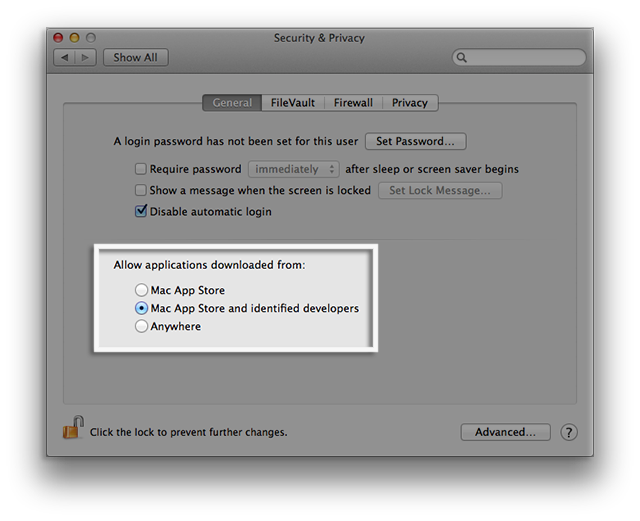
I would recommend making sure that Mac App Store and Identified Developers is selected. You can find this under Security & Privacy and System Preferences. Once this is done, test downloading your printer driver.


Gatekeeper options

Gatekeeper gives you more control over what you install. You can choose the safest option and only allow apps that come from the Mac App Store to open. There is also the option of only allowing apps that come from the Mac App Store and identified developers. Or you can choose to allow any apps to open, just like previous versions of OS X.

Gatekeeper options are found in Apple menu > System Preferences… > Security & Privacy > General tabunder the header "Allow applications downloaded from:"

User uploaded file

Note: The default setting for Gatekeeper in OS X Lion v10.7.5 is "Anywhere".

Gatekeeper options are:

  • Mac App Store – Only apps that came from the Mac App Store can open.
  • Mac App Store and identified developers (default in OS X Mountain Lion) – Only allow apps that came from the Mac App Store and developers using Gatekeeper can open.
  • Anywhere – Allow applications to run regardless of their source on the Internet (default in OS X Lion v10.7.5); Gatekeeper is effectively turned off. Note: Developer ID-signed apps that have been inappropriately altered will not open, even with this option selected.


OS X: About Gatekeeper

http://support.apple.com/kb/HT5290


Cheers,


Jason H.

This thread has been closed by the system or the community team. You may vote for any posts you find helpful, or search the Community for additional answers.

How can I get MacBook Pro connected to Epson Stylus SX125?

Welcome to Apple Support Community
A forum where Apple customers help each other with their products. Get started with your Apple Account.