21.5 inch late 2013 iMac - RAM upgrade

I'm under the impression (from the local Apple Store) that the RAM on my iMac can't be upgraded, is this true?? I'd love to upgrade my device as I'm doing audio production and need more power

iMac (21.5-inch, Late 2013)

Posted on Nov 12, 2014 10:59 PM

Reply
8 replies

Nov 14, 2014 11:04 AM in response to Greenetunes

Hello Greenetunes,


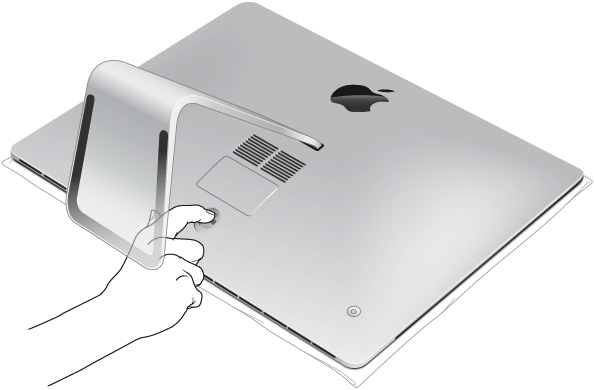
It can be done. But for your iMac, a iMac (21.5-inch, Late 2013), they are correct in stating that you cannot upgrade the memory on it. That means that either an Apple Retail Store or an Apple Authorized Service provider would have to do the upgrade because of how it needs to be installed. If you look at the image below as well as in the article, you will see that your iMac does not have a compartment door like 27.5 inch models have for easy access.


iMac: How to remove or install memory

http://support.apple.com/en-us/HT201191


Memory replacement on the iMac (21.5-inch, Late 2012) and iMac (21.5-inch, Late 2013) is not user-removable and must be done by an Apple Retail Store or Apple Authorized Service Provider.


User uploaded file


Regards,

-Norm G.

Jun 27, 2016 4:02 PM in response to davidrok85

An Apple authorized service provider should be able to upgrade the RAM for you; it involves a take-part.

The 'Late 2013 21.5-inch iMac' memory specs - are as follows from http://mactracker.ca database app


Better to get both replaced, if you are paying to have a tech open the iMac for you. If they are installing

quality sourced memory RAM chips from reputable manufacturer, guaranteed, 16GB is recommended.


• Find an Apple Authorized Service Provider


Built-in Memory 8 or 16 GB PC3-12800 (1600 MHz) DDR3

Maximum Memory 16 GB

Memory Slots 2 - 204-pin PC3-12800 (1600 MHz) DDR3 SO-DIMM (Non user-accessible)


While the computer is open for upgrade, you may consider matching memory chips for best performance

and then they would not need to be upgraded later. When at an AASP you may ask about other upgrade

possibilities they could perform for you in your iMac 21.5, beyond the memory RAM chips.


Good luck & happy computing! 🙂

Jun 27, 2016 4:38 PM in response to davidrok85

You might want to reconsider as taking apart an iMac is not considered minor surgery (the screen, glass, etc need to be removed to get to the various parts), so the cost might be far more than one might expect. If you go to an AASP, I would ask if I could bring my own RAM and seriously consider buying it from either of the two most recommended RAM vendors: OWC (macsales.com) or Crucial - unless they offered to use RAM from either of those two. Macs are quite finicky about their RAM. And yes, do get matching modules.

Jun 28, 2016 8:08 AM in response to babowa

You are absolutely right babowa. Yes i was thinking about buying the chips from crucial. I live in Ecuador so we don't have apple stores, just apple retailers who also offer authorized tech support. i'm pretty sure i can take my own ram chips and have them installed by them. Any way, I'll think about it. Right now I'm just thinking about keeping the 8gb until the day it might just not be enough.


Thank you for your help!

This thread has been closed by the system or the community team. You may vote for any posts you find helpful, or search the Community for additional answers.

21.5 inch late 2013 iMac - RAM upgrade

Welcome to Apple Support Community
A forum where Apple customers help each other with their products. Get started with your Apple Account.