Wifi issues with 10.10.1

. After this update, My wifi cannot connect to my network. Ran diags and other "fixes" shown on Apple blogs, but although my MacBookPro "Sees" my network, when I select it, it disappears, then the selector dims.

MacBook Pro, iOS 8.1

Posted on Nov 22, 2014 12:45 PM

Reply
5 replies

Nov 25, 2014 5:34 PM in response to CarlAVII

Allen - Thanks for the tips. Unfortunately, same result. My WiFi network is visible, but I cannot select it. I will first be prompted for my WPA2 Password, then the attempt fails "connection timed out" However, I just noted something when I'm prompted for my network password. Underneath the rectangle wherein you enter your PW, it says "enter exactly 64 hexadecimal characters". I don't recall seeing this before - but my formally keen observation abilities seem to also have dimmed out.....according to my wonderful wife.

Nov 26, 2014 6:13 AM in response to Olekkie

Olekkie,


The next step would be to remove all Preferred Networks and stored network passwords, as detailed below.


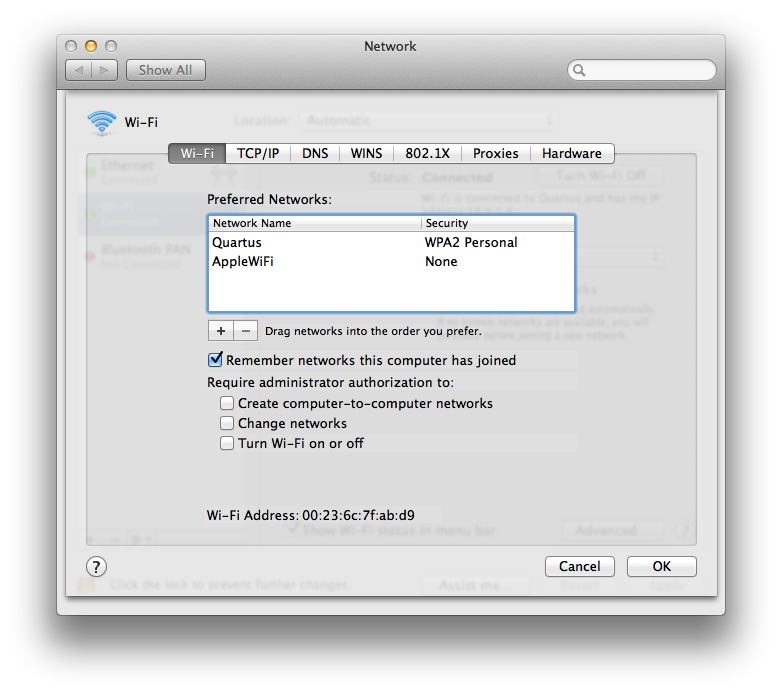
  1. Select the Wi-Fi tab and view your Preferred Networks list.
    1. Select each network and click the minus (-) sign to remove those networks from your Preferred Networks list.
    2. Click OK and close the Network preferences.

      User uploaded file

  2. Remove your stored network passwords using the Keychain Access Utility.
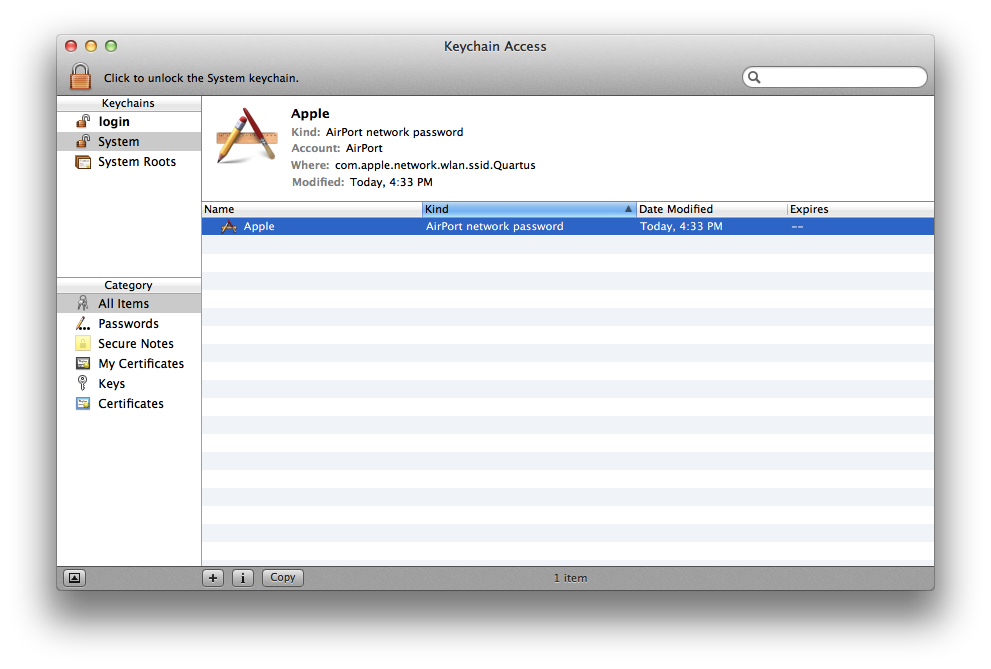
    1. Open Keychain Access from /Applications/Utilities. Your window will look like this:

      User uploaded file

    2. Remove your AirPort network passwords from the login keychain: Select the "login" keychain from the Keychain sidebar. Click the "Kind" column to order the list of keychain items by their type. Remove all entries of the kind: "AirPort network password".
    3. Remove your AirPort network passwords from the System keychain: Select the "System" keychain from the Keychain sidebar. Click the "Kind" column to order the list of keychain items by their type. Remove all entries of the kind: "AirPort network password".

      Note: The above steps will remove your Wi-Fi network passwords. If you do not know them, or if your network does not use passwords to restrict access, you should contact your network administrator.

  3. Restart your computer.
  4. Join your Wi-Fi network. You will need to enter your password for your network again if it requires one.

Wi-Fi: How to troubleshoot Wi-Fi connectivity
http://support.apple.com/en-us/HT202222


Cheers,

Allen

Nov 26, 2014 3:45 PM in response to CarlAVII

Allen - Following your directions, here is what I found:


Wi-Fi tab, preferred Networks -There were no networks shown. It was blank.


Keychain Access - there were no AirPort network passwords, or any other reference to AirPort, under any heading or column. I did find 2 references to a past and current router, I deleted them, then re-booted.


When the system came up, it appeared that the same problem persisted. I went into network/assist me to establish a new connection w/my network. I went thru the routine a few times, and continuously got the same response “the password is incorrect”. I used my desktop to check on the password shown on my router, and I was entering the correct password. I had to do another home task, so just left everything as it was.


About an hour later, I came back to see if I had properly gone over your instructions, and noted the WiFi “fan” in the top of the monitor was black, indicating wi-fi connection. Started Safari. It spun on the home page (yahoo) for awhile, then brought it in! Wanting to make sure this wasn’t a “fluke” I quit Safari, and started Firefox. My Verizon home page came right up.


So Allen, it would seem you have DID IT!! I hope anyone who has said they are experiencing WiFi issues since the recent updates read this and apply your magic solution.


Thank you so much - I was seriously thinking of putting my MBPro up for sale on eBay. Oltekkie

This thread has been closed by the system or the community team. You may vote for any posts you find helpful, or search the Community for additional answers.

Wifi issues with 10.10.1

Welcome to Apple Support Community
A forum where Apple customers help each other with their products. Get started with your Apple Account.