Hi rosebud8914,
Welcome to the Support Communities! It seems you are having some issues with the responsiveness of the iPhone 4s when you touch the screen. Do you have a screen protector on the iPhone? Sometimes that extra layer between your finger and the glass can have an affect.
Have you considered updating your iOS to the latest version, which is iOS 8.1.1? A fresh install of your iPhone's operating system may also resolve the issue.
If the screen on your iPhone, iPad, or iPod touch doesn't respond to touch - Apple Support
http://support.apple.com/en-us/HT201406
Make sure your hands are clean and dry, then try these steps:
- If you have a case or screen protector on your device, try removing it.
- Clean the screen with a soft, slightly damp, lint-free cloth
- Restart your device. If you can't restart, reset your device.
If you’re using an iPad that’s plugged into a power source, your touchscreen might behave differently. Try unplugging it
If your touchscreen still doesn't respond like it should, contact Apple Support or take your device to an Apple Retail Store or Apple Authorized Service Provider.
Update the iOS software on your iPhone, iPad, and iPod touch - Apple Support
http://support.apple.com/en-us/ht4623
iOS software updates introduce new features that let you do even more with your iPhone, iPad, or iPod touch. Be sure to keep your devices up to date so that you don't miss out on the latest features.
Back up your device to iCloud or iTunes.
If you use your device's Personal Hotspot for your computer's Internet connection, update your device wirelessly or connect your computer to another network.
The easiest way to update your device is wirelessly, also called “over the air.” Here’s how:
- Plug in your device to a power source.
- Tap Settings > General > Software Update.
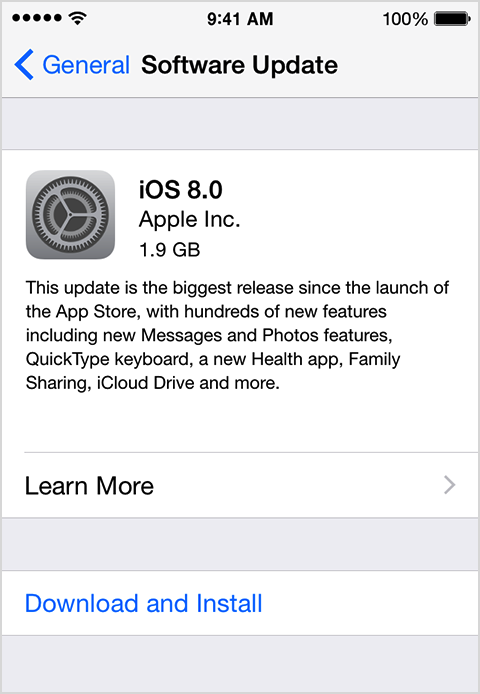
- Tap Download and Install. Updates might download automatically while your device is connected to Wi-Fi and a power source.
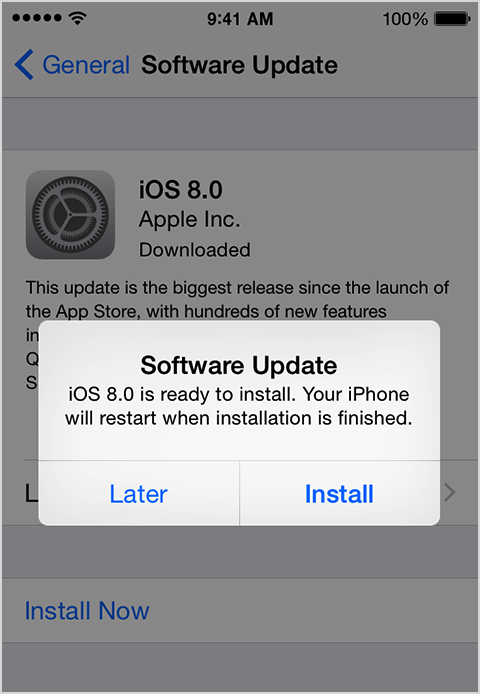
- Tap Install, or tap Later to install the update later. If you use a passcode, you'll need to enter it before installing the update.
If you have some free space, but not enough to update over the air, you can either update using iTunes or delete content manually from your device. Whether you use iTunes or update over the air, you'll have the same amount of free space on your device after you update.
I hope this information helps ....
- Judy


