The article below explains how the pre-order process works. If the item does not automatically downlowd to your iTunes Music library, and you are unable to download the purchased content, I've included a link to contact the iTunes Store Support team as well.
iTunes Store: About pre-orders - Apple Support http://support.apple.com/en-us/HT202723
You can pre-order music and movies from the iTunes Store prior to their public release date. Pre-ordered items will download when they become available.
If an item isn't yet available, you may be able to pre-order it and download it when it becomes available. Items available for pre-order will have an orange pre-order button that displays the pre-order price. Most pre-orders will show an expected release date near or below the pre-order button. When the pre-order item becomes available, your account will be billed for the pre-order, and the item will appear in the Purchased section of your account. If there is a billing issue that prevents us from billing your account when the item is released, you'll receive an email notifying you that the item is available. You need to click the link within the email, using a computer and the latest version of iTunes, to fulfill the pre-order. You may also receive one or more emails if the status of your pre-order changes.
Some pre-orders include songs that are available for download immediately. When you pre-order, you will be charged only for these songs and you will receive them immediately.
To pre-order an item
Click or tap the Pre-order button.
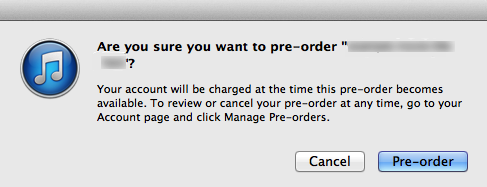
Click or tap Pre-order on the confirmation dialog.
When you've successfully completed a pre-order, a thank-you page will appear.
Download a pre-ordered item
When a pre-ordered item becomes available, you will receive an email letting you know that you can download your pre-order.
If you enabled the option to automatically download prepurchased content in iTunes, then your pre-ordered content may already be in your library. If not, click the download link provided in your email notification, and your pre-ordered content will begin to download. You can also use the Check for Available Downloads feature in iTunes on your computer (choose Store > Check for Available Downloads) to begin downloading your pre-order.
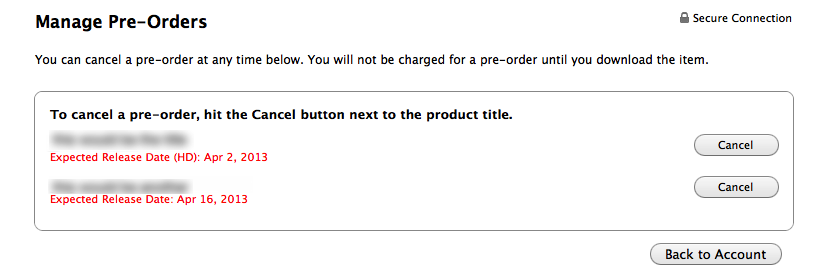
To view, cancel, or see the expected release dates for your pending pre-orders
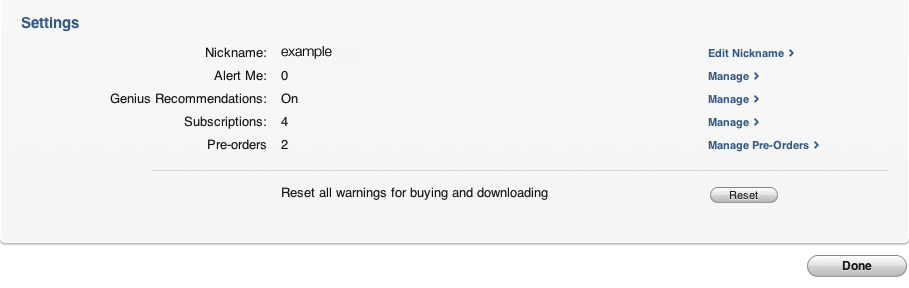
Choose Store > View My Apple ID and click Manage Pre-Orders, which is located in the Settings section at the bottom of the Account Information screen in iTunes on your computer.
From the Manage Pre-Orders screen, click the Cancel button to the right of the pre-order you want to cancel. You'll be asked to confirm your pre-order cancellation.
Note: You can't manage pre-orders on iPhone, iPod touch, or iPad.
Last Modified:
Download past purchases - Apple Support
http://support.apple.com/en-us/HT2519
This thread has been closed by the system or the community team.
You may vote for any posts you find helpful, or search the Community for additional answers.
I pre-ordered an album, but its not showing up in my purchase history but it says I have it in my acount info. Thanks in advanced.
Welcome to Apple Support Community
A forum where Apple customers help each other with their products. Get started with your Apple Account.