Where on the Cloud are my songs?

I have an IMac (Yosemite OS 10.10.1) and IPod Touch. My 7000 songs on ITunes (almost all NOT bought from ITunes)

on my IMac are also backed up on my IPod Touch, supposedly via The Cloud.

I pay yearly to have my songs backed up on the Cloud.

But I logged in today to the Cloud and didn't see any of my songs there.

The cloud shows several applications including Contacts, Calendar, Pages, Numbers, Mail, and a few more.

I didn't see any applications that could contain my songs. Where are my songs on ICloud,

if I am paying for this back-up on the Cloud?

I would like my songs backed up on the Cloud in case they accidentally get erased

from my IMac and my IPod Touch. Where on the Cloud are they?

Posted on Jan 29, 2015 6:41 PM

Reply
7 replies

Jan 31, 2015 6:53 PM in response to Henry R

You can see all of your matched songs in your iTunes Library on your computer:


Check iCloud Status

iCloud status will help you to determine whether a song was purchased from the iTunes Store, matched, uploaded, or is ineligible for upload. Items might not be eligible for upload if:

  • Your computer is not authorized for playback for that item.
  • The music video was not purchased from the iTunes Store or was purchased using a different Apple ID.

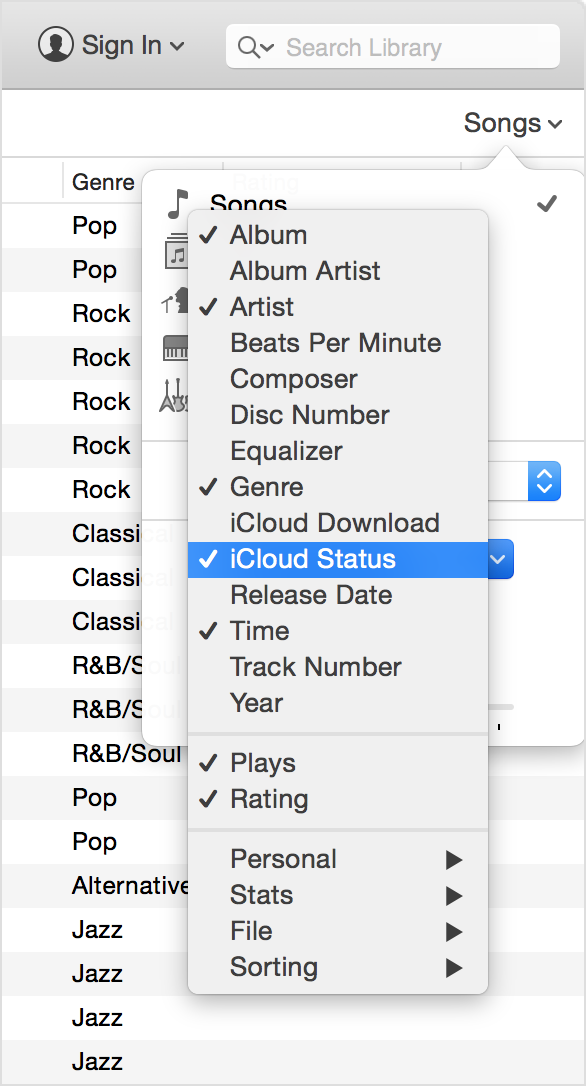
To see the iCloud status of your songs:

  1. Open iTunes. Make sure that you're in the My Music window. If you're not, click on the Music icon in the upper-left corner, then click on My Music in the top-middle of the screen.
  2. In the pop-up menu in the upper-right corner of the screen, select Songs.
  3. In the same menu, click Show Columns.
  4. Make sure that there is a check next to iCloud Status. If there's not, click on iCloud Status.
    A status button will then be visible next to songs.
    User uploaded file

If a song contains DRM and is no longer available on the iTunes Store for purchase, the song is uploaded to iCloud and made available for download in protected DRM format. You will be required to authorize your computer or device for playback.

A song will not be uploaded to iCloud if the song contains DRM, was purchased using a different Apple ID, and could not be matched.

When you subscribe to or enable iTunes Match, your iOS device or computer will be associated to the Apple ID being used for iTunes Match. Learn more about Manage your associated devices in iTunes - Apple Support.

Cheers,


GB

Feb 1, 2015 8:31 AM in response to Henry R

iTunes Match will store your uploaded songs in iCloud, and matched songs can be downloaded from the App Store. But this part of iCloud is separate from other uses of iCloud. You do not see see your songs on iCloud Drive or on the web interface. You only access it using iTunes or the Music.app, as gail from main said.

I have an IMac (Yosemite OS 10.10.1) and IPod Touch. My 7000 songs on ITunes (almost all NOT bought from ITunes)

on my IMac are also backed up on my IPod Touch, supposedly via The Cloud.

I pay yearly to have my songs backed up on the Cloud.

With iTunes Match you are paying for synchronized cloud storage across your devices, but not for a backup. iTunes Match is not meant as a backup of your iTunes Library. It is a central storage for your music in iCloud, that is synced with all devices.

(see: http://www.apple.com/itunes/itunes-match/)

If you change a song or delete a song, these changes will propagate to all your devices. Don't rely on iTunes Match as your only backup. You cannot restore the previous version or deleted items from iTunes Match. That is, why you always need a backup of your iTunes library on your Mac, for example on an external drive, like described at this link: Back up your iTunes library by copying it to an external drive - Apple Support

Feb 2, 2015 11:50 AM in response to gail from maine

Gail:


Re what you wrote:

"To see the iCloud status of your songs:

  1. Open iTunes. Make sure that you're in the My Music window. If you're not, click on the Music icon in the upper-left corner, then click on My Music in the top-middle of the screen.
  2. In the pop-up menu in the upper-right corner of the screen, select Songs.
  3. In the same menu, click Show Columns.
  4. Make sure that there is a check next to iCloud Status. If there's not, click on iCloud Status.
    A status button will then be visible next to songs"


After I click on the Music Icon on the upper left of the screen in ITunes, and then click on "My Music"

(You can also click on "Playlists" to get "Songs").

The only place it says "songs" is on the extreme upper right, well to the right of the list

of songs, artist, album and genre. I click on songs. Underneath it shows "show columns".

Underneath that there is no place where it lists "Cloud Status".

The menu under "Show Columns" lists a lot of choices such as Album Artist, Beats per minute, composer, disc number,

genre, and about 10 other choices.

But there is nothing that says "Cloud Status" or anything at all about Cloud.

Am I looking in the wrong place?

Feb 2, 2015 7:41 PM in response to Henry R

That was a direct cut and paste from the Apple Support page.


Try this instead:


While in Music>My Music, click on the View option on the top menu, then click on "Show Music in the Cloud". This will show all music in the cloud that it not currently downloaded to your computer. What I wasn't sure of (I do not have Match), was whether checking this option would show you both purchased, as well as your personal music that is stored in the cloud.


So, the reason I did the direct cut and paste was in case the "view" was different when navigating to it that way. This is what I see when I look at that dropdown, following the instructions in the cut and paste:


User uploaded file


I would think that once you display your music that is strictly in the cloud, you should see all your music listed, with the ones that are in the cloud only being shown with the little cloud next to them.


Cheers,


GB

This thread has been closed by the system or the community team. You may vote for any posts you find helpful, or search the Community for additional answers.

Where on the Cloud are my songs?

Welcome to Apple Support Community
A forum where Apple customers help each other with their products. Get started with your Apple Account.