Updated to iTunes 12.1, now iTunes crashes every time it attempts to access the internet through our internal proxy - cannot access store!

Hi,


Does anybody have any experience of using iTunes with a web filtering proxy? My home is using the Sophos UTM home edition to provide edge antivirus and content filtering. More information available here: http://www.sophos.com/en-us/products/free-tools/sophos-utm-home-edition.aspx

The proxy settings for the computer is set to use an automatic configuration script "WPAD" and the settings are locked by group policy and cannot be disabled or changed.


Now here's the problem, when launching iTunes, the iTunes prompts me to enter login details for the HTTPS proxy. That's all well and good, so I enter the login details and hit okay. But when I go to the store tab, iTunes crashes with javascriptcore.dll. This makes sense because a WPAD proxy configuration file is pretty much JavaScript code. But this should not happen, as now I cannot access the iTunes store.

Prior to iTunes 12.1, iTunes would sometimes freeze when attempting to access the store but it would eventually work.

The proxy logs are not showing that any iTunes requests were blocked, dropped or otherwise rejected.


Does anybody have any suggestions to get this to work again or at least work around the issue?

NOTE: Disabling the proxy is not an option because the proxy settings on the Windows computers are locked through group policy. I can however, edit the WPAD proxy configuration file and add exceptions to the proxy but I don't know where to start!

I will also post this on the Sophos UTM support forums.

Thanks in advance.

iTunes-OTHER, Windows 7, iTunes version 12.1

Posted on Feb 2, 2015 6:15 AM

Reply
115 replies

Apr 8, 2015 7:48 AM in response to Someone7272

Heh Someone7272,

just wanted to come back out here and mention, for Apple's sake, what I did to get my iTunes working correctly again. This is DEFINITELY a workaround, and not every person will be able to pull off. You don't have to be a network administrator, but you do need to be a local administrator.


Basically, my organization uses a proxy script (automatic configuration script) with an extension of .PAC. When I downloaded and opened the file, low and behold it's just a plan text javascript file, containing a single function called


function FindProxyForURL(url, host) {...


The function returns a string that either says "DIRECT", or else it says "PROXY ##.###.####.##:####; PROXY ##.###.####.##:###; DIRECT" (assuming to mean, try this proxy server first, then this one, and else go direct).


Since I'm a web developer and have IIS running on my local box, I just created a website to answer to the same port as the proxy script was being hosted on, and then added an entry in my HOSTS file to match the server url of where our proxy script was hosted. Effectively this lets me locally bypass the use of the proxy (using this modified script):


function FindProxyForURL(url, host)

{

return "DIRECT";

}


All problems with iTunes went away after I did that. I have full internet access with "DIRECT", so not exactly sure what functionality the proxy is adding to our corporate environment. Our McAfee Web Gateway continues to block unauthorized URLs, so I can only guess the proxy may be getting used possibly to cache content for performance or bandwidth optimization??

Apr 10, 2015 3:10 PM in response to Morac

Not that this is going to be a suprise to anybody, as Apple are as useless as ever, but iTunes 12.1.2.27 DOES NOT FIX THIS PROBLEM!!!

Fr0gPr1nce wrote...

function FindProxyForURL(url, host)

{

return "DIRECT";

}


We have tried this previously. Even though this would mean iTunes would be blocked from accessing the internet because this would bypass the proxy, and web requests sent directly through the gateway are blocked, but iTunes still crashed the same way.


funchrist wrote...

same here

i got itunes 64 bits on 3 different computers.

as soon as I scroll too fast, crash.

I am very sorry but Apple are very good at technology, but rubbish at software

You're not having the same problem, please create your own thread. The issue regarded in this topic is not caused by scrolling too fast.

purdyjgirl wrote...

Thank you for posting this. Reset Cache also seems to have fixed the crashing problem for me,

and was a lot simpler than all of the other suggestions.

Reset Cache does not resolve this problem, if it did for you, then you were not having the same problem.


Apple sure know how to make me run a mile, I certainly won't be buying another piece of Apple hardware in my life, and I am starting to advise everybody I know against them now.

I'm just so ****** off that a flaw of this magnitude has been allowed to exist on software that a massive company like Apple have released. I'd be embarassed, if I released software like this.

Anyway guys, I am working on a much better workaround, based on the fact that a WPAD/PAC file is the root cause, I'm currently experimenting with using Group Policy registry keys to set the proxy settings and bypass list, eliminating the need for a WPAD file. It is much more limited in what you can do, especially if you have multiple proxies, but at least iTunes will 'work' for now. Obviously, again, you need to be a network administrator for this to be possible.

Apr 27, 2015 8:16 AM in response to Someone7272

Hey Someone and Morac,


I was having the exact same issue - it is absolutely the wpad causing the issues. My org uses a wpad to set the proxy server. I was able to hardcode the proxy in my Internet Options, which bypasses the wpad. Of course, this comes back to being local admin, which many aren't.


So even though it wasn't resolved from an iTunes, you did help me find a workaround.


I did submit my own independent bug report - maybe if enough distinct users submit them, they'll consider fixing whatever's broken with how the wpad is handled..

Apr 29, 2015 5:30 PM in response to csurguine

Hi csurguine,


You wrote...

I was having the exact same issue - it is absolutely the wpad causing the issues.

My org uses a wpad to set the proxy server. I was able to hardcode the proxy in my

Internet Options, which bypasses the wpad. Of course, this comes back to being

local admin, which many aren't.


So even though it wasn't resolved from an iTunes, you did help me find a workaround.


I did submit my own independent bug report - maybe if enough distinct users submit them,

they'll consider fixing whatever's broken with how the wpad is handled..

I was considering attempting this, but using registry to set the proxy in Internet Options explicitly, this does not allow you to use different proxies depending on the destination. Additionally, it does not allow you to bypass the proxy for certain destinations as can be done in a WPAD file.


Here is the latest update from Apple Developer Relations:

User uploaded file

Sorry I haven't been responding for a while, our web proxy encountered a massive issue with HTTPS filtering which I have only just been able to workaround.

This is in no way connected to the bug in iTunes.

May 8, 2015 1:25 AM in response to darbidDE

Thanks everybody for all the support so far. I wasn't expecting this topic to take off like it has.


I'm going to run software updates for all my software later today including iTunes, but I'm disappointed to hear that the problem has not completely been resolved.


darbidDE wrote...

I just updated to 12.1.2.27. Now without notice iTunes just closes.

Before I got an error window (I think an unhandled exception error).


So maybe things are happening on "the error they cannot reproduce"

as they are now catching the error. :-)

This tells me that they are indeed catching the exception generated, rather than letting Windows stop the program, but it's not a satisfactory solution.

If you work in programming, or are a programming student, you'll understand the text below.


What you're describing sounds like the exception is being caught but not dealt with (hence the term 'unhandled') which still results in iTunes being forced closed. If an exception occurs which means that the program cannot continue, then you are supposed to display a (helpful!!) message to the user, and allow the program to end gracefully.

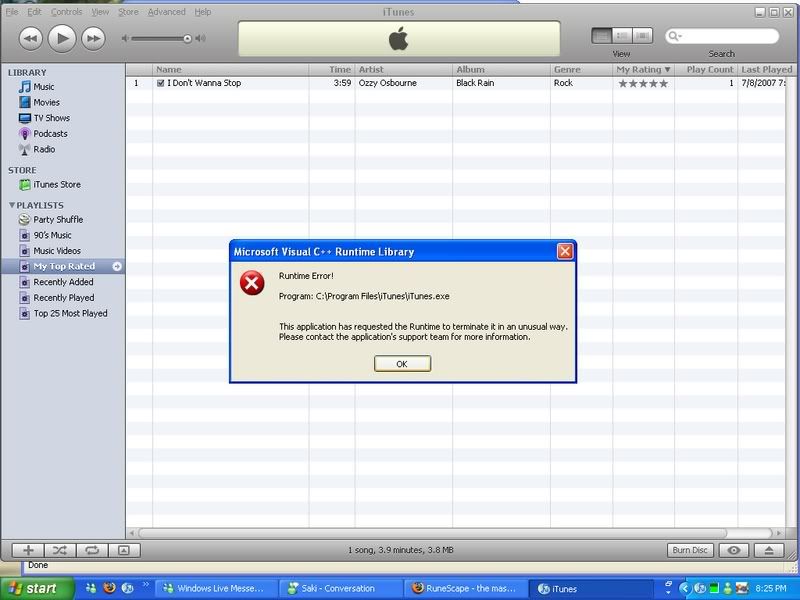
This just sounds like iTunes is being forced-terminated with a generic unhandled exception message. Very helpful(!). It's equivalent to a Visual C++ Runtime error, which I'm sure a lot of you have seen. The Visual C++ Runtime would terminate the program forcefully.


EDIT: Oh. I wonder if iTunes still is written in Visual C++

(Not my screenshot, RuneScape is awful, and who still uses Windows XP on a non-virtual machine! Probably an old screenshot.)


Apple now have access to mine and others' WPAD files, so I'm glad that they're making progress but still disappointed, because this problem should not have existed in the first place! Prior to iTunes 12, everything was fine! Don't try and fix something that isn't broken Apple!

May 8, 2015 10:49 AM in response to darbidDE

I hate to be a "me too" guy, but I've been having this problem as well. My company uses a .pac file (set in the internet options) to access internal resources through a proxy. All non-internal resources are DIRECT. The only way I can get iTunes to access the internet (store, updates, etc.) is if I disable the PAC file in internet settings, otherwise near instant crash (loading up Visual Studio debugger shows the crash in JavaScriptCore.dll.


iTunes Version: 12.1.2.27

My System (note likely relevant, but..): Win8.1 x64, Lenovo W530, Corei7 3840QM, 32GB RAM, 1T SSD, nVidia K200M + intel HD 4000


-- pryankster

May 9, 2015 1:56 AM in response to Someone7272

Hi all,


I'm chiming in as well because I have the exact same issue as described by OP.


using a wpad/proxy.pac file entirely breaks itunes ability to access the store. it will crash javascriptcore.dll and terminate the program, every **** time.

Great that I've just spent month rolling out direct access to our organisation and to protect the always connected machines we use cloud proxy via a proxy.pac cloud hosted file.


Itunes is now totally unusable on any machine. this really is terribly broken.

I would post more details but the OP has covered literally every aspect of the issue Im facing in detail, so I'm just here to add pages to this thread really (and follow it in the vain hope something gets done about this glaring problem).

This thread has been closed by the system or the community team. You may vote for any posts you find helpful, or search the Community for additional answers.

Updated to iTunes 12.1, now iTunes crashes every time it attempts to access the internet through our internal proxy - cannot access store!

Welcome to Apple Support Community
A forum where Apple customers help each other with their products. Get started with your Apple Account.