Linking data with a calendar using index match

hi, I'm making a timesheet/journal and im trying to link the journal data with a calendar.

the journal entries contain amongst other things a DATE and JOB ID. im trying to link the JOB ID

with the corresponding date on the calendar. I have sort of got it working using the index and match functions

but comes unstuck when when the journal entry skips a date entry, as you can see on the image attached

3 March returns an error because there is no matching date on the journal table.

as the journal entries can contain multiple jobs and instances of the same job on any single given date

is there a way to add each unique job id for the matching date added to the calendar? At the moment my

formula just return the first entry

User uploaded file

User uploaded file

iPad Mini

Posted on Mar 14, 2015 5:13 PM

Reply
8 replies

Mar 15, 2015 3:46 AM in response to Jerrold Green1

as the fire was my aversion to having a big red exclamation mark staring at me whilst reviewing what days and jobs I've worked on for the month,

then i I feel the fire has been extinguished well enough for my needs. If you have any suggestions to fix up the formula id love to hear them but would preferably like some input regarding a way of displaying multiple jobs per day

Mar 15, 2015 9:15 AM in response to Shtankeye

Hello


If I understand it correctly, you may try something like the following tables. It introduces index column Journal::K.


User uploaded file


Journal (excerpt) A1 Job ID A2 A A3 A A4 A A5 B J1 Date J2 2015-03-01 J3 2015-03-02 J4 2015-03-02 J5 2015-03-02 K1 index K2 =IF(COUNTIFS(A$1:A2,A2,J$1:J2,J2)=1,J2&"|"&(COUNTIF(K$1:K1,J2&"|*")+1),"") K3 =IF(COUNTIFS(A$1:A3,A3,J$1:J3,J3)=1,J3&"|"&(COUNTIF(K$1:K2,J3&"|*")+1),"") K4 =IF(COUNTIFS(A$1:A4,A4,J$1:J4,J4)=1,J4&"|"&(COUNTIF(K$1:K3,J4&"|*")+1),"") K5 =IF(COUNTIFS(A$1:A5,A5,J$1:J5,J5)=1,J5&"|"&(COUNTIF(K$1:K4,J5&"|*")+1),"")


User uploaded file


March (excerpt) A1 Sun A2 2015-03-01 A3 =IFERROR(INDEX(Journal::$A,MATCH(OFFSET($A$1,INT((ROW()-2)/4)*4+1,COLUMN()-1)&"|"&MOD(ROW()-2,4),Journal::$K,0),1),"") A4 =IFERROR(INDEX(Journal::$A,MATCH(OFFSET($A$1,INT((ROW()-2)/4)*4+1,COLUMN()-1)&"|"&MOD(ROW()-2,4),Journal::$K,0),1),"") A5 =IFERROR(INDEX(Journal::$A,MATCH(OFFSET($A$1,INT((ROW()-2)/4)*4+1,COLUMN()-1)&"|"&MOD(ROW()-2,4),Journal::$K,0),1),"") B1 Mon B2 2015-03-02 B3 =IFERROR(INDEX(Journal::$A,MATCH(OFFSET($A$1,INT((ROW()-2)/4)*4+1,COLUMN()-1)&"|"&MOD(ROW()-2,4),Journal::$K,0),1),"") B4 =IFERROR(INDEX(Journal::$A,MATCH(OFFSET($A$1,INT((ROW()-2)/4)*4+1,COLUMN()-1)&"|"&MOD(ROW()-2,4),Journal::$K,0),1),"") B5 =IFERROR(INDEX(Journal::$A,MATCH(OFFSET($A$1,INT((ROW()-2)/4)*4+1,COLUMN()-1)&"|"&MOD(ROW()-2,4),Journal::$K,0),1),"") C1 Tue C2 2015-03-03 C3 =IFERROR(INDEX(Journal::$A,MATCH(OFFSET($A$1,INT((ROW()-2)/4)*4+1,COLUMN()-1)&"|"&MOD(ROW()-2,4),Journal::$K,0),1),"") C4 =IFERROR(INDEX(Journal::$A,MATCH(OFFSET($A$1,INT((ROW()-2)/4)*4+1,COLUMN()-1)&"|"&MOD(ROW()-2,4),Journal::$K,0),1),"") C5 =IFERROR(INDEX(Journal::$A,MATCH(OFFSET($A$1,INT((ROW()-2)/4)*4+1,COLUMN()-1)&"|"&MOD(ROW()-2,4),Journal::$K,0),1),"") D1 Wed D2 2015-03-04 D3 =IFERROR(INDEX(Journal::$A,MATCH(OFFSET($A$1,INT((ROW()-2)/4)*4+1,COLUMN()-1)&"|"&MOD(ROW()-2,4),Journal::$K,0),1),"") D4 =IFERROR(INDEX(Journal::$A,MATCH(OFFSET($A$1,INT((ROW()-2)/4)*4+1,COLUMN()-1)&"|"&MOD(ROW()-2,4),Journal::$K,0),1),"") D5 =IFERROR(INDEX(Journal::$A,MATCH(OFFSET($A$1,INT((ROW()-2)/4)*4+1,COLUMN()-1)&"|"&MOD(ROW()-2,4),Journal::$K,0),1),"") E1 Thu E2 2015-03-05 E3 =IFERROR(INDEX(Journal::$A,MATCH(OFFSET($A$1,INT((ROW()-2)/4)*4+1,COLUMN()-1)&"|"&MOD(ROW()-2,4),Journal::$K,0),1),"") E4 =IFERROR(INDEX(Journal::$A,MATCH(OFFSET($A$1,INT((ROW()-2)/4)*4+1,COLUMN()-1)&"|"&MOD(ROW()-2,4),Journal::$K,0),1),"") E5 =IFERROR(INDEX(Journal::$A,MATCH(OFFSET($A$1,INT((ROW()-2)/4)*4+1,COLUMN()-1)&"|"&MOD(ROW()-2,4),Journal::$K,0),1),"") F1 Fri F2 2015-03-06 F3 =IFERROR(INDEX(Journal::$A,MATCH(OFFSET($A$1,INT((ROW()-2)/4)*4+1,COLUMN()-1)&"|"&MOD(ROW()-2,4),Journal::$K,0),1),"") F4 =IFERROR(INDEX(Journal::$A,MATCH(OFFSET($A$1,INT((ROW()-2)/4)*4+1,COLUMN()-1)&"|"&MOD(ROW()-2,4),Journal::$K,0),1),"") F5 =IFERROR(INDEX(Journal::$A,MATCH(OFFSET($A$1,INT((ROW()-2)/4)*4+1,COLUMN()-1)&"|"&MOD(ROW()-2,4),Journal::$K,0),1),"") G1 Sat G2 2015-03-07 G3 =IFERROR(INDEX(Journal::$A,MATCH(OFFSET($A$1,INT((ROW()-2)/4)*4+1,COLUMN()-1)&"|"&MOD(ROW()-2,4),Journal::$K,0),1),"") G4 =IFERROR(INDEX(Journal::$A,MATCH(OFFSET($A$1,INT((ROW()-2)/4)*4+1,COLUMN()-1)&"|"&MOD(ROW()-2,4),Journal::$K,0),1),"") G5 =IFERROR(INDEX(Journal::$A,MATCH(OFFSET($A$1,INT((ROW()-2)/4)*4+1,COLUMN()-1)&"|"&MOD(ROW()-2,4),Journal::$K,0),1),"")


Notes.


Formula in Journal::K2 can be filled down.


Formula in March::A3 can be filled (copied and pasted) across ranges A3:G5, A7:G9, A11:G13, A15:G17 and A19:G21. They are all the same.


Indices in Journal::K consist of date & | & ordinal of distinct job ID on the date.


Tables are built in Numbers v2.


Good luck,

H

Mar 15, 2015 4:24 PM in response to Shtankeye

S,


Sorry that I upset you. It's very rare to need to use the IFERROR function to eliminate the warning triangles. In some cases, where no further calculations rely upon the result, it can be expeditious and safe, but I still like to avoid it because this can mask an error that I'm not expecting. In most cases, you can test the input cells and take action based on their conditions by wrapping your primary expression in a normal IF function rather than an IFERROR function.


Jerry

Mar 16, 2015 5:41 PM in response to Hiroto

Hi thanks for your help, I havent been able to get the formula for the calendar table to work, I keep ending up with too many of these ))) when I'm done entering the formula. I am however just beginning to learn my way around the whole spreadsheet concept and have been trying to copy your formula without any real knowledge of its internal workings. your formula has given me a bit of homework to better understand the purpose of different functions and how to include multiple functions in an argument. ill keep at it and let you know how I go

thanks again

Mar 17, 2015 1:27 PM in response to Shtankeye

Hello


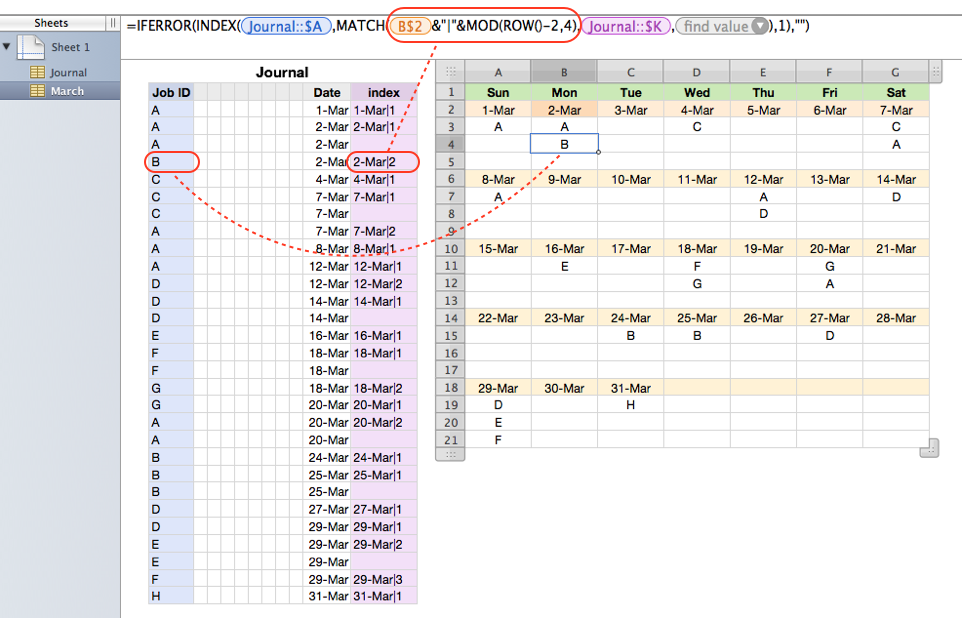
Perhaps the following formulae would be easier to understand although written this way we have to manually change the corresponding date cell addresses such as A$2, A$6 individually and can only fill down formulae in row 3 across rows 3:5, formuale in row 7 across rows 7:9 and so on.


User uploaded file


March (excerpt) A1 Sun A2 2015-03-01 A3 =IFERROR(INDEX(Journal::$A,MATCH(A$2&"|"&MOD(ROW()-2,4),Journal::$K,0),1),"") A4 =IFERROR(INDEX(Journal::$A,MATCH(A$2&"|"&MOD(ROW()-2,4),Journal::$K,0),1),"") A5 =IFERROR(INDEX(Journal::$A,MATCH(A$2&"|"&MOD(ROW()-2,4),Journal::$K,0),1),"") A6 2015-03-08 A7 =IFERROR(INDEX(Journal::$A,MATCH(A$6&"|"&MOD(ROW()-2,4),Journal::$K,0),1),"") A8 =IFERROR(INDEX(Journal::$A,MATCH(A$6&"|"&MOD(ROW()-2,4),Journal::$K,0),1),"") A9 =IFERROR(INDEX(Journal::$A,MATCH(A$6&"|"&MOD(ROW()-2,4),Journal::$K,0),1),"") B1 Mon B2 2015-03-02 B3 =IFERROR(INDEX(Journal::$A,MATCH(B$2&"|"&MOD(ROW()-2,4),Journal::$K,0),1),"") B4 =IFERROR(INDEX(Journal::$A,MATCH(B$2&"|"&MOD(ROW()-2,4),Journal::$K,0),1),"") B5 =IFERROR(INDEX(Journal::$A,MATCH(B$2&"|"&MOD(ROW()-2,4),Journal::$K,0),1),"") B6 2015-03-09 B7 =IFERROR(INDEX(Journal::$A,MATCH(B$6&"|"&MOD(ROW()-2,4),Journal::$K,0),1),"") B8 =IFERROR(INDEX(Journal::$A,MATCH(B$6&"|"&MOD(ROW()-2,4),Journal::$K,0),1),"") B9 =IFERROR(INDEX(Journal::$A,MATCH(B$6&"|"&MOD(ROW()-2,4),Journal::$K,0),1),"") C1 Tue C2 2015-03-03 C3 =IFERROR(INDEX(Journal::$A,MATCH(C$2&"|"&MOD(ROW()-2,4),Journal::$K,0),1),"") C4 =IFERROR(INDEX(Journal::$A,MATCH(C$2&"|"&MOD(ROW()-2,4),Journal::$K,0),1),"") C5 =IFERROR(INDEX(Journal::$A,MATCH(C$2&"|"&MOD(ROW()-2,4),Journal::$K,0),1),"") C6 2015-03-10 C7 =IFERROR(INDEX(Journal::$A,MATCH(C$6&"|"&MOD(ROW()-2,4),Journal::$K,0),1),"") C8 =IFERROR(INDEX(Journal::$A,MATCH(C$6&"|"&MOD(ROW()-2,4),Journal::$K,0),1),"") C9 =IFERROR(INDEX(Journal::$A,MATCH(C$6&"|"&MOD(ROW()-2,4),Journal::$K,0),1),"") D1 Wed D2 2015-03-04 D3 =IFERROR(INDEX(Journal::$A,MATCH(D$2&"|"&MOD(ROW()-2,4),Journal::$K,0),1),"") D4 =IFERROR(INDEX(Journal::$A,MATCH(D$2&"|"&MOD(ROW()-2,4),Journal::$K,0),1),"") D5 =IFERROR(INDEX(Journal::$A,MATCH(D$2&"|"&MOD(ROW()-2,4),Journal::$K,0),1),"") D6 2015-03-11 D7 =IFERROR(INDEX(Journal::$A,MATCH(D$6&"|"&MOD(ROW()-2,4),Journal::$K,0),1),"") D8 =IFERROR(INDEX(Journal::$A,MATCH(D$6&"|"&MOD(ROW()-2,4),Journal::$K,0),1),"") D9 =IFERROR(INDEX(Journal::$A,MATCH(D$6&"|"&MOD(ROW()-2,4),Journal::$K,0),1),"") E1 Thu E2 2015-03-05 E3 =IFERROR(INDEX(Journal::$A,MATCH(E$2&"|"&MOD(ROW()-2,4),Journal::$K,0),1),"") E4 =IFERROR(INDEX(Journal::$A,MATCH(E$2&"|"&MOD(ROW()-2,4),Journal::$K,0),1),"") E5 =IFERROR(INDEX(Journal::$A,MATCH(E$2&"|"&MOD(ROW()-2,4),Journal::$K,0),1),"") E6 2015-03-12 E7 =IFERROR(INDEX(Journal::$A,MATCH(E$6&"|"&MOD(ROW()-2,4),Journal::$K,0),1),"") E8 =IFERROR(INDEX(Journal::$A,MATCH(E$6&"|"&MOD(ROW()-2,4),Journal::$K,0),1),"") E9 =IFERROR(INDEX(Journal::$A,MATCH(E$6&"|"&MOD(ROW()-2,4),Journal::$K,0),1),"") F1 Fri F2 2015-03-06 F3 =IFERROR(INDEX(Journal::$A,MATCH(F$2&"|"&MOD(ROW()-2,4),Journal::$K,0),1),"") F4 =IFERROR(INDEX(Journal::$A,MATCH(F$2&"|"&MOD(ROW()-2,4),Journal::$K,0),1),"") F5 =IFERROR(INDEX(Journal::$A,MATCH(F$2&"|"&MOD(ROW()-2,4),Journal::$K,0),1),"") F6 2015-03-13 F7 =IFERROR(INDEX(Journal::$A,MATCH(F$6&"|"&MOD(ROW()-2,4),Journal::$K,0),1),"") F8 =IFERROR(INDEX(Journal::$A,MATCH(F$6&"|"&MOD(ROW()-2,4),Journal::$K,0),1),"") F9 =IFERROR(INDEX(Journal::$A,MATCH(F$6&"|"&MOD(ROW()-2,4),Journal::$K,0),1),"") G1 Sat G2 2015-03-07 G3 =IFERROR(INDEX(Journal::$A,MATCH(G$2&"|"&MOD(ROW()-2,4),Journal::$K,0),1),"") G4 =IFERROR(INDEX(Journal::$A,MATCH(G$2&"|"&MOD(ROW()-2,4),Journal::$K,0),1),"") G5 =IFERROR(INDEX(Journal::$A,MATCH(G$2&"|"&MOD(ROW()-2,4),Journal::$K,0),1),"") G6 2015-03-14 G7 =IFERROR(INDEX(Journal::$A,MATCH(G$6&"|"&MOD(ROW()-2,4),Journal::$K,0),1),"") G8 =IFERROR(INDEX(Journal::$A,MATCH(G$6&"|"&MOD(ROW()-2,4),Journal::$K,0),1),"") G9 =IFERROR(INDEX(Journal::$A,MATCH(G$6&"|"&MOD(ROW()-2,4),Journal::$K,0),1),"")


The following part of the original formulae:


OFFSET($A$1,INT((ROW()-2)/4)*4+1,COLUMN()-1)


is calculating the date cell address for corresponding entry cell addresses such as A2 for {A3, A4, A5}, A6 for {A7, A8, A9}, D10 for {D11, D12, D13} etc.


And the following part of the original and new formulae:


MOD(ROW()-2,4)


is calculating entry index for each date such as 1 for {A3, A7, A11, A15, A19}, 2 for {A4, A8, A12, A16, A20}, 3 for {A5, A9, A13, A17, A21} etc.


Hope this may help,

H

This thread has been closed by the system or the community team. You may vote for any posts you find helpful, or search the Community for additional answers.

Linking data with a calendar using index match

Welcome to Apple Support Community
A forum where Apple customers help each other with their products. Get started with your Apple Account.
