Of course, you could get up to some mischief and make yourself an Automator (Launchpad : Other : Automator) Service item that looks like the following. You select an initial single file, and then as many target directories as you want. You right-click on the file to show the contextual menu, and at the bottom, you select Services. Then on the following menu, you select the name of this service (e.g. COPY file • Multiple Folders).
The script will duplicate the file choice in each of the selected directories. A dialog will be presented on completion with the filename and a list of folders.
Once you have chosen a new Automator Service, you want to drag & drop the Utility Library : Run AppleScript action into the larger right window. It will look like the following when done. Use a meaningful Service name when you save it. I have tested it with a single file and three folders, but you can have more folders without changing the code.
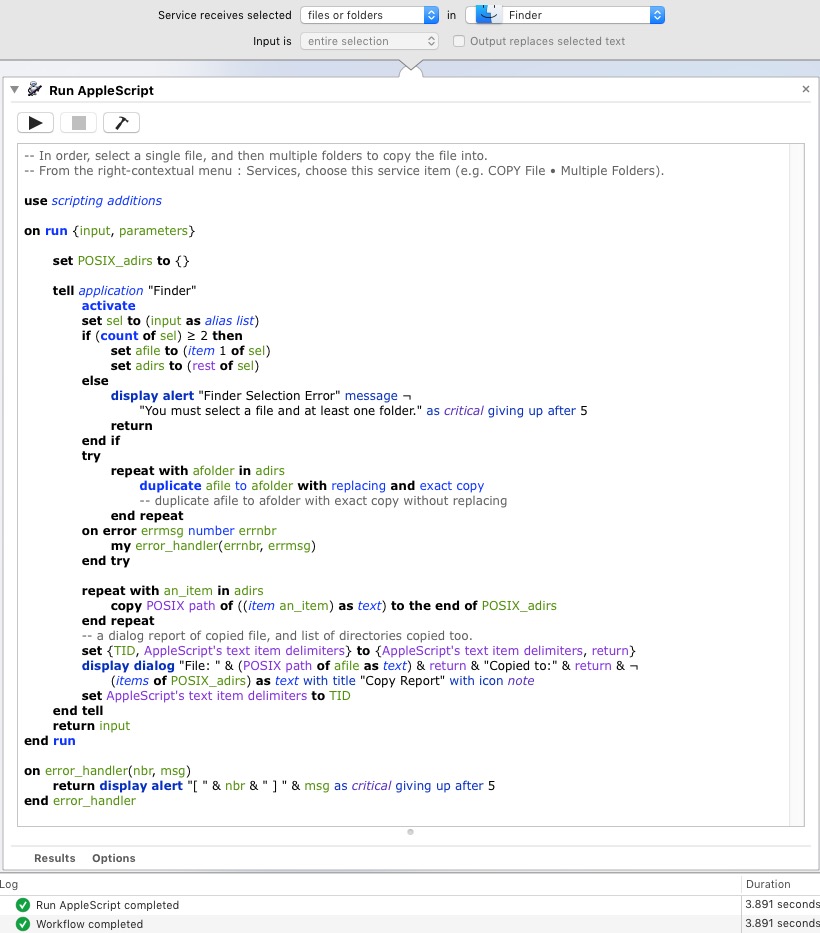
Replace the (* Your script goes here *) text with the following AppleScript code, and adjust the rest of the service as I have shown it above.
set POSIX_adirs to {}
tell application "Finder"
activate
set sel to (input as alias list)
if (count of sel) ≥ 2 then
set afile to (item 1 of sel)
set adirs to (rest of sel)
else
display alert "Finder Selection Error" message ¬
"You must select a file and at least one folder." as critical giving up after 5
return
end if
try
repeat with afolder in adirs
duplicate afile to afolder with replacing and exact copy
-- duplicate afile to afolder with exact copy without replacing
end repeat
on error errmsg number errnbr
my error_handler(errnbr, errmsg)
end try
repeat with an_item in adirs
copy POSIX path of ((item an_item) as text) to the end of POSIX_adirs
end repeat
-- a dialog report of copied file, and list of directories copied too.
set {TID, AppleScript's text item delimiters} to {AppleScript's text item delimiters, return}
display dialog "File: " & (POSIX path of afile as text) & return & "Copied to:" & return & ¬
(items of POSIX_adirs) as text with title "Copy Report" with icon note
set AppleScript's text item delimiters to TID
end tell
-- more code that goes after the end run statement in the Service.
on error_handler(nbr, msg)
return display alert "[ " & nbr & " ] " & msg as critical giving up after 5
end error_handler





