Apple watch ODS upgrade I can not install the upgrade - - Error message I am not connected to the internet; when in fact I am. And I followed all other requirements.

Apple watch OS upgrade I can not install the upgrade - - Error message I am not connected to the internet; when in fact I am. And I followed all other requirements.

Watch Standard 42mm

Posted on May 24, 2015 11:46 AM

Reply
1 reply

May 26, 2015 11:13 AM in response to gmczar

Hey gmczar,


Thanks for the question. If I understand correctly, you are having trouble updating the OS on the Apple Watch. It says you are not connected to the internet. I would recommend that you read these articles, they may be helpful in troubleshooting your issue.


Unpair your Apple Watch and iPhone - Apple Support


  1. Open the Apple Watch app on your iPhone.
  2. Tap My Watch > Apple Watch, then tap Unpair Apple Watch.
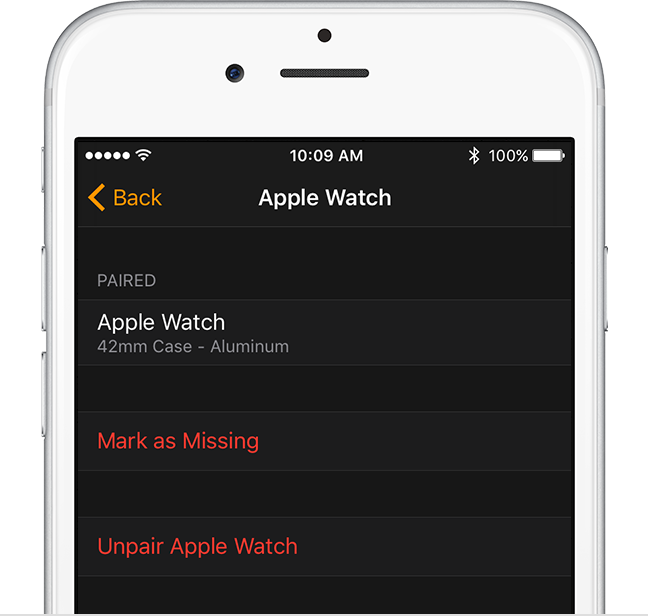
    User uploaded file
  3. Tap again to confirm. Your iPhone will create a new backup of your Apple Watch before erasing all content and settings on your Apple Watch. You can use the backup to restore a new Apple Watch. After your Apple Watch unpairs, you'll see the Start Pairing message.
  4. Use these steps to set up and pair your Apple Watch again.


Thanks for using Apple Support Communities.

Have a good one,

Mario

This thread has been closed by the system or the community team. You may vote for any posts you find helpful, or search the Community for additional answers.

Apple watch ODS upgrade I can not install the upgrade - - Error message I am not connected to the internet; when in fact I am. And I followed all other requirements.

Welcome to Apple Support Community
A forum where Apple customers help each other with their products. Get started with your Apple Account.