Aiport Extreme yellow light keeps blinking won't connect

The Airport Extreme is connected to a Xfinity modem and the modem's router is disabled. The AE has been losing connection sporadically since I bought it, but if I unplug it and replug it back in then it would connect. Now the yellow light continues to blink and will not connect. I had the Xfinity model enable the router and I have a connection with it. But even with pushing the reset button, it will not connect and the light turn green.

null-OTHER, OS X Yosemite (10.10.3), Airport Extreme

Posted on Jun 2, 2015 9:26 AM

Reply
10 replies

Jun 2, 2015 11:01 AM in response to EdCr

The Airport Extreme is connected to a Xfinity modem and the modem's router is disabled

OK, we got that the modem/router is not performing routing functions.


I had the Xfinity model enable the router and I have a connection with it

Now, you are indicating that the modem router is performing routing functions.


Can you clarify at the present time, whether the modem/router is or is not performing routing functions?


We ask, because the setup of the AirPort Extreme will vary according to whether you have a simple modem (with no routing being performed by the device), or a device that is providing routing functions for the network.


But even with pushing the reset button, it will not connect and the light turn green.

Here, we assume that you are talking about the AirPort Extreme. Resetting the AirPort erases the current network settings, so the AirPort Extreme will blink amber (forever) until it is set up once again to work with your modem. If the settings are correct, the indicator light on the AirPort will turn green.


Are you saying here that you did not set up the AirPort again after you reset it, or are you saying that you reset it, did set it up again, and are still having difficulty?

Jun 2, 2015 11:23 AM in response to Bob Timmons

To clarify; I tried resetting the Airport Extreme while the routing function of the modem was disabled. The Airport Extreme could not be set up no matter what I did. I used the Airport Utility on my MacBook. After not being able to get the Airport Extreme to work and have the yellow light turn green, I then had the router in the Xfinity modem enabled so I could get my network running again. The network and internet is working properly using the router that is part of the modem.

Jun 2, 2015 1:13 PM in response to EdCr

No one except the original poster can mark a thread as "solved", so whether or not you were aware, you did mark it as "solved".


I assume that the router function of the Xfinity modem/router is still enabled, as you indicate above.


With the AirPort Extreme powered on, hold in the reset button on the back of the device for 7-8 seconds and release. Allow a full minute for the AirPort Extreme to restart to a slow, blinking amber light status.


Verify that an Ethernet cable connects from one of the four LAN <--> ports on the Xfinity modem/router to the WAN "O" port on the AirPort Extreme


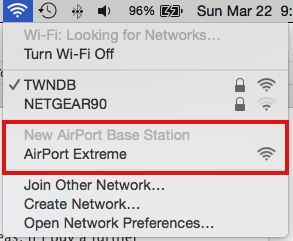
Click the WiFi icon at the top of your Mac's screen and look for a listing of New AirPort Base Station. Just below that, click on AirPort Extreme

User uploaded file


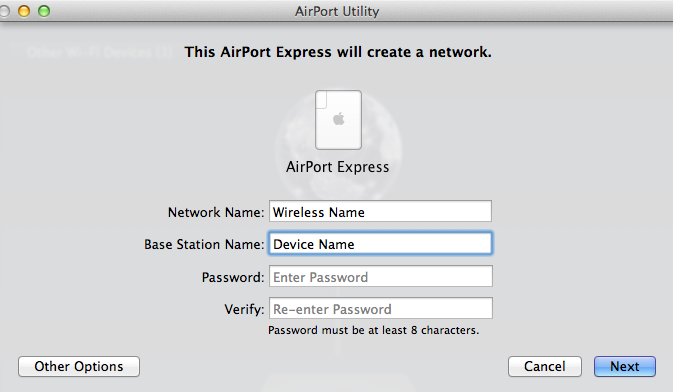
That will get the setup "wizard" running. It will take a minute to analyze the settings and then suggest a setup for the AirPort Extreme, which will look similar to the example below, except that you will see a picture of the AirPort Extreme.

User uploaded file


Network Name..........Type in a simple name for the wireless network

Base Station Name..........Type in a simple name that you want to call the AirPort Extreme

Password..........Type in a password to be used for the wireless network name and AirPort Extreme

Verify.........Type in the same password again to confirm

Click Next


The "wizard" will set up everything for you automatically. When you see the message of Setup Complete, click Done.


The AirPort Extreme should have a green light and you should be able to connect to the wireless network that you named.


Jun 4, 2015 12:42 PM in response to Bob Timmons

OK I just got the chance to create the network as you had showed in previous reply. After setting up the Airport with the wizard it did connect. I reconnected the Airport to the Xfinity router modem and after going through the process the green light came on. I do have a connection and it is working.


Thank you for your help

This thread has been closed by the system or the community team. You may vote for any posts you find helpful, or search the Community for additional answers.

Aiport Extreme yellow light keeps blinking won't connect

Welcome to Apple Support Community
A forum where Apple customers help each other with their products. Get started with your Apple Account.