Maha66

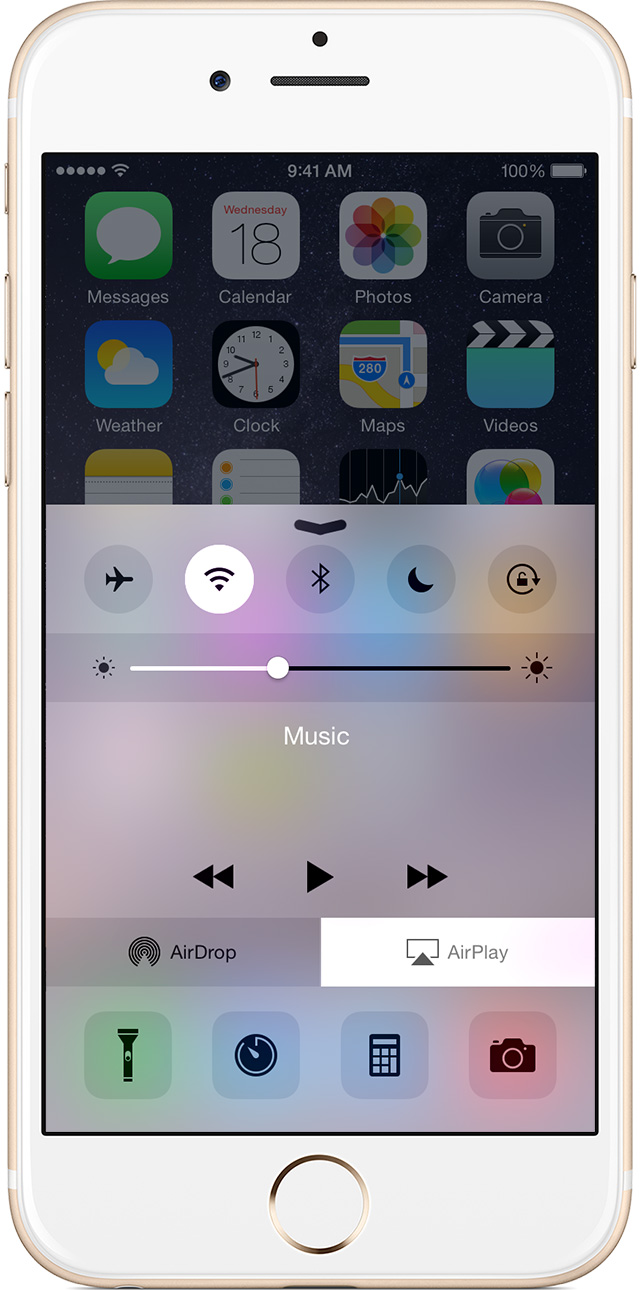
Q: The airplay button has disappeared from the control center. How can I fix it? Thanks

AAirPlay disappeared. I've tried solutions offered in other posts and still does not work or even show up. Help would be greatly appreciated. Thanks

iPad 2 Wi-Fi + 3G, iOS 7.1.2

Posted on Jun 22, 2015 9:29 AM

Close

Q: The airplay button has disappeared from the control center. How can I fix it? Thanks

  • All replies
  • Helpful answers

  • by sterling r,

    sterling r sterling r Jun 24, 2015 10:01 AM in response to Maha66
    Community Specialists
    Jun 24, 2015 10:01 AM in response to Maha66

    Hey there Maha66,


    It sounds like you are unable to see the Airplay option in the Control Center on your iPad. Since I do not know exactly what troubleshooting you have done, I would recommend you take a look at these steps from the following article about that kind of an issue on an iOS device:


    Get help using AirPlay and AirPlay Mirroring on your iPhone, iPad, or iPod touch

    Try these steps first

    1. Make sure that you have the latest software on your iOS device and Apple TV.
    2. Make sure that both devices have Wi-Fi turned on.
      On your iOS device, go to Settings > Wi-Fi.
      On your Apple TV, go to Settings > General > Network.
    3. If you're trying to use peer-to-peer AirPlay, make sure that both devices have Bluetooth turned on.
      On your iOS device, go to Settings > Bluetooth.
      On your Apple TV, go to Settings > General > Bluetooth.


    If you don't see AirPlay in Control Center

    When an AirPlay-enabled device is available, you'll see AirPlay in Control Center on your iOS device.

    If you don't, try these steps:

    1. Restart your iOS device and Apple TV.
    2. Connect both devices to the same Wi-Fi network.
      On your iOS device, go to Settings > Wi-Fi.
      On your Apple TV, go to Settings > General > Network. If your Apple TV is connected using Ethernet, make sure that it’s plugged in to the router you're using for Wi-Fi.
    3. On your Apple TV, make sure that AirPlay is turned on. Go to Settings > AirPlay.


    Thank you for using Apple Support Communities.

    Regards,

    Sterling

  • by Maha66,

    Maha66 Maha66 Jun 24, 2015 1:57 PM in response to sterling r
    Level 1 (0 points)
    Jun 24, 2015 1:57 PM in response to sterling r

    TThanks for the response. I've tried all the suggested troubleshooting and still nothing. Very strange. Other posts suggest the problem should not persist but I have not seen the AirPlay icon in over a week. Any other ideas? Thanks

  • by Maha66,Solvedanswer

    Maha66 Maha66 Jun 24, 2015 2:07 PM in response to Maha66
    Level 1 (0 points)
    Jun 24, 2015 2:07 PM in response to Maha66

    FFixed it! I mistakenly had the a TV plugged into the modem rather than the router. Now it works fine. Thanks again for the help!

  • by sterling r,

    sterling r sterling r Jun 24, 2015 2:29 PM in response to Maha66
    Community Specialists
    Jun 24, 2015 2:29 PM in response to Maha66

    Thanks for the update! Next I would quit all the running apps on the device:


    Force an app to close in iOS

    1. Press the Home button two times quickly. You'll see small previews of your recently used apps.

    2. Swipe left to find the app you want to close.

    3. Swipe up on the app's preview to close it.


    When you have done that restart the device and test the issue again:


    iOS: Turning off and on (restarting) and resetting


    If the issue persists, I would next reset your network settings:


    If your iPhone, iPad, or iPod touch won’t connect to a Wi-Fi network

    Reset your Network Settings. Tap Settings > General > Reset > Reset Network Settings. This also resets Wi-Fi networks and passwords, cellular settings, and VPN and APN settings that you’ve used before.


  • by sterling r,

    sterling r sterling r Jun 29, 2015 2:33 PM in response to Maha66
    Community Specialists
    Jun 29, 2015 2:33 PM in response to Maha66

    Wonderful! I'm glad the issue is resolved now.