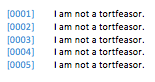
You cannot alter Pages predefined numbering convention, or coerce brackets into the list style. Probably suggests that Apple Attorneys don't use Pages. 😉
Although Pages v5.5.3 does provide for the ability to automatically detect lists (without bullets & lists enabled) by simply typing a 1, some text, and a return — the OS X 10.10.4 update appears to have disabled this feature even when it is enabled in Pages v5.5.3 preferences. Even if the auto-detect was working, it would become confused by brackets and leading zero padding.
Trying to make this work with two table columns is unacceptable. Recommend a non-Apple word processing solution that will provide for this legal bracket list format.
I recommend you look at Word in Office for Mac 2011. When you choose the number list, there is an ability to create a custom list format using 01, 02, etc. I placed [00nn] in the custom field, where the nn is the 01 number format that Word inserts. The numbers auto-increment in the list. This was actually done in Word 15.11.1 in Office 2016 for Mac Preview on OS X 10.10.4 Yosemite.