apple watch haptic working only no sound with notifications-any help
Apple watch,haptic working no sound with notifications,any advice please
Apple watch,haptic working no sound with notifications,any advice please
Greetings Rob@1957,
Thanks for the question. If I understand correctly, the Apple Watch does not make a sound when you receive notifications. I would recommend that you read this article, it may be able to help the issue.
Adjust brightness, text, sound, and haptics on Apple Watch
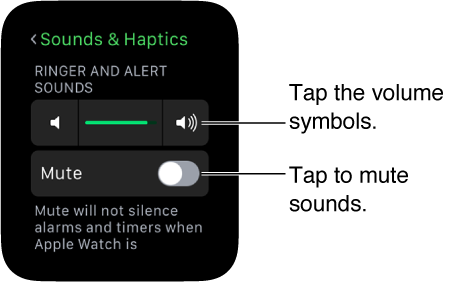
Adjust sound. Open Settings
, then scroll down and tap Sounds & Haptics. Tap the volume buttons under Ringer and Alert Sounds or tap the slider once to select it, then turn the Digital Crown to adjust the volume. Or open the Apple Watch app on iPhone, tap My Watch, tap Sounds & Haptics, then drag the Ringer and Alert Sounds slider.
Thanks for using Apple Support Communities.
Take care
Next try unpairing and re-pairing your watch. The Watch app on your iPhone takes watch backups automatically, including a fresh one when unpairing via the app. Choose to restore the watch (Restore from Backup) when offered the option during set up. Most data and settings will be restored, with some exceptions (eg Apple Pay cards, passcode).
This is not correct. My watch was making the ringing glass sound with each text message notification for example. Now, just the haptic vibration. This IS an issue.
No, unfortunately. The watch will even make sounds OTHER than notifications. Notifications just don't work. Only solution I've found so far is to reset the Watch and set it up again. At least until this happens again.
Exact same issue here. iPhone 6S, Watch up to date. I get sound notifications for mail & other apps but not for Messages (only iMessage, I don't have anyone using SMS). I have a friend who is also experiencing this issue.
Hi - try these steps.
Firstly, check your settings.
On your iPhone, in the Watch app, go to: My Watch > Messages:
- Choose Custom and then check, under Alerts, that Show Alerts, Sound and Haptic are each enabled.
On your iPhone, in the Watch app, go to: My Watch (bottom left tab) > Sound & Haptics:
- Check the Alert Volume;
- Check that Silent Mode is not enabled;
- Check that Haptic Strength is set to the middle or far right hand side of the slider.
It may then also help to restart both your iPhone and your watch. Turn both devices off first, then restart your iPhone before restarting your watch:
- To turn your watch off: press and hold the side button until you see the Power Off slider; drag it to turn off;
- To turn it on: press and hold the side button until you see the Apple logo.
Is the iphone on Mute for notifications?
i checked each item and all are set properly. I get haptic for messages fine. I just reset both and still no sound for iMessages.
apple watch haptic working only no sound with notifications-any help