Adding Canon MP480 printer & blank printer list

When trying to add my Canon MP480 printer, there are no printers in the list. I have tried adding under "printers & scanners" list by clicking "+" but the list is blank.

I have tried installing software from Canon's website. I do not know where my software CD is. When I plug in to the USB it does not do anything. Just a blank printer list. None are found.

MacBook Pro, OS X Yosemite (10.10.4)

Posted on Jul 21, 2015 8:22 PM

Reply
8 replies

Jul 22, 2015 7:29 AM in response to PAHU

I have opened an run the installer. It did not seem to do anything.


The cable is not an issue. It connects to other devices I have. It is plugged directly into my laptop.


When I went to see the USB information the way you explained, I could not find that either. Below is the complete list from Utilities. User uploaded file

Also, the PrinterDriver file shows up like my flash drive as a device? Should that be the case after I install it?


I feel like I am missing applications or something.

Jul 22, 2015 6:05 PM in response to seylk

seylk wrote:


I have opened an run the installer. It did not seem to do anything.

It will copy files to a Canon folder (/Library/Printers/Canon/BJPrinter) and the PPD folder (/Library/Printers/PPDs/Contents/Resources). This is so that when the printer is visible and you select it, the supporting driver files will be available to use.

seylk wrote:


The cable is not an issue. It connects to other devices I have. It is plugged directly into my laptop.

Excellent.

seylk wrote:


When I went to see the USB information the way you explained, I could not find that either. Below is the complete list from Utilities. User uploaded file

So in this image showing the Utilities folder contents you can see the application called System Information. Open this application and then you will see the USB entry in the left column. As mentioned before, the top right pane will show all the USB busses on the Mac and the Canon should be listed under one of them.


Below is an image of what you should see. Here I have a Canon MG6360 connected to my iMac via USB
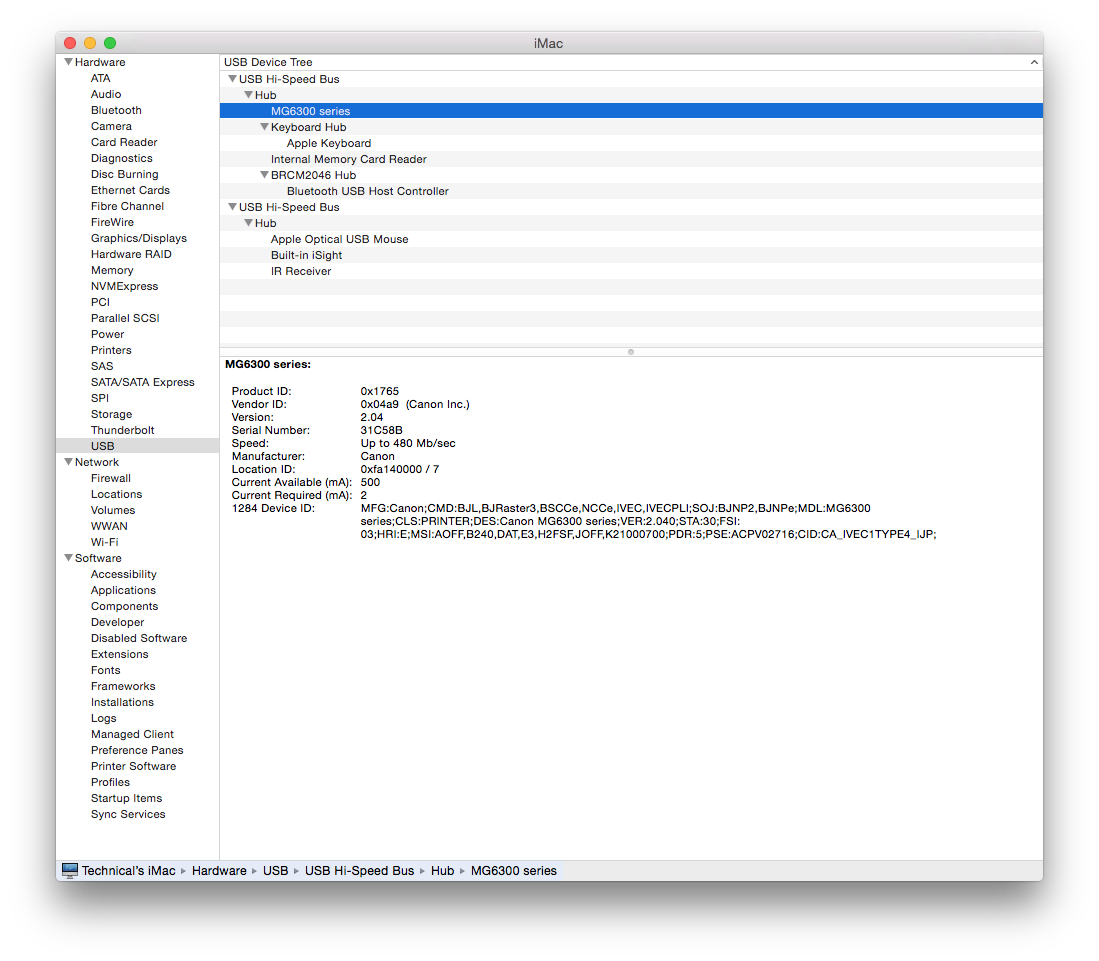
User uploaded file

seylk wrote:


Also, the PrinterDriver file shows up like my flash drive as a device? Should that be the case after I install it?

Yes. The file that you downloaded will mount and appear as a flash drive - the same as if you did connect a USB memory stick or external USB hard drive. When you open this mounted drive and run the installer inside, the drive will still be mounted when the installer has finished. So like a USB memory stick, when you are finished with the using the contents of this drive, you need to eject it to make it disappear from your Desktop.


Jul 21, 2015 9:19 PM in response to seylk

Note that after you download the file, you need to open it and run the installer that is inside to copy the driver files to the Mac.


That said, with the MP480 connected to the Mac via USB cable, it should be appear in the Default view of the Add printer window. So with that window not showing the MP480, then there could be an issue with the USB cable, the port on the Mac or the MP480.


Are you connecting the USB cable directly to the Mac, and not via a USB hub or the USB port on an Apple keyboard? (if you are using a wired keyboard rather than Bluetooth).


If you have another USB cable then try that. If the MP480 still fails to appear in the Default view, then open System Information (Applications > Utilities) and select USB in the left column. The top right pane will show all the USB busses in the Mac and the MP480 should be listed under one of the busses. Once you see the MP480 in this view, then you will be able to add the printer.

This thread has been closed by the system or the community team. You may vote for any posts you find helpful, or search the Community for additional answers.

Adding Canon MP480 printer & blank printer list

Welcome to Apple Support Community
A forum where Apple customers help each other with their products. Get started with your Apple Account.