how do I add play count to a new playlist in iTunes 12
I want to see the play count in my playlists. All of my playlists created before the latest iTunes update have the play count.
MacBook Pro (13-inch Late 2011), Mac OS X (10.7.5)
I want to see the play count in my playlists. All of my playlists created before the latest iTunes update have the play count.
MacBook Pro (13-inch Late 2011), Mac OS X (10.7.5)
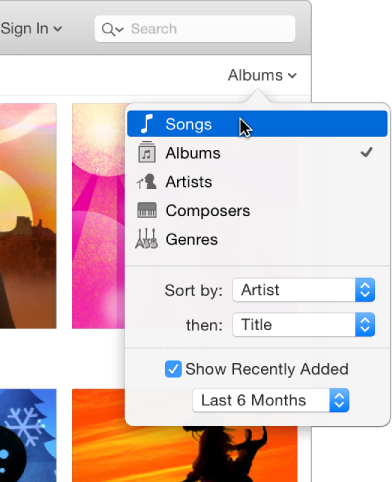
Go to your playlist, From the status bar choose "view", then go to "view as" and in there choose "Songs".
Then If you can't see the plays numbers, go to the place which writes Name, Album and ... there you have to Right-Click and in then you have to tick "Plays" button.
Now you can see your play count in your playlists.
I also would like to show play count but have 12.5.5.5 and it does not have a "My Music" nor does it have a "Playlist". For some reason the names of these things have changed after recently updated my itunes. I have been surfing around for two days trying to merely add the play count option but it is not intuitively available and the instructions posted here do not help since the navigation titles are now different. Thanks.. looking forward to your response. Susan
PS: For one playlist I have set it to sort by plays but it does it in an order where the song least played first and there is no option to change it. The idea of wanting it in that order is to have the ones played most first. This is a related issue that perhaps someone knows how to change that from least play first to most played first.
Hello ,
Thanks for using Apple Support Communities.
If you want to add the playlist column when viewing the songs in your playlists, then please follow the directions below. For the step where it says to click on My Music, you will be clicking on Playlists.
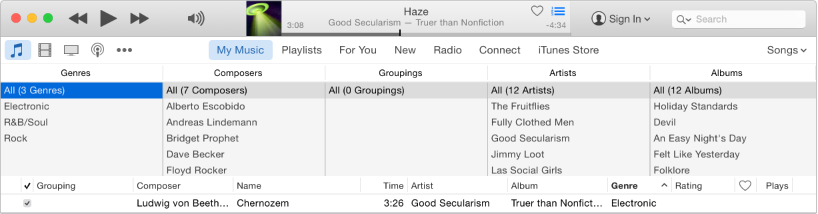
To quickly drill down into your music library and find a song, you can use the column browser.
Your music is sorted by up to five categories (Genres, Composers, Groupings, Artists, and Albums), divided into columns. As you select an item in each column, the list narrows down to display only the matching songs.
For example, to find only music by Mozart, you could select Classical in the Genres column, then Mozart in the Composers column.
Click the Music button
near the top left of the iTunes window.
Click My Music.
Click the pop-up menu near the top right and choose Song List.
Choose View > Column Browser > Show Column Browser, and choose the columns you want to display. You can’t change the order of the columns.
To use the column browser, select options in as many columns as you’d like.
As you select options, songs that match your selections are displayed below.
To close the column browser, choose View > Column Browser > Hide Column Browser.
Take care.
I think you best answered the original question which is what I was looking for, adding the play count to a playlist.
how do I add play count to a new playlist in iTunes 12