I can't import videos from Photos into iMovie

Can any one help? I have been reading the tutorials for this but what I see is not what they suggest. I have an event set up in my Library and I want to import some videos from Photos. But Photos does not show up anywhere as an option. If I try an import and navigate to Pictures the Photos Library is greyed out. So I simply can't work out how to do this.

I have version !0.0.9 of iMovie and Version 1.01 of Photos and I am on !0.10.4 of mac OS

Posted on Aug 6, 2015 11:58 AM

Reply
14 replies

Aug 8, 2015 11:51 AM in response to PhilG007

Hello PhilG007,

Thanks for using Apple Support Communities.


From your post I understand that you're trying to add some videos to an iMovie project. Given your description of the issue it looks like you're going through the import process and trying to import the entire Photos library. Rather than doing this, all you need to do is simply access your Photos library in the Libraries list on the left side of iMovie as shown in the help article below.


Add media from your Photos, iPhoto, or Aperture library

  1. In the Libraries list, select your Photos, iPhoto, or Aperture library.

  2. Click the pop-up menu at the top of the browser, choose a content category, and then scroll through the thumbnails of photos and video clips in that category.

  3. Select the photo or clip you want to use to see a preview in the viewer.

  4. Do one of the following:

    • Insert the photo or video clip: Drag it to the timeline between clips or between a clip and a transition.

      As you drag, a blue box appears in the timeline, indicating where the photo or clip will appear in the timeline.

    • Replace a clip: Drag the photo or clip on top of a clip in the timeline.

      As you drag, a white border appears around the clip in the timeline. When you release the mouse button, choose Replace from the menu that appears. The photo or clip replaces the clip in the timeline.

Add photos and video clips from Photos, iPhoto, or Aperture - iMovie Help


Have a good one.

Aug 11, 2015 6:03 AM in response to PhilG007

Hey Phil,


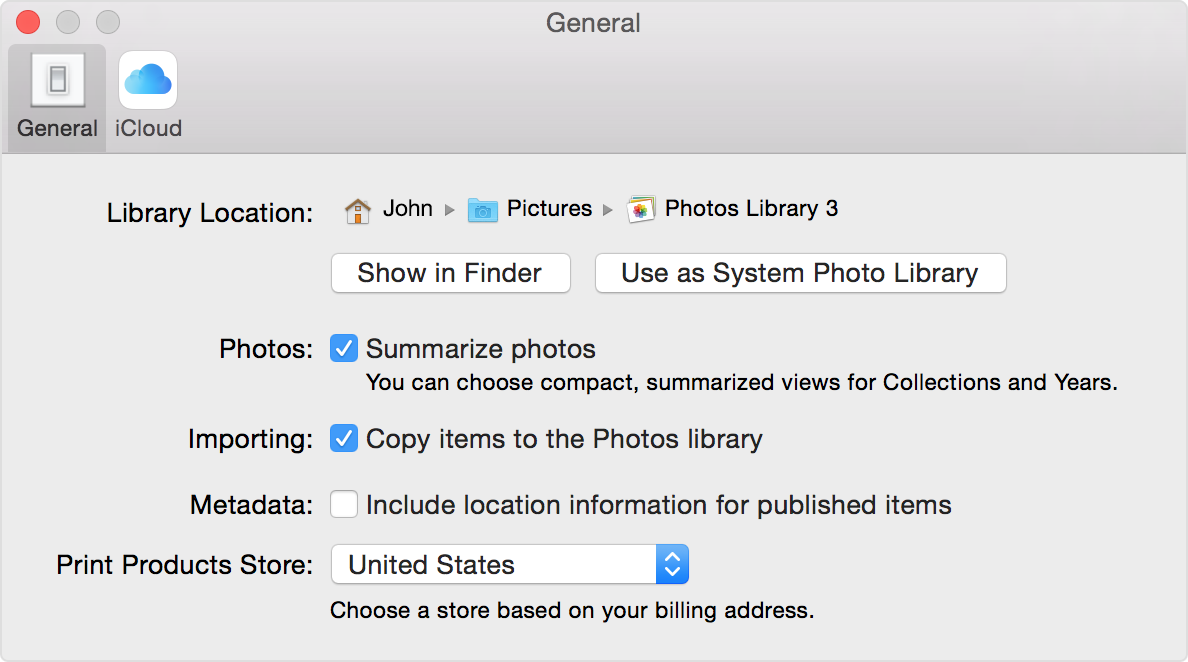
Thanks for providing those screenshots. Since you're not seeing the Photos Library in the Libraries list on the left side, I'd like you to make sure that your Photos Library is set as the system library, shown in the information below.


Follow these steps to designate a System Photo Library:

  1. Quit Photos.
  2. Hold down the Option key, then open Photos. One of the photo libraries is already designated as YourLibraryName (System Photo Library).
  3. Choose the library you want to designate as the System Photo Library.
  4. After Photos opens the library, choose Photos > Preferences from the menu bar.
  5. Click the General tab.
  6. Click the Use as System Photo Library button.

User uploaded file


Designate a System Photo Library in Photos - Apple Support


Take care.

Aug 10, 2015 2:25 AM in response to chuck_3rd

Hi Alex, thank you so much for coming back to me. It is not my intention to import the whole Photos library just certain clips I have downloaded from my camera.

I am not sure what the pop-up menu is at the top of the browser. I followed the link enclosed in your post but that screen did not look like mine. Here is a screen grab of my window:

User uploaded file

I don't have the option in the Libraries field to view Photos, (which is where all my clips and images are now) I have the iPhoto Library as you can see, but there is nothing in it.

The only pop-up window I can find is if I click on import and then I get the following window:

User uploaded file

Which I can go and search for files, but I don't see any options for getting Photos to show in the Library drop down.

Any thoughts on this? Am I missing something?

Many thanks

Phil

Aug 24, 2015 2:18 AM in response to Bills37

You are right there never was a link. I searched for Apple support and found that it was going to cost me money to sort out. I don't use iMovie that often and I found a work around, so I have not wasted any more time on it. I suspect that this is due to upgrading to Yosemite without doing a clean install. But that is very much a hunch. If I ever get a chance I might try wiping the drive clean and doing a fresh install of Yosemite and see if that fixes the issue.

Aug 24, 2015 2:23 PM in response to PhilG007

Phil:


Since your excellent description of the problem matched my experience exactly, I have to share with you the solution I stumbled upon.


I took all the videos I could not move into iMovie and I put them in an album in Photos. Then, when I opened iMovie, by some miracle I don't understand, the video snippets were available to import as an event, or as an album from Photos. The actual import contained more than that album--had only a few extra files dated the same day--but I finally had the materials I needed to create a little iMovie video.


Now I'm struggling with putting captions on the video screens. So far finding iMovie is far less useful than the ProShow Gold that runs on Windows. I changed from Windows to OS X because Apple was supposed to be so much better in graphics. Guess its my fault for believing the hype.


Thanks for your help in understanding this problem.


Bill

This thread has been closed by the system or the community team. You may vote for any posts you find helpful, or search the Community for additional answers.

I can't import videos from Photos into iMovie

Welcome to Apple Support Community
A forum where Apple customers help each other with their products. Get started with your Apple Account.