View the length of a complete audiobook in iTunes

How do I view the length of a complete audiobook in iTunes 12.2? When it gets on my iPhone in iBooks I can see the time left on the book, but I can't do this on my Mac, has anybody got a solution to this?

MacBook Pro, OS X Yosemite (10.10.5)

Posted on Aug 16, 2015 11:46 AM

Reply
1 reply

Aug 18, 2015 6:48 AM in response to MadsEng

Howdy MadsEng,

Thanks for using the Apple Support Communities.


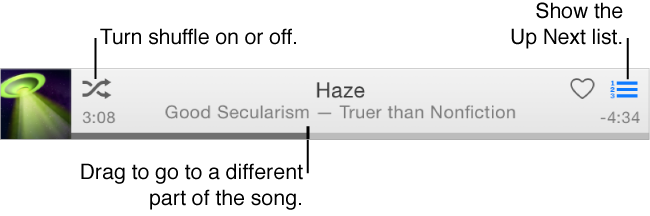
I see from your post that you're trying to see the duration of your audiobook in iTunes on your Mac. In order to see this, you need to be viewing the Audiobooks section in iTunes, and then simply click on the album artwork of your audiobook. Once you do this, you'll see the different tracks underneath, with the duration of each track on the right. When you start playing your audiobook, you will see the the status of it playing along the top of the iTunes window as shown below.


User uploaded file


I hope this helps!

This thread has been closed by the system or the community team. You may vote for any posts you find helpful, or search the Community for additional answers.

View the length of a complete audiobook in iTunes

Welcome to Apple Support Community
A forum where Apple customers help each other with their products. Get started with your Apple Account.