Jean Shea

Q: Why doesn't my iPhone show up in my iTunes account?

I was told just plug it in and you can download your iTunes stuff into your new iPhone. However, my iTunes on my iMac doesn't recognize the new phone. And my account doesn't show it. It used to be you could add devices to your account that but I don't see how to do that now.

iMac, OS X Yosemite (10.10), null

Posted on Aug 19, 2015 6:27 PM

Close

Q: Why doesn't my iPhone show up in my iTunes account?

  • All replies
  • Helpful answers

  • by alex_h1,

    alex_h1 alex_h1 Aug 21, 2015 6:43 AM in response to Jean Shea
    Community Specialists
    Aug 21, 2015 6:43 AM in response to Jean Shea

    Hello Jean Shea,

    Thanks for using Apple Support Communities.


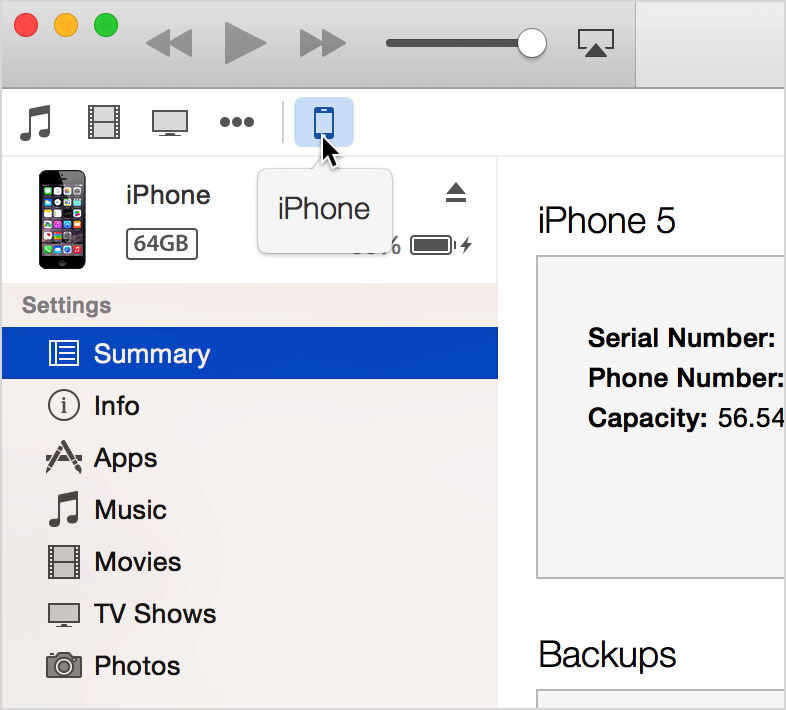
    From your post I understand that you'd like to sync content from iTunes to your iPhone, but you cannot find your iPhone in iTunes.  First of all, please check the top left corner of iTunes as shown below to see if your iPhone appears.


    Locate your connected device.


    If you can see the iPhone, then follow the directions in the article below to get help setting up syncing in iTunes.


    Sync your iPhone, iPad, and iPod with iTunes using USB - Apple Support


    If your iPhone is not appearing as shown, then you will need to follow the directions below to troubleshoot that issue.


    If you don't see your connected device in iTunes for Mac - Apple Support


    Have a great weekend.

  • by Jean Shea,

    Jean Shea Jean Shea Aug 22, 2015 11:35 AM in response to alex_h1
    Level 1 (19 points)
    iCloud
    Aug 22, 2015 11:35 AM in response to alex_h1

    Thanks, Alex, for the information. My problem was the latter: the iPhone was not showiing up in iTunes. What puzzled me was that Photos was detecting it and "reading" my iPhone. The matter resolved itself, which sounds crazy, I know. I can only think of a couple things that might have made the difference. I had originally plugged my iPhone into the USB port on the keyboard (not wireless). I have done that with previous iPhones without problems, but this time, it wasn't working.

    I decided to unplug everything and restart my computer, and switch to my Dynex USB hub. After that all was well.
    I suspect it was rebooting the iMac that set things straight, which is one of the things suggested in the second link you provided.
    Thanks for your help.

  • by alex_h1,

    alex_h1 alex_h1 Aug 22, 2015 11:36 AM in response to Jean Shea
    Community Specialists
    Aug 22, 2015 11:36 AM in response to Jean Shea

    Hey there Jean Shea,


    I'm happy to see that it has been resolved.  


    Have a good one.