Cannot leave iMessage conversation in Messages (iOS)

My work iPhone is part of a multi-party iMessage conversation among family members. I would like to remove this iPhone from the conversation.


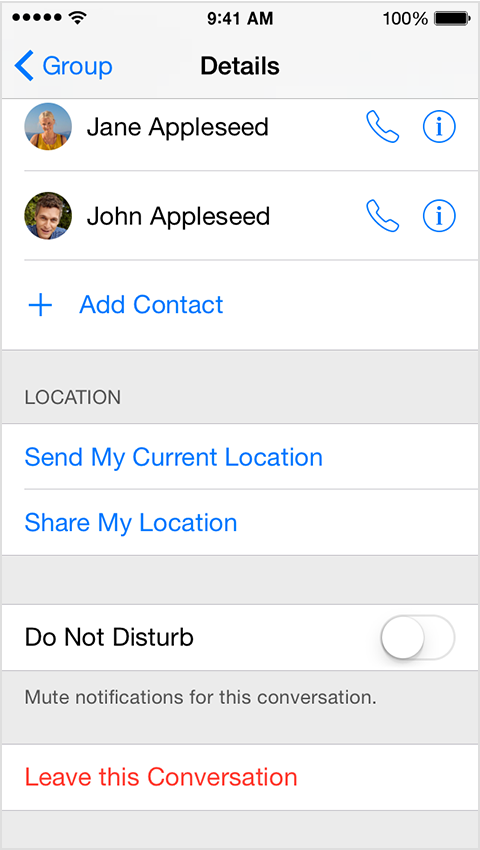
For reasons that elude me, the button for "Leave this Conversation" (under Details) is grayed out (not red text) and inoperative.


This behavior has persisted through multple restarts (hard and soft) and OS updates (e.g., last week' update to iOS 8.4.1). Any suggestions would be most welcome.

iOS 8.4.1

Posted on Aug 20, 2015 12:40 PM

Reply
2 replies

Aug 22, 2015 11:54 AM in response to Steve Davidson

Hello Steve,

Thanks for using Apple Support Communities.


I see from your post that you're trying to leave a group message but the icon to Leave this Conversation is grayed out. This is likely because either there are only three people in the group iMessage, or one of the group members are not using iMessage.


Leave a group message

If the group message is using iMessage and has more than three participants, you can leave the conversation. Tap Details. Then tap Leave this Conversation.

User uploaded file

Leave this Conversation might not be available if there are only three people in the group iMessage or if the group message uses MMS.

Send a group message with your iPhone, iPad, or iPod touch - Apple Support


Take care.

Sep 2, 2015 6:47 PM in response to chuck_3rd

Interesting observation you've made: The problem conversations all had three parties. That's a strange limitation. Obviously leaving a conversation with only two members is meaningless, but why would Apple not enable one of the three parties to bow out?


Unfortunately, the only solution was to terminate the threads and start a bunch of new, two-party conversations.


Thank you for your reply.

This thread has been closed by the system or the community team. You may vote for any posts you find helpful, or search the Community for additional answers.

Cannot leave iMessage conversation in Messages (iOS)

Welcome to Apple Support Community
A forum where Apple customers help each other with their products. Get started with your Apple Account.