iPhone won't load from logo screen - probable memory issue

- iphone 5


Hello,


i keep running dangerously low on storage, it's at 0mb a lot and usually my device will shut down and restart a few times and clear open web pages etc. to make space.


a few weeks ago it did this just constantly restarting from the logo screen for half an hour, vibrated and went into a loop for over half an hour and eventually worked again.


yesterday my iPhone crashed, went to the logo screen and would then switch off, no self restarting loop as usual.


I've put the device in recovery mode and dfu mode to see if would do anything but still the same issue for 24 hours.


I really don't want to restore from back up as I'm not sure how complete the backup is i.e some app data isn't backed up, does anyone have any suggestions? There must be something I can try without a restore, Ideally I'd like to free up some space but I believe it's impossible in dfu or recovery mode?


thank you

iPhone 5, iOS 8.4, null

Posted on Aug 26, 2015 10:48 AM

Reply
1 reply

Aug 27, 2015 1:56 PM in response to kaufcol

Hi kaufcol -

The resource below will explain what to do if your iPhone is not responsive. Try the option to Update first, so that your iOS will be refreshed, but your data will not be erased. If you can get it to turn on, you can manually remove data by following the instructions below.

Otherwise, with the iPhone's internal storage maxed out as it is, you may have no other option but to restore the iPhone, which will erase your data.

Click on the links below for complete details. I've highlighted some key points below:

If your iPhone, iPad, or iPod touch doesn't respond or doesn't turn on - Apple Support
https://support.apple.com/en-us/HT201412


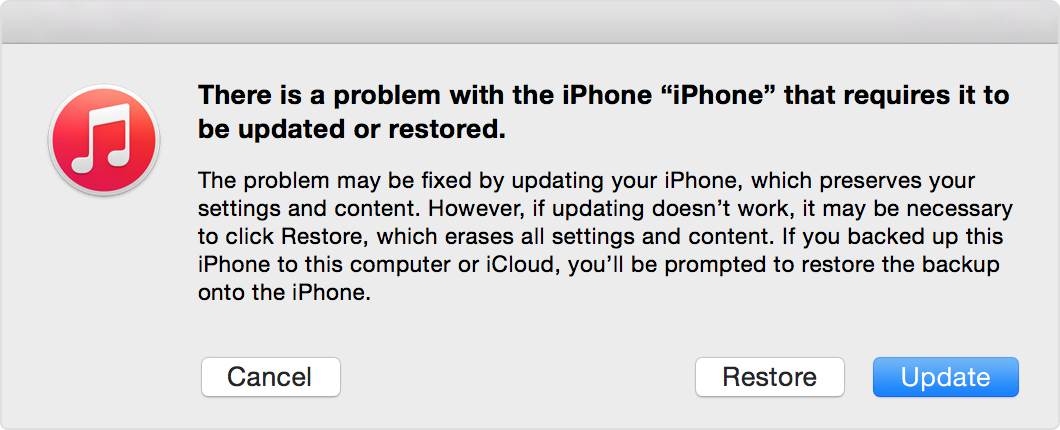
When you get the option to restore or update, choose Update. iTunes will try to reinstall iOS without erasing your data.

User uploaded file


If you need more space for an iOS update - Apple Support
https://support.apple.com/en-us/HT203097


Delete content manually

You can also create more space on your device manually. In the Usage Settings menu, you can see how much space your apps use and delete the ones you don't need. You can always re-download your purchased apps or other content later. Follow these steps:

  1. Tap Settings > General > Usage > Manage Storage.
  2. Select any app to see how much space it uses, and tap Delete App to remove it.
  3. Install the iOS update again. Tap Settings > General > Software Update.

You can also reduce the size of your Photo library by turning on iCloud Photo Library and Optimizing your device storage. Learn more about app storage space and content.

You can redownload any purchases you made on the iTunes store including apps, music, movies, etc.
Download past purchases from iTunes - Apple Support

When you enable iCloud on the phone any of the data that you had in that service (contacts, calendars, etc.) will again be accessible. You can see what data you have at www.icloud.com.

Take care,

Judy

This thread has been closed by the system or the community team. You may vote for any posts you find helpful, or search the Community for additional answers.

iPhone won't load from logo screen - probable memory issue

Welcome to Apple Support Community
A forum where Apple customers help each other with their products. Get started with your Apple Account.