Finder "Arrange By" broken since upgrade ? - All files arranged as "Other"

I am not sure if this started happening because of the most recent upgrade or if this even affects other users, but I am experiencing the following issue. The "Arrange By" feature in Finder will only differentiate between "Folders" and "Other". I have tried PDF, PNG, XLS, XLSX, and PPTX files - all get arranged as "Other".


Is anyone else experiencing this issue or has perhaps even found a fix ?


EDIT: Spelling, categories

MacBook Pro, OS X Yosemite (10.10.5), Finder

Posted on Sep 11, 2015 2:18 AM

Reply
16 replies

Sep 11, 2015 3:54 AM in response to Lexiepex

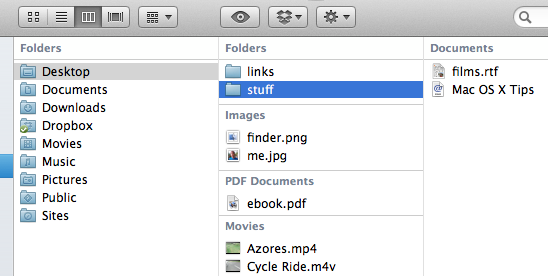
What exactly do you mean by "you have folder selected" ? In the arrange by, "Kind" is selected. The topmost category is in the header, as usual. Below a random "arrange by kind" screenshot from google. That's how Finder is supposed to "Arrange By".


User uploaded file


In my screenshot above, "Images", "PDF Documents", etc., all get sorted into the category "Other".


Edit:


One more screenshot of my Finder in column view


User uploaded file

Sep 14, 2015 6:56 AM in response to Barney-15E

It's not my desktop. I googled the picture to clarify for Lex how the Arrange By Kind is supposed to work. I.e., that my Finder is not arranged "by folder", whatever that means. That's what I wrote above the picture as well.


The test folder is really just a bunch of different file types in the same folder. Nothing fancy, I just copied a few random files and changed the name. The problem is that Finder doesn't differentiate different file types properly. Everything gets grouped as Other.

Sep 14, 2015 6:42 PM in response to altabq

altabq wrote:

The problem is that Finder doesn't differentiate different file types properly. Everything gets grouped as Other.

It doesn't solely use file extensions for kind. It uses Uniform Type Identifiers to determine the type of content.

Open a Terminal window and type the following, leaving a space after the command, but don't hit return, yet.

mdls

Drag one of the files into the Terminal window and hit return. It will list all of the metadata attached to that file.


Here is an example of part of the output for an Excel Spreadsheet:

kMDItemContentCreationDate = 2012-10-27 01:59:01 +0000

kMDItemContentModificationDate = 2015-03-18 22:19:03 +0000

kMDItemContentType = "com.microsoft.excel.xls"

kMDItemContentTypeTree = (

"com.microsoft.excel.xls",

"public.data",

"public.item"

)

The ContentType is where it gets the info for the Arrange By information.

Now, a text type document is just a document. It doesn't have a special category, so those will end up in Other.


My guess is there is something still wrong with your spotlight index. You can delete the whole thing and it will rebuild it automatically.

Here is the command to erase the index on the startup volume. If you need to erase other volumes, replace / with the path to the volume.

sudo mdutil -E /

sudo temporarily elevates your privileges and runs the next command with those privileges. The rest of the command erases the index on the startup volume: /

This thread has been closed by the system or the community team. You may vote for any posts you find helpful, or search the Community for additional answers.

Finder "Arrange By" broken since upgrade ? - All files arranged as "Other"

Welcome to Apple Support Community
A forum where Apple customers help each other with their products. Get started with your Apple Account.