iCloud Backup Broken After iOS 9 Upgrade

iCloud Backup on both my iPhone and iPad have been working fine for years until I upgraded to iOS 9. After the upgrade it said my latest backup was "Never". When I pressed "Backup Now" the progress bar flashed quickly then went back to saying my latest backup was "Never" (no error messages).


I decided to try turning iCloud Backup off and back on again. When I try to turn in on it says "iCloud Backup Failed. There was a problem enabling iCloud Backup.".


Any ideas or suggestions on how to fix?

iPhone 6, iOS 9

Posted on Sep 17, 2015 10:18 AM

Reply
553 replies

Nov 16, 2015 12:22 PM in response to leJuan5150

I also have this problem, but there is no solution that I'm aware of. In my case, the device is one that is owned by my company, and apparently company policy now blocks un-encrypted backups. To see if this is your problem, go to Settings>General>Device Management. Under this, I have Mobile Device Management. Open the Mobile Device Management profile, and look under Restrictions. If you have an entry like "Encryped backups enforced", your iCloud backup is blocked by company IT policy.

Nov 16, 2015 2:27 PM in response to SondraLG

That is a very interesting idea. It could explain perhaps why some people are running into these problems while others are not.


I trying to find a Settings you mentioned, but do not see a device management item under the general section within settings.


For my own part, I have followed the instructions for most all of the suggestions, including the deletion of an existing iCloud back up, changing the DNS settings on my phone, and have even tried back ups from other locations such as hotel rooms in another state. None of these has fixed the problem for me.


My device does sync with the Google Apps services, though to my knowledge, the only enforced behavior is the requirement that our users have a lock-screen pass code enabld. I don't think there is a restriction on the mobile device backups.


Does this suggest that iCloud backups are not encrypted on Apple's end? That seems like somethin they'd want to sort out given their push into enterpr with IBM.

Nov 17, 2015 3:28 AM in response to wwalkersd

Yes, nothing seems to work! I have spent hours on the phone to Apple Support, jumping through the same hoops that you have all had to jump through - and on numerous occasions. Apple Support didn't have a clue and the issue was escalated to one of their managers. Again, we jumped through the same hoops - even to the extent of changing to a mutually agreed new password so that this manager could escalate the problem to the engineers. That was a week ago, and I've heard nothing since. I really am not happy about sharing my password with people that I don't know - but I don't know what else to do.


My issue is really quite simple. I have NEVER EVER used iCloud backup on any of my devices. I always backup to my iMac and let Time Machine do its stuff. But, since the 9.1 update, I suddenly have a 4.76 GB backup. And not only that, I can't delete it. You'll see, from the Manage Storage screenshot (grabbed from my windows icloud control panel - but similar display on iMac) below, the utterly ridiculous display that shows 'Backups 0 KB' (with nothing that can be deleted - obviously), yet the other screen shows a stonking 4.76 GB backup that I never made.


I have been through all twenty-two pages of this discussion - religiously attempting all the fixes that were suggested in addition to the procedures that Apple had me do. Nothing has worked, and I'm still waiting for a response from Apple. This is so utterly annoying - and I refuse, point blank, to buy extra storage that I don't need. Grrrr........
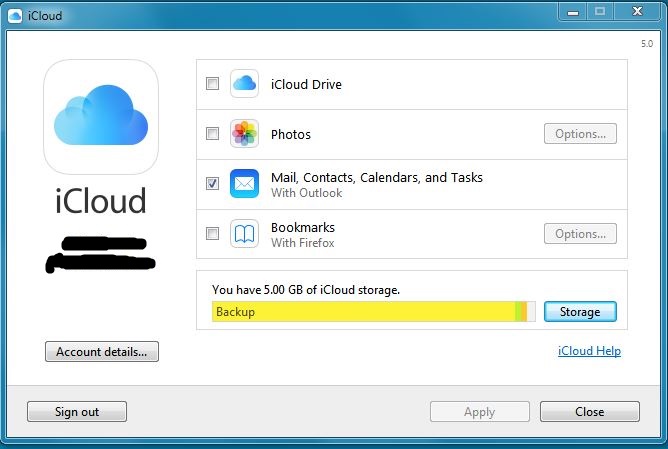
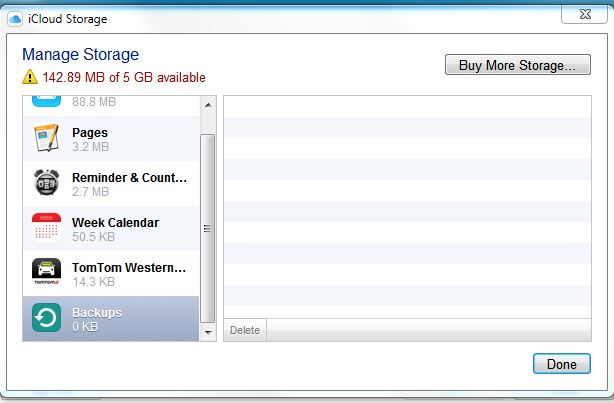

User uploaded fileUser uploaded file

Nov 17, 2015 4:10 AM in response to prothalus

I believe you also dealing with different issue then everyone else here.

One of your devices created reserved space on icloud server.

Two ways to fix.

1. to start backup of the device that made that reservation and when backup shows enough bytes (couple hundred), you will be able to delete it.

2. contact the same senior advisor and ask him/her to release reservation. If they do not know how, tell to ask his friends.

If both of those were tried, then you got no choice as to wait until icloud support will fix your account on their end.


BTW you actually have no problem, unlike other thousands people on that thread. From your words you do not depend on icloud backup, that reservation does not affect you in any way shape or form.

Nov 17, 2015 4:22 AM in response to gregory202

Okay,


I just want to give a bit more of information regarding the issue at hands. I just bought an iPhone 6S (64GB) and restored it from iTunes (I always was able to save backups on my Mac) and voilá, iCloud now works again. It is a different number though, I am now using the new iPhone with all the old data but associated to a new SIM card.


Regarding the old 5S, it is at home, with my old number and still can't backup to iCloud.


Both iPhones are running the 9.1 iOS version. As I will give my old 5S to my mother, I'm curious about if this issue gets fixed when I restore it with my mother's current 4S backup. I'll then give feedback about it.


Best,

Alex

Nov 17, 2015 9:34 AM in response to leJuan5150

Please add me to this one.

iCloud backups working fine for years on all my iOS devices untill last week.

I got a warning last Sunday that my iPhone backup was 2 weeks overdue but couldn't get it back to work, neither automatically nor manually.

I have now cancelled the old backup, toggled the on/off switch on the phone and I am now starting again from scratch.

The outlook isn't promising tough with over 1 day wait for about 5 gig of data..

Ironically, my other devices (iPhone 3GS, iPhone 4S and iPad 4 all with latest iOS) seem to be unaffected by this issue.

Nov 17, 2015 3:25 PM in response to Gran Maestro

Gran Maestro wrote:


Please add me to this one.

iCloud backups working fine for years on all my iOS devices untill last week.

I got a warning last Sunday that my iPhone backup was 2 weeks overdue but couldn't get it back to work, neither automatically nor manually.

I have now cancelled the old backup, toggled the on/off switch on the phone and I am now starting again from scratch.

The outlook isn't promising tough with over 1 day wait for about 5 gig of data..

Ironically, my other devices (iPhone 3GS, iPhone 4S and iPad 4 all with latest iOS) seem to be unaffected by this issue.

Unlikely, people with that problem have it on all devices running IOS9 and higher on the same apple id. But if you d like to join, happy to see you. If you however want to try troubleshoot your problem, start with disabling icloud backup options under manage storage in icloud.

Turn them all off and try to backup, then turn on one or two and try again. Make sure to turn off and on only when spinning wheel stops circling.

If you have the same problem, after you turn them all off you still will not be able to backup.

Nov 18, 2015 1:03 AM in response to gregory202

Yes, it does appear to be a different issue, albeit to do with backups that don't work.


I have already carried out your 1. on numerous occasions, That did not work for me. Your 2. seems the only way forward but Apple are now mysteriously silent.


You are correct in saying that I do not depend on iCloud backup, but you are incorrect in saying that it does not affect me. Surely I have the right to decide if I want to use iCloud backup in the future - using the space that should be made available to me? And, with only 142 Mb now available to me, I am unable to store my photos. So ho come it doesn't affect me?

Nov 18, 2015 3:27 AM in response to prothalus

Sorry, I misunderstood you. When you said you never use backups - the only good thing that comes, I didn't realize that you want to use photo library. But then again it does not affect you - cause 5 gigs of storage is not enough for photo library anyway. Even if you do not have 5 right now, you will have in two-three months. And if you combine it with computer photos, I am pretty sure you will have to buy more.

Nov 18, 2015 3:54 AM in response to festas33

Hey everyone,


Just some new developments... Two days after moving to a new 6S with a new number but after restoring from the previous iphone 5S (and having the first iCloud automatic backup worked as it should on the first night) I noticed yesterday that it wasn't backing up for two days now. I tried to manually force it to backup and it couldn't finish. I thought I was doomed once again.


After this happened, I turned off iCloud in the old 5S (which is running the old number) and again tried to force the iCloud backup (on the new 6S). Once again, couldn't finish. I went to sleep and noticed today that it was able to finish a complete backup later in the evening. Interesting.


Once I restore my mother's 4S to my 5S I'll let you know if the problem persists in that device or if it gets solved.


Cheers,

Alex

Nov 19, 2015 9:26 AM in response to festas33

I found the solution for my case. All i had to do was go to iCloud storage on my iPad, deleted the backup for my iPhone from there. then turned off backup on my iPhone and turned it back on again. The started the backup manually...voila!. Good to know: on my iPad i could see a last backup date of the iPhone, on the iPhone however it could not show me the last backup date. Hope this helps

This thread has been closed by the system or the community team. You may vote for any posts you find helpful, or search the Community for additional answers.

iCloud Backup Broken After iOS 9 Upgrade

Welcome to Apple Support Community
A forum where Apple customers help each other with their products. Get started with your Apple Account.