Search photos without keywords

Hi,


On the Photo app, I would like to search all photos without key words in photos.

All my albums has been tagged with a keyword but I would like to find all photos which are not in my albums but are in "Photos"


How can i do that ?


Thanks

iMac, OS X Yosemite (10.10.5)

Posted on Sep 24, 2015 4:16 AM

8 replies

Sep 17, 2016 7:26 AM in response to léonie

Although the ability to find photos with no keywords was available in iPhoto it is not included in the photos.app. I miss this feature a lot and the only decent work around I have found is to create a smart album that has multiple filters of "keyword is not (followed by one of your common keywords)". Its a bit daunting but you can add to it as you find more keywords you need to filter out. I have approximately 50 filters to make this smart album useful.
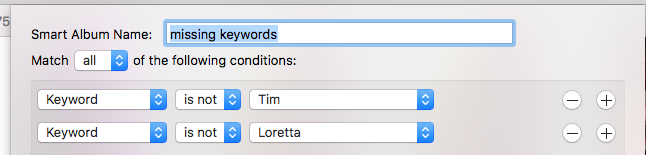
User uploaded file

Sep 18, 2016 5:14 AM in response to timmacman

timmacman wrote:


Although the ability to find photos with no keywords was available in iPhoto it is not included in the photos.app. I miss this feature a lot and the only decent work around I have found is to create a smart album that has multiple filters of "keyword is not (followed by one of your common keywords)". Its a bit daunting but you can add to it as you find more keywords you need to filter out. I have approximately 50 filters to make this smart album useful.

User uploaded file


I do the same thing but it's not easily manageable as, like you, I have so many keywords (and they will sometimes change).


As smart albums are based on rules, include negative conditions ("is not"), and keywords are so fundamental to managing increasingly large libraries, it's baffling that Apple have decided not to include a negative rule for keywords.


Hopefully Sierra will tidy up some of these omissions but I'm not hopeful.

Sep 15, 2016 3:13 AM in response to léonie

I would also like to search for photos that have no keyword as a cross check to what photos have missed my filing system. Slightly surprised it's not available, as it's relatively straight forward task.


On the "Album is not any" smart album process above, what do the results show? I have a mixture of smart albums and manually created albums. Do the results mean those photos are not in smart, manual, or both?


Thank you

Sep 15, 2016 4:01 AM in response to Jerry Dammers

The constraint "Not in Any Album" will only apply to photos not in standard albums. Smart albums are excluded, because it would lead to a logical contradiction if smart albums were included.


If a photo appears in the "Not in Any" album it is in an album and must not be in this album. But if it is not in the album, it should be in the album, which is not possible.

This thread has been closed by the system or the community team. You may vote for any posts you find helpful, or search the Community for additional answers.

Search photos without keywords

Welcome to Apple Support Community
A forum where Apple customers help each other with their products. Get started with your Apple Account.

