Battery 3 not recognized in LogicProX after El Capitan update.

MacBook Pro 13’’ Early 2011, 4g RAM, i7


- Native Instruments: Battery 3 2006 version 3.0.0.004 (latest '06 version) is not recognized by Logic Pro X 10.2.0 (latest version) for Mac OS X El Capitan on Early 2011 13’’ MacBook Pro 4g ram i7 processor. It used to work just fine. I did the El Capitan update and it tells me “The plug-in named ‘Battery 3’ isn’t available on your system. Choose another plug-in, or quit Logic Pro X and install the plug-in on your computer in order to use it in the project.”


What I’ve done so far to solve this problem is:


  1. Restart Logic
  2. Restart Computer
  3. Un-Install Battery 3
  4. Re-Install Battery 3


No results have been produced. Battery 3 is fully functional as a stand alone plug-on but no longer is recognized by Logic Pro X as an available plug-in, only after the El Capitan update. I’m sure I am not the only one and help is much needed! Thank you,


Dillon Crozier

MacBook Pro (13-inch Early 2011), OS X El Capitan (10.11), Battery 3 on LogicProX

Posted on Oct 20, 2015 2:39 PM

Reply
3 replies

Nov 23, 2015 8:02 AM in response to dillcroz

Hello Dillon,


while testing the DAW on El Capitan 10.11.1, I installed Battery 3, updated via Native Instrument Service Center to Version 3.2.3.637, launched Logic Pro 10.2.0 and it was not recognized at all, just as you wrote. No sign, that the AU validation tool had the slightest idea, that Battery was there.

Then I moved the Battery 3.component file from Library/Audio/Plug-Ins/Components to ~/Library/Audio/Plug-Ins/Components, launched Logic again and it was recognized instantly without the slightest problem. It's running stable since then.


Good luck and let us know if that worked for you too. Thilo.


Ps.: The machine on wich I tested this is a mid 2010 2,4 GHz 8 Core Mac Pro with lots of RAM.

Nov 23, 2015 9:28 AM in response to lordtom09

Hi Lord tom. please read the following from the Native instruments site


OS X 10.11 (El Capitan) Compatibility News

This article provides the latest information regarding the compatibility of Native Instruments products with OS X 10.11 (El Capitan).

Currently two major compatibility issues concerning KOMPLETE, MASCHINE and TRAKTOR products have been identified. Should you have updated to OS X 10.11 (El Capitan), please proceed as explained below in order to resolve the corresponding issue.

Validation of AU (Audio Units) Plug-ins Fails in Logic Pro X

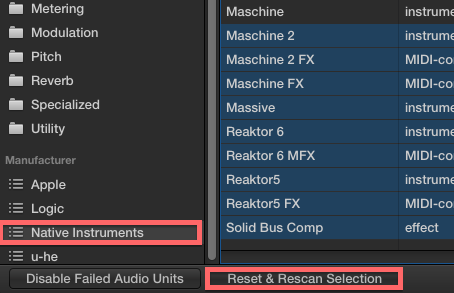
Please download and install the OS X 10.11.1 update by clicking on the Apple symbol in your Desktop and choosing Software Updates... This update fixes an issue whereby Native Instruments Audio Units plug-ins will not pass the AU validation and therefore will not be available in Logic Pro X.Note: If your AU plug-ins do not appear in Logic Pro X after updating to OS X 10.11.1, please rescan your plug-in folders by going to Logic Pro > Preferences >Plug-in Manager in Logic's toolbar. In the Plug-in Manager window, select all entries for which the validation has failed (as shown in the Compatibility column) and then press Reset & Rescan Selection.
User uploaded file

Kernel Panic when Using Legacy Native Instruments Devices

Incompatibility between some older NI devices and OS X 10.11 has been discovered. This issue triggers kernel panics that crash the connected computer immediately, resulting in loss of any unsaved work, or serious disruption of a performance.The following hardware is affected:


  • TRAKTOR KONTROL S4 (MK1)
  • TRAKTOR KONTROL X1 (MK1)
  • TRAKTOR AUDIO 2 (MK1)
  • AUDIO 8 DJ
  • AUDIO 4 DJ
  • AUDIO 2 DJ (MK1)
  • MASCHINE (MK1)
  • RIG KONTROL 3

  • There are drivers already available that fix this issue. You can download the driver version 2.8.0 for your corresponding device here.


    regards,


    Scorpii

    This thread has been closed by the system or the community team. You may vote for any posts you find helpful, or search the Community for additional answers.

    Battery 3 not recognized in LogicProX after El Capitan update.

    Welcome to Apple Support Community
    A forum where Apple customers help each other with their products. Get started with your Apple Account.